Known Participant
August 13, 2022
해결됨

Is there a way to align a layer to the "outside" of a selection?

  • August 13, 2022
  • 5 답변들
  • 1768 조회

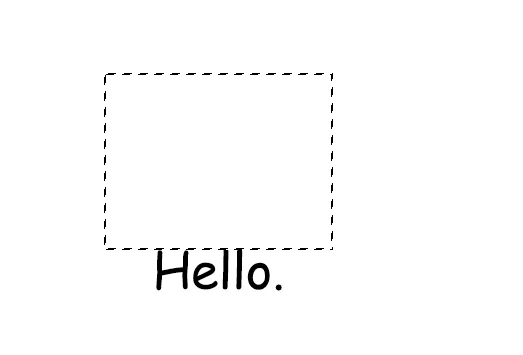
I have a layer and I have a selection on my canvas, I wanna align this layer to the outside part of the selection, be it the bottom outside, or the up outside or the sides, I think the align buttons only allow me to align the layer to the inside of the selection.


  See in the image, I wanna be able to align the image to be outside and beneath the selection box.

이 주제는 답변이 닫혔습니다.
최고의 답변: jazz-y

We can make alignment more interactive:


To get alignment to the outer edge, you need to save the script to the prest folder, run it from the menu, activate event tracking and then press shift while aligning to one of the sides. Unfortunately, such an alignment will not be recorded in the action, but it is quite suitable for manual work.


Based on @Stephen Marsh code.


/*
<javascriptresource>
<name>Alignment tracking</name>
</javascriptresource>
*/
#target photoshop
var s2t = stringIDToTypeID,
    t2s = typeIDToStringID;
try {
    var evt = t2s(arguments[0].getEnumerationValue(s2t('using'))),
        ad = activeDocument;
    if (evt && ad.selection.bounds) {
        if (ScriptUI.environment.keyboardState.shiftKey) {
            var l = ad.activeLayer,
                s = ad.selection;
            switch (evt) {
                case 'ADSBottoms': l.translate(0, -(l.bounds[1].value - s.bounds[3].value)); break;
                case 'ADSTops': l.translate(0, -(l.bounds[3].value - s.bounds[1].value)); break;
                case 'ADSLefts': l.translate(-(l.bounds[2].value - s.bounds[0].value), 0); break;
                case 'ADSRights': l.translate(-(l.bounds[0].value - s.bounds[2].value), 0); break;
            }
        }
    }
} catch (e) { }
if (!evt) {
    dialogWindow();
}
function dialogWindow() {
    var w = new Window("dialog {text: 'Alignment tracking',alignChildren:['fill','top']}"),
        bnNotifier = w.add("button {text: 'Enable alignment tracking'}"),
        bnOk = w.add("button {text:'Ok', properties: {name:'ok'}}}"),
        evt = new Events();
    bnNotifier.onClick = function () {
        if (evt.checkEvents()) evt.removeEvents() else evt.addEvents()
        setEnabledButtonValue()
    }
    w.onShow = function () {
        setEnabledButtonValue()
    }
    function setEnabledButtonValue() {
        var enabled = evt.checkEvents()
        bnNotifier.text = enabled ? 'Disable alignment tracking' : 'Enable alignment tracking'
        bnNotifier.graphics.foregroundColor = enabled ? bnNotifier.graphics.newPen(bnNotifier.graphics.PenType.SOLID_COLOR, [1, 0, 0, 1], 1) : bnNotifier.graphics.newPen(bnNotifier.graphics.PenType.SOLID_COLOR, [0, 0.8, 0, 1], 1)
    }
    w.show()
}
function Events() {
    var f = File($.fileName);
    this.addEvents = function () {
        app.notifiersEnabled = true
        app.notifiers.add('Algn', f)
    }
    this.removeEvents = function () {
        for (var i = 0; i < app.notifiers.length; i++) {
            var ntf = app.notifiers[i]
            if (ntf.eventFile.name == f.name) { ntf.remove(); i--; }
        }
    }
    this.checkEvents = function () {
        for (var i = 0; i < app.notifiers.length; i++) {
            if (app.notifiers[i].eventFile.name == f.name) return true
        }
        return false
    }
}


 

5 답변

Stephen Marsh
Community Expert
Community Expert
August 13, 2022

@HeyoThere 


Try the following script (original code updated to work correctly with a Background layer):


/*
Align Top of Layer to Bottom of Selection.jsx
https://community.adobe.com/t5/photoshop-ecosystem-discussions/is-there-a-way-to-align-a-layer-to-the-quot-outside-quot-of-a-selection/td-p/13132396
v1.0 - 13th August 2022, Stephen Marsh
*/

// Save the current ruler units and set to pixels
var savedRuler = app.preferences.rulerUnits;
app.preferences.rulerUnits = Units.PIXELS;

// Selection lower edge value
var selY2 = activeDocument.selection.bounds[3].value;

// Save the selection as a temp channel
activeDocument.selection.store(activeDocument.channels.add());
activeDocument.channels[activeDocument.channels.length-1].name = "_tempChannel";
activeDocument.activeChannels = activeDocument.componentChannels;

// Deselect
activeDocument.selection.deselect();

// Active layer upper edge value
var layY1 = activeDocument.activeLayer.bounds[1].value;

// Difference between lower and upper edge values
var diff = layY1 - selY2;

// Move using the (negative) difference value
activeDocument.activeLayer.translate(0, -diff);

// Load the temp channel selection
activeDocument.selection.load(activeDocument.channels.getByName("_tempChannel"), SelectionType.REPLACE);

// Remove the temp channel
activeDocument.channels.getByName("_tempChannel").remove();

// Restore the ruler units
app.preferences.rulerUnits = savedRuler;


HeyoThere작성자
Known Participant
August 13, 2022

This script does exactly what I need, thank you. It's weird that there isn't a built in way to align outside of the stuff. In this case, is there a way to make this code ask if I wanna align the text to the up part of the selection, or the right or the left and bottom, just to make this function more complete to anyonelse that needs it?

jazz-y답변
Legend
August 13, 2022

We can make alignment more interactive:


To get alignment to the outer edge, you need to save the script to the prest folder, run it from the menu, activate event tracking and then press shift while aligning to one of the sides. Unfortunately, such an alignment will not be recorded in the action, but it is quite suitable for manual work.


Based on @Stephen Marsh code.


/*
<javascriptresource>
<name>Alignment tracking</name>
</javascriptresource>
*/
#target photoshop
var s2t = stringIDToTypeID,
    t2s = typeIDToStringID;
try {
    var evt = t2s(arguments[0].getEnumerationValue(s2t('using'))),
        ad = activeDocument;
    if (evt && ad.selection.bounds) {
        if (ScriptUI.environment.keyboardState.shiftKey) {
            var l = ad.activeLayer,
                s = ad.selection;
            switch (evt) {
                case 'ADSBottoms': l.translate(0, -(l.bounds[1].value - s.bounds[3].value)); break;
                case 'ADSTops': l.translate(0, -(l.bounds[3].value - s.bounds[1].value)); break;
                case 'ADSLefts': l.translate(-(l.bounds[2].value - s.bounds[0].value), 0); break;
                case 'ADSRights': l.translate(-(l.bounds[0].value - s.bounds[2].value), 0); break;
            }
        }
    }
} catch (e) { }
if (!evt) {
    dialogWindow();
}
function dialogWindow() {
    var w = new Window("dialog {text: 'Alignment tracking',alignChildren:['fill','top']}"),
        bnNotifier = w.add("button {text: 'Enable alignment tracking'}"),
        bnOk = w.add("button {text:'Ok', properties: {name:'ok'}}}"),
        evt = new Events();
    bnNotifier.onClick = function () {
        if (evt.checkEvents()) evt.removeEvents() else evt.addEvents()
        setEnabledButtonValue()
    }
    w.onShow = function () {
        setEnabledButtonValue()
    }
    function setEnabledButtonValue() {
        var enabled = evt.checkEvents()
        bnNotifier.text = enabled ? 'Disable alignment tracking' : 'Enable alignment tracking'
        bnNotifier.graphics.foregroundColor = enabled ? bnNotifier.graphics.newPen(bnNotifier.graphics.PenType.SOLID_COLOR, [1, 0, 0, 1], 1) : bnNotifier.graphics.newPen(bnNotifier.graphics.PenType.SOLID_COLOR, [0, 0.8, 0, 1], 1)
    }
    w.show()
}
function Events() {
    var f = File($.fileName);
    this.addEvents = function () {
        app.notifiersEnabled = true
        app.notifiers.add('Algn', f)
    }
    this.removeEvents = function () {
        for (var i = 0; i < app.notifiers.length; i++) {
            var ntf = app.notifiers[i]
            if (ntf.eventFile.name == f.name) { ntf.remove(); i--; }
        }
    }
    this.checkEvents = function () {
        for (var i = 0; i < app.notifiers.length; i++) {
            if (app.notifiers[i].eventFile.name == f.name) return true
        }
        return false
    }
}

 

Trevor.Dennis
Community Expert
Community Expert
August 13, 2022

This works, but it is messy.

Make the selection into a workpath (icon at bottom of paths panel)


Select the Type tool. Hover over the bottom of the workpath till you see the double arrow cursor, and type.

If the text is placed inside the workpath, use the Path Selection tool (black arrow) and drag it to where you want it.


Make the type layer a Smart Object (right click menu)

Use Free Transform and flip horizontally and vertically

Job done


Michael Bullo
Community Expert
Community Expert
August 13, 2022

This might be more hassle than it's worth, but...


Select > Transform Selection
This allows you to extend the sides of the selection, that you won't be aligning to, to the edge of the document.


Select > Inverse
Reverses the selection.


Then use the align options while using the Move Tool.

Stephen Marsh
Community Expert
Community Expert
August 14, 2022

@Michael Bullo – Excellent! I like this and will likely look into it further, just for fun.

Stephen Marsh
Community Expert
Community Expert
August 17, 2022

@Stephen Marsh - Thanks mate. I've got a lot of respect for the work you do and I am curious to see what you might do with this method.


@Michael Bullo 


I had a play with your suggestion and came up with both an Action and Script.


Action screenshot:


Script version of the action:

(Script code updated on 20th August 2022)


// Save the current ruler units and set to pixels
var savedRuler = app.preferences.rulerUnits;
app.preferences.rulerUnits = Units.PIXELS;

// Selection bounds
var selectionBounds = activeDocument.selection.bounds;
var selectionLeft = selectionBounds[0].value;
var selectionTop = selectionBounds[1].value;
var selectionRight = selectionBounds[2].value;
var selectionBottom = selectionBounds[3].value;
var selectionWidth = selectionBounds[2].value - selectionBounds[0].value;
var selectionHeight = selectionBounds[3].value - selectionBounds[1].value;

// Calculate the selection extension values
var extendSelLeft = selectionLeft - 0;
var extendSelRight = activeDocument.width.value - selectionRight;
var extendSelTop = selectionTop - 0;

// Save the selection as a temp channel
activeDocument.selection.store(activeDocument.channels.add());
activeDocument.channels[activeDocument.channels.length-1].name = "_tempChannel";
activeDocument.activeChannels = activeDocument.componentChannels;

// align using the lower middle anchored transform
bottomCentre();

// Load the temp channel selection
activeDocument.selection.load(activeDocument.channels.getByName("_tempChannel"), SelectionType.REPLACE);

// Remove the temp channel
activeDocument.channels.getByName("_tempChannel").remove();

// Restore the ruler units
app.preferences.rulerUnits = savedRuler;


/***** Functions *****/

function bottomCentre() {
    // Resize the selection to canvas left, top, right
    activeDocument.selection.resizeBoundary( extendSelLeft + selectionWidth + extendSelRight, selectionHeight + extendSelTop, AnchorPosition.BOTTOMCENTER );
    // Inverse selection
    var idinverse = stringIDToTypeID("inverse");
    executeAction(idinverse, undefined, DialogModes.NO);
    align2Selection('AdCH');
    align2Selection('AdTp');
    activeDocument.selection.deselect();
}

function align2Selection(method) {
    /* 
    AdLf = Align Left
    AdRg = Align Right
    AdCH = Align Centre Horizontal
    AdTp = Align Top
    AdBt = Align Bottom
    AdCV = Align Centre Vertical
    */
    var desc = new ActionDescriptor();
    var ref = new ActionReference();
    ref.putEnumerated(charIDToTypeID("Lyr "), charIDToTypeID("Ordn"), charIDToTypeID("Trgt"));
    desc.putReference(charIDToTypeID("null"), ref);
    desc.putEnumerated(charIDToTypeID("Usng"), charIDToTypeID("ADSt"), charIDToTypeID(method));
    try {
        executeAction(charIDToTypeID("Algn"), desc, DialogModes.NO);
    } catch (e) {}
}


Bojan Živković11378569
Community Expert
Community Expert
August 13, 2022

There isn't built in option to align object to outside of selection.

lambiloon
Community Expert
Community Expert
August 13, 2022

Hi check the given link which tells what options we have in Photoshop for alignment maybe it helps you..regards


https://helpx.adobe.com/photoshop/using/aligning-layers.html

Ali Sajjad / Graphic Design Trainer / Freelancer / Adobe Certified Professional