
Participant
Jul 31, 2022 7:53 PM UTC
Answered

Issue in urdu font/text in photoshop

Hi Community.

I am using Adobe Phtoshop CC (V14.0).

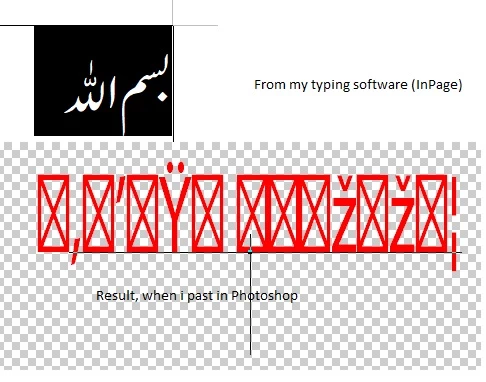
When i am pasting a text in Urdu language, already typed in Urdu writing software, it converts to icons and shapes in PhotoShop. 

I have installed all required fonts in my system. I am using Windows 10
This topic is closed to new replies. Start a new post to keep the conversation going.
Engr25463997n8eeCorrect answer
Participant
Aug 1, 2022 6:44 PM UTC

Hi Friend. Thanks a lot for response. 

I have resolved issue just short time ago.

There is no problem with Adobe software. 

Result of my typing software was not a "Unicode" text. I have converted my text in unicode. now it is working well.


This is also a tip for other users, facing same or such issue.


Thanks 

2 replies

c.pfaffenbichler
Community Expert
Community Expert
Aug 1, 2022 2:20 PM UTC

Could you please post screenshots with the pertinent Panels (Toolbar, Layers, Character, Options Bar, …) visible? 

What is the font you selected in Photoshop? 

Translate
Engr25463997n8eeAuthorCorrect answer
Participant
Aug 1, 2022 6:44 PM UTC

Hi Friend. Thanks a lot for response. 

I have resolved issue just short time ago.

There is no problem with Adobe software. 

Result of my typing software was not a "Unicode" text. I have converted my text in unicode. now it is working well.


This is also a tip for other users, facing same or such issue.


Thanks 

Translate