

Layer transparency not displaying correctly
I have a persistent layer issue where the layer transparency does not display correctly.
Background, I have had this problem on an old G5 tower running CS 2020, but not when using CS5. So I thought my CS 2020 was corrupt or my old graphics card was going bad, and since I was planning to get a newer Mac to replace the G5, I did most of the masking work in CS5 to go around this problem.
Recently I finally got the Mac Studio and is now running the latest Photoshop 2023, but this same problem still persists. So this rules out corrupt software or bad graphics card but rather a Photoshop setting that I may have missed and is causing it.
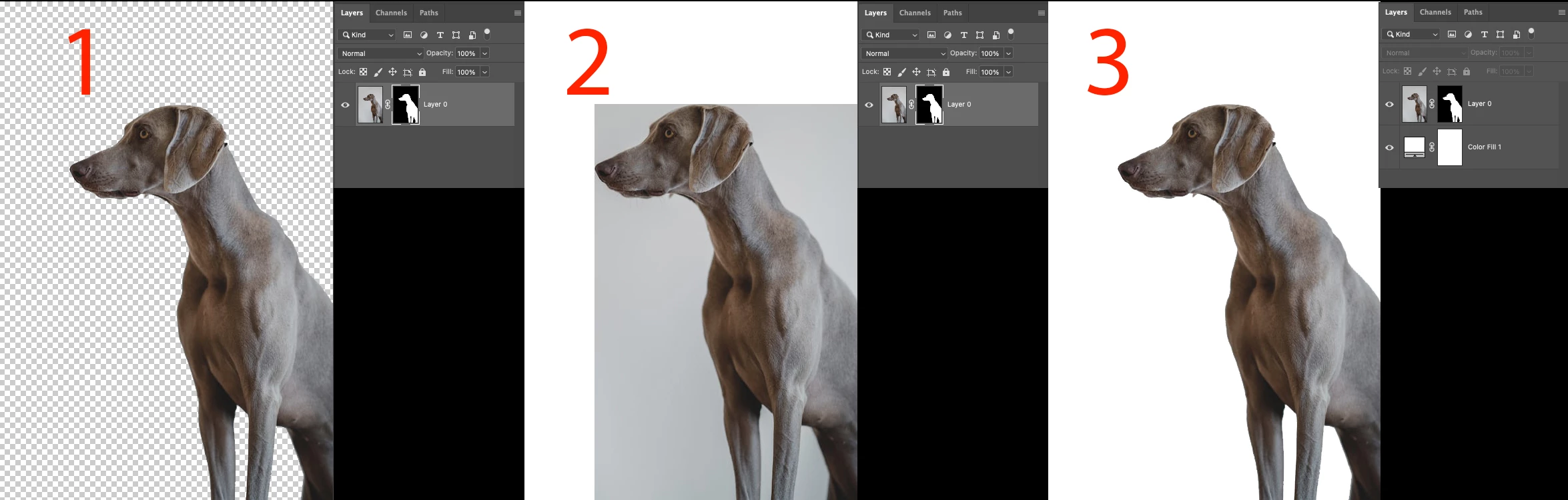
The problem is that when I have the transparency setting set to "grid", the layer mask displays as it should, see #1.
But if I have the transparency setting set to "none", which should make all the transparent parts white, except it doesn't. Parts of the original background actually stays in view eventhough it should be invisible, see #2.
But then if I add another color layer underneath (any color), the problem goes away, see #3.
By the way, this is the same with or without a layer mask, as long as it is a layer with transparent parts.
What the hell is going on? Is anyone else having the same problem? Any solutions?


 AdChoices