
Known Participant
July 17, 2021
Question

Layers Panel - Masks

  • July 17, 2021
  • 1 reply
  • 287 views

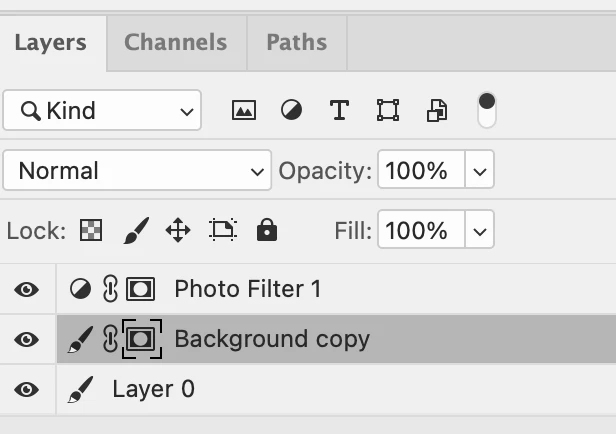
Hello.  I have Photoshop 2021.  I'm wondering why after adding a layer mask and looking in the layers panel, I see an added thumbnail with brackets around it to indicate the mask.  Why don't I get a thumbnail showing what the mask looks like?  Thanks


This topic has been closed for replies.

1 reply

Michael Bullo
Community Expert
Community Expert
July 17, 2021

The "brackets" around your mask shows that it is targeted. This will happen if you click once on a layer mask. If you were to start painting on the canvas you would actually be drawing on that targeted mask.


Your lack of a thumbnail preview is an easy fix. In the upper right corner of the Layers panel is a menu that contains the entry Panel Options. Just set your Thumbnail Size to something larger.

Known Participant
July 18, 2021

Thanks.  I see exactly what you clicked on but I don't see any option in the drop down to increase the size of the thumb nails.

Known Participant
July 18, 2021

Just found it.  Thanks again.