Known Participant
May 19, 2021
해결됨

Lens Profile - "Unable to locate a matching profile..."

  • May 19, 2021
  • 1 답변
  • 1710 조회

Hello to all. Could you help advise me how to adjust / overide this?


I'm trying to apply an AF Nikkor 28-105 f/3.5-4.5 lens profile to an image of a B&W silver gelatin print that I scanned as a TIF file using an Epson V500 flatbed. I took the photo using that lens on my Nikon F4s but when I bring up the TIF in LrC or Ps, the Nikon lens correction choices are a mere eight (8) lenses of what's normally available to me when I lens correct photos taken with my Nikon D810.


I assume LrC and PS read the EXIF data (LensInfo or LensModel?) from the TIF (Epson V500) or NEF (D810) files and offer the lens choices the programs think appropriate.


What approaches would you recommend so I could overide this to use the Adobe lens profiles normally available? Looking in my LrC catalog, I've got about 5800 photos with "Unknown Lens" that seem to have this problem. Is there a more elegant approach than the brute force "manual adjustment" one that I'm seemingly left with? 


I've use an old Mac Pro (mid-2010) running 10.14.6 Mojave, and Adobe CC (LrC 10.2, Ps 22.4, and Camera Raw 13.2). 


Thanks for your consideration.
이 주제는 답변이 닫혔습니다.
최고의 답변: Jeff Arola

If in photoshop you go to File>File Info>Camera Data is the Lens listed?


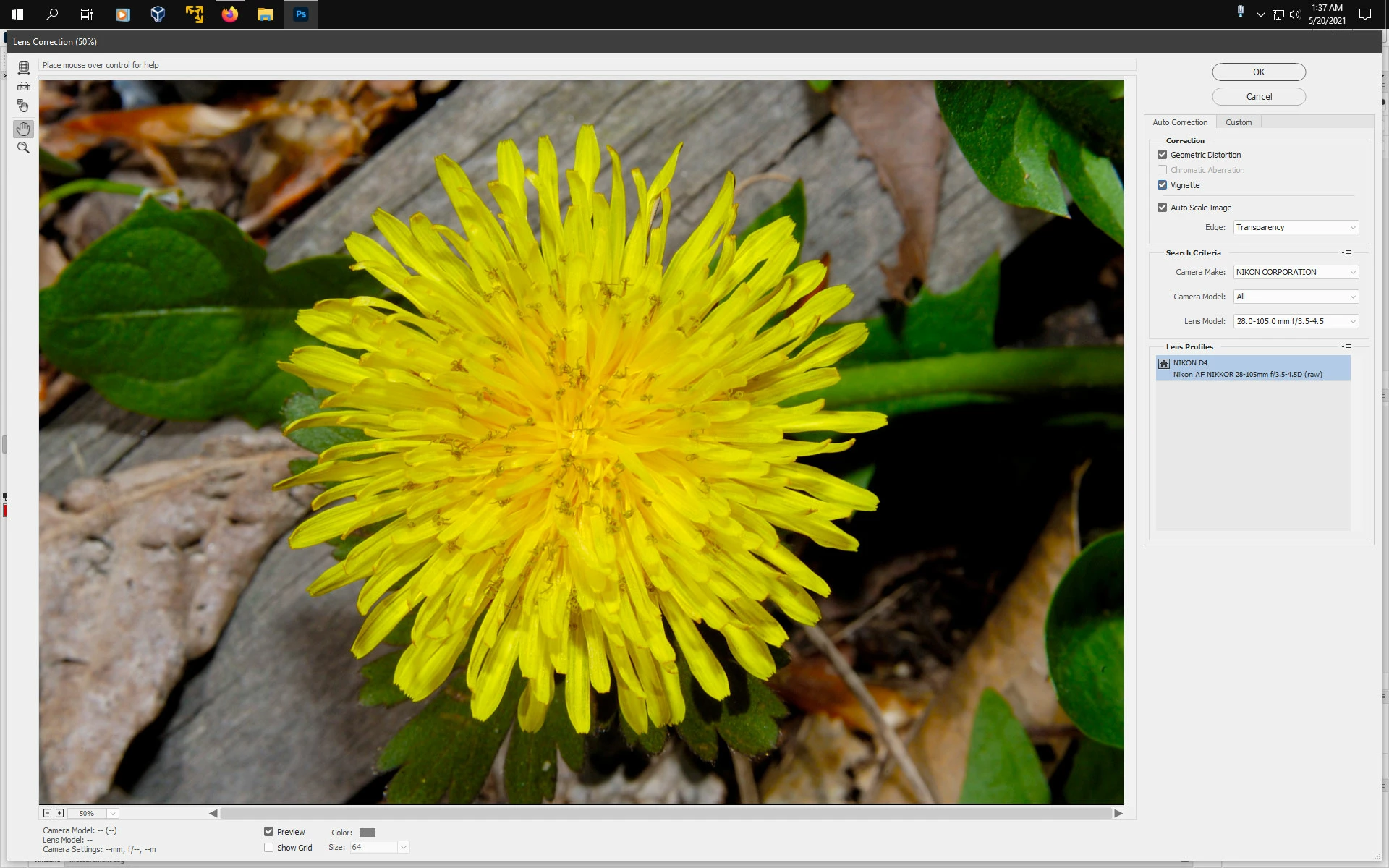
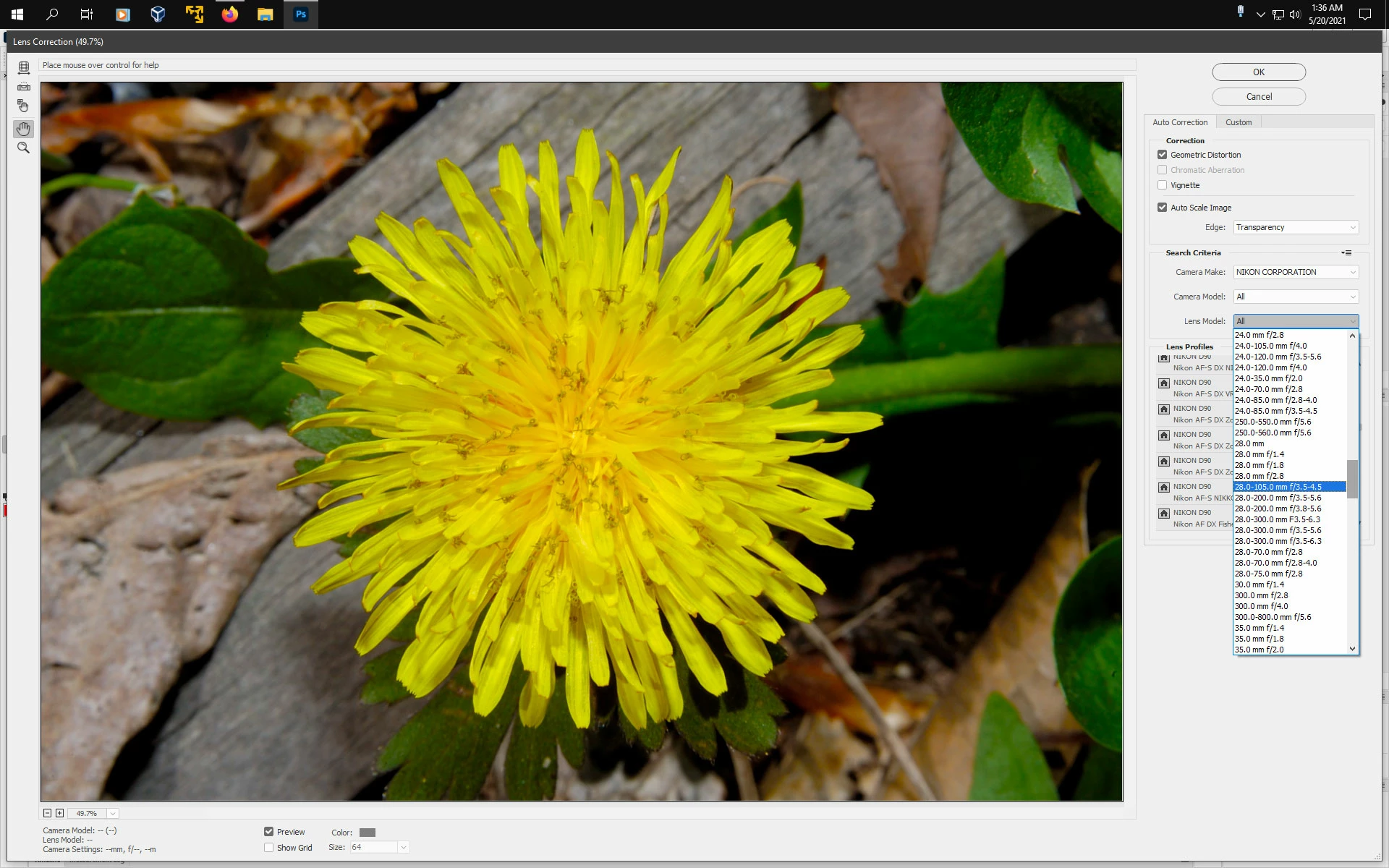
You should be able to open the TIF in photoshop, go to Filter>Lens Correction, set Camera Make

to Nikon Corporation, Camera Model to All and select the 28 to 105 profile from the Lens Model list.


Are all those 5800 photos taken with the same camera/lens and scanned?


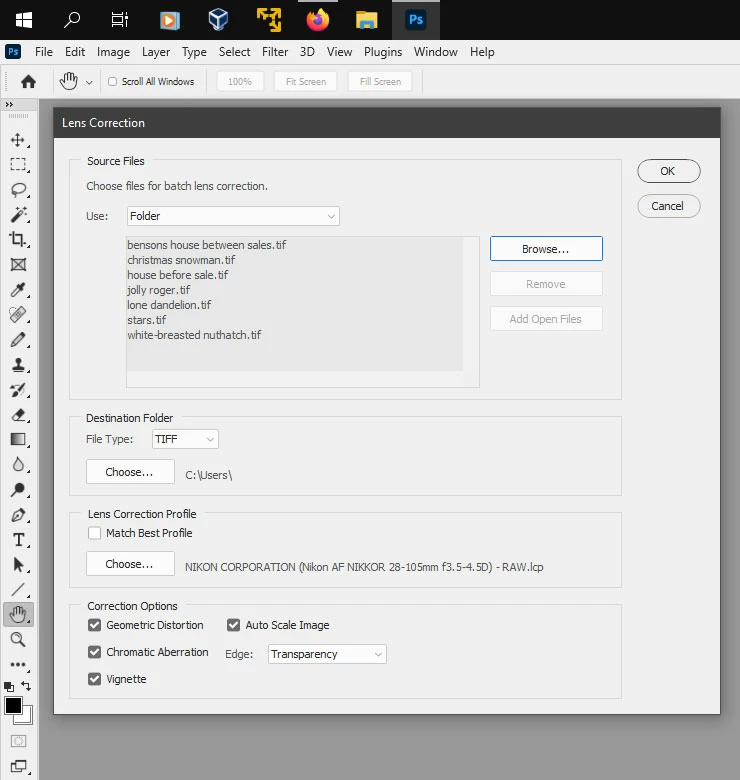
In photoshop you could use File>Automate>Lens Correction and select the 28 to 105 profile from

C:\ProgramData\Adobe\CameraRaw\LensProfiles\1.0\Nikon


1 답변

Jeff Arola
Community Expert
Community Expert
May 20, 2021

If in photoshop you go to File>File Info>Camera Data is the Lens listed?


You should be able to open the TIF in photoshop, go to Filter>Lens Correction, set Camera Make

to Nikon Corporation, Camera Model to All and select the 28 to 105 profile from the Lens Model list.


Are all those 5800 photos taken with the same camera/lens and scanned?


In photoshop you could use File>Automate>Lens Correction and select the 28 to 105 profile from

C:\ProgramData\Adobe\CameraRaw\LensProfiles\1.0\Nikon


KEPhotoSEA작성자
Known Participant
May 20, 2021

@Jeff Arola Jeff, thanks for your reply and your help. 

1) I looked under File>File Info>Camera Data and there wasn't any information in the Lens: field.

2) Your suggestion about opening the TIF in Ps, going to Filter>Lens Correction, setting Camera Make

to Nikon Corporation, Camera Model to All, and Selecting the 28-105 profile from the Lens Model list worked! I was able to find all of the lens profiles including two (2) that I'd recently built using Adobe Lens Profile Creator 1.0.4.

3) Regarding my 5800 photos with "Unknown Lens", no, they weren't taken with the same lens, but some of the more recent ones were and I scanned those using the Epson V500 flatbed.

4) Your suggestion to use File>Automate>Lens Correction may offer some interesting possibilities for me!


Thanks so very much!