

Krissy ODW
Participant
October 8, 2019
Question

Libraries panel greyed

  • October 8, 2019
  • 3 replies
  • 472 views

Hiyas. 
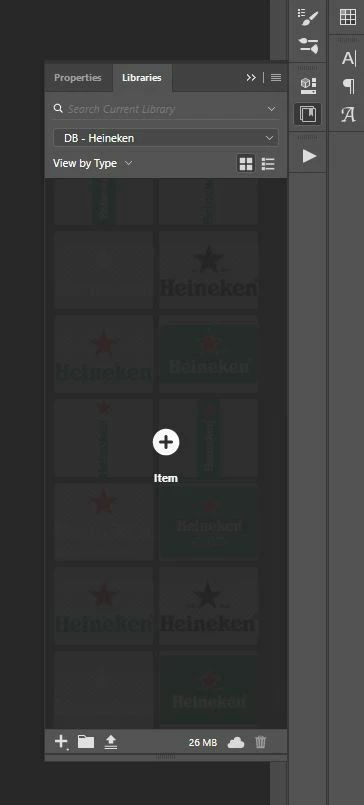
Anyone know why my libraries panel is displaying like this, greyed out with + item in the middle? 
Clicking on the + item doesn't seem to do anything and I can still select and use all of the items in the library, it's just really annoying because it makes it really hard to see the items in the library. 

Photoshop CC 19. Windows 10
This topic has been closed for replies.

3 replies

Adobe Employee
October 9, 2019

It looks like the UI for the panel is frozen. Try restarting everything, down to your computer. 😉

-- Adobe CC Libraries Engineer
Akash Sharma
Legend
October 8, 2019

Hi there,


Sorry that library panel in Photoshop is not working as expected. That shouldn't be happening, let us make it right.


Could you please take a look a this article https://helpx.adobe.com/uk/creative-cloud/kb/creative-cloud-libraries-panel-doesn-t-load-in-desktop-products.html#proxy_network_admin and let us know if that helps?


Thanks,

Akash

lambiloon
Community Expert
Community Expert
October 8, 2019

Hi you can check the following video hope that help.

https://youtu.be/-ikEwin7GdI

Regards

Ali Sajjad / Graphic Design Trainer / Freelancer / Adobe Certified Professional