- Home
- Photoshop ecosystem
- Discussions
- Re: Liquify Tool command not working because of di...
- Re: Liquify Tool command not working because of di...

Copy link to clipboard
Copied
Hi Guys,
Can anyone help me out here with this. I'm trying to make a background and need to use the Liquify tool. When i click it, it gives me that message. Where is the disk error? I'm running on a Late 2012 21.5 i-Mac running Catalina. I have 16GB of ram. Ican't use the graphics card, I'm assuming it's to old?
I was running version 23.5.1 and downgraced to version 23.5 as i seen it worked for a few. But still does not work. is there a work around?
Thanks,
Tommy


 1 Correct answer


Hi Thomas, I'm assuming this is PS CC2021.
Your graphics card does make a difference (not in a good way).
The GeForce GT 620M clocks in at under 600 ops/sec.
That combined with the VRAM not meeting requirements will definitely put you in a hole with performance.
You can try installing an older version of PS that is more compatible with your card, but I'm not sure how far back you will have to go. Otherwise a hardware upgrade is needed to run current (2020+) builds effectively.
...

Explore related tutorials & articles
 14
Replies
14
14
Replies
14

Copy link to clipboard
Copied
Copy link to clipboard
Copied
Hi,
I have tried some of that. i disabled the canvas and some other options to disable or enable. Some of it, I don't understand what they are asking me to do with some of this like the folders. Is my computer to old to use these features? I'm sorry, I'm not a computer wiz with some if this stuff.
Thanks,
Tommy
Copy link to clipboard
Copied
Is my GPU just to old? it has 512MB of Vram i belive.
Thanks,
Tommy
Copy link to clipboard
Copied
Your AMD Radeon R9 M395 clocks in close to the minimum 2000 ops/sec at 1395 comparitively.
512 VRAM is not enough to meet minimum. The recommended min is 1.5 GB
https://helpx.adobe.com/photoshop/kb/photoshop-cc-gpu-card-faq.html
Have you tried going into Preferences/Performance and set the legacy compositing setting?
Copy link to clipboard
Copied
Hi,
I can try that. My GPU is actually the (NVIDIA GeForce GT 640M 512 MB)
Does this make a difference?
Thanks,
Tommy
Copy link to clipboard
Copied
Copy link to clipboard
Copied
Hi Thomas, I'm assuming this is PS CC2021.
Your graphics card does make a difference (not in a good way).
The GeForce GT 620M clocks in at under 600 ops/sec.
That combined with the VRAM not meeting requirements will definitely put you in a hole with performance.
You can try installing an older version of PS that is more compatible with your card, but I'm not sure how far back you will have to go. Otherwise a hardware upgrade is needed to run current (2020+) builds effectively.
https://prodesigntools.com/ has direct download links to previous CC versions. This is legit as long as you have an active subscription.
Copy link to clipboard
Copied
Hi Kevin,
I very much appreciate your time. I'm running photoshop 23.5 2022. So, where does that leave me? I have the photography setup with you guys.
Thanks,
Tommy
Copy link to clipboard
Copied
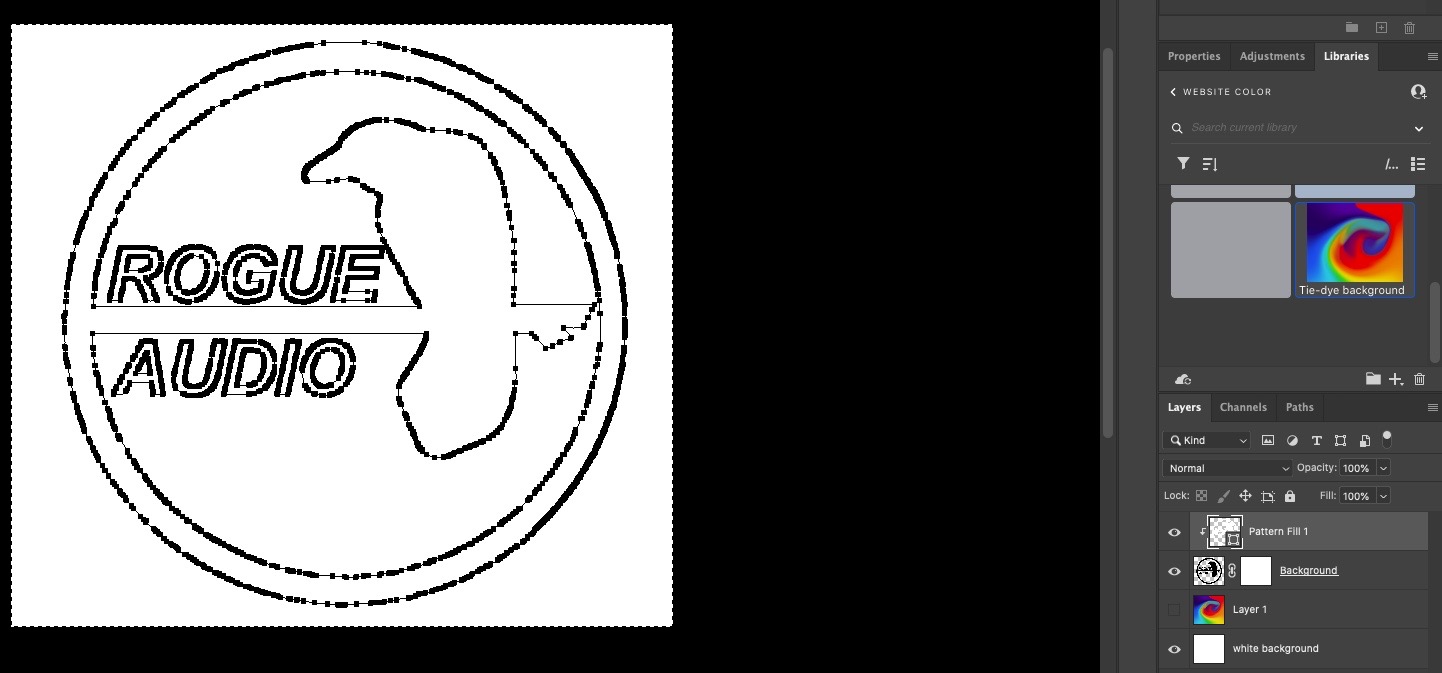
Can I kindly ask you another question while I'm trying to do this. I'm trying to make a logo with a tie dye background. I can show you a screen shot. I'm not sure how to figure this out.
I have a bird logo that i want the bird itself in tie dye and the background in white or black. I can't seem to figure this out.
Here is my logo. I tried making the tie dye as a pattern, but can't figure out to make a pattern and insert in the area i have selected as you can see.
Copy link to clipboard
Copied
Delete the "Pattern Layer" with all the points.
Delete the layer mask on the bird layer.
Select the bird image and then create a mask on that layer.
Move the tie die layer above the bird layer.
Hold Opt and click between the masked bird layer and the tie dye layer. It will create a Clipping Mask between the two.

Copy link to clipboard
Copied
I appreciate this very much!
Copy link to clipboard
Copied
Hi Kevin,
I have another question. How can I make text with tie dye. Seems much harder than it should be. I don't see any tuts on doing this the easy way. Doing what you said for the bird is nort working, Or I'm doing something wrong.
Thanks,
Tommy
Copy link to clipboard
Copied
Same process just swith the masked layer with a text layer.
Copy link to clipboard
Copied
Here is a rough outline using your assets:
Bird layer is masked, tie die is clipping masked to the bird layer.


Get ready! An upgraded Adobe Community experience is coming in January.
Learn more
 AdChoices