


Inspiring
February 19, 2020
Answered

M: Every drawing action snaps to upper left hand screen corner

  • February 19, 2020
  • 22 replies
  • 16548 views

Hi, i need help with a bug.


in almost all drawing tools (brush, pen, smudge, copy, eraser, etc...) , after i click and drag a little to draw something, the tool will snap to the upper left hand corner of the screen space.


- this is the uptodate version of creative cloud photoshop in Germany

- I tried resetting Photoshop to defaults (CTRL-SHIFT-ALT-Start)

- I tried resetting all tools to default via tool palette

- i tried resetting all brushes to defaults

- i tried restarting computer

- i tried disabling all other programms running (autohotkey, browser, mail-programs)


Hints are:

- if in brush i turn up "Smoothing (Glättung)" to something higher than 0% then the bug will not occur.

- the bug will only occur if a click-and-drag. Doing just clicks, it won't jump to the corner

- not all tools have a smoothing-% setting, and those tools i can't get to work.


Please help.


kind regards,

Stephan Möbius
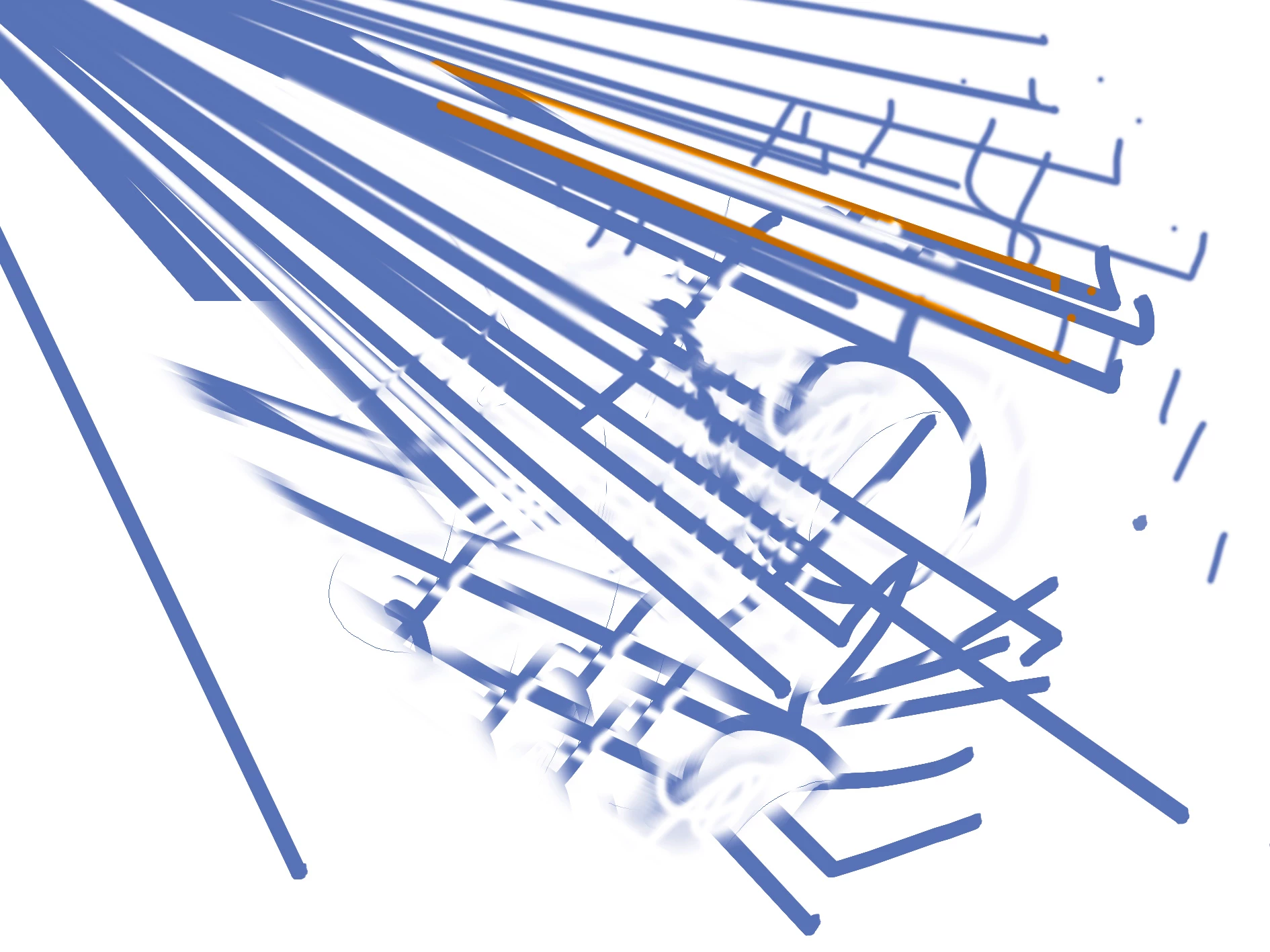
 

[Moderator Note: PS-37593]

This topic has been closed for replies.
Correct answer Pete.Green

Hi all,


Several folks over on our feedback forum have reported that last night's 21.1.1 update has resolved this for them.


For anybody still seeing this, can you;

  • Update to 21.1.1
  • Let us know which version of Windows you're using and if the update fixes this for you?


Thanks & regards,

Pete

22 replies

Participant
April 3, 2020

Hi,

Looking for the same here, can not use the hand tool like usual, I pan and then press escape to stay right were I want to (really trouble and time consuming). I had updated to V. 21.1.1

Win 10 Pro. 1909 and NVIDIA Quadro M4000.


Thanks

JJMack
Community Expert
Community Expert
April 3, 2020

Make sure you have Photoshop 21.1.1 configured to use windows INK. That there  no PSUserConfig.txt file in you preferences file with a stylus 0 statement and the you  Have Use Windows INK  checked in your  Wacom Preferences  for pen mapping with Photoshop. Adobe broke Photoshop WinTab support in the 21.1.0 update and did not fix it in 21.1.1.  I have a Quadro K2200 a less expensive adapter.  The crazy cursor jumping and clicking is related to the broken WinTab support.

JJMack
Participant
August 14, 2020

Greetings!
I also am having problems with Photoshop 2020 drawing Tools *and* Menu Tab Menus. I have the same "lines going back to the top left corner", but I also have this weird Menu Tabs Menus "jumping" when trying to select and scroll down a Menu.
I attach here a screenshot of the Tools issue. Here is a link to a Dropbox Shared Folder and File to view an *.mp4 video of  the Menu Tabs Menus "jumping":

Photoshop 2020 Tools & Menu Tabs Problems_1.mp4

I have attempted all the suggested solutions in the several related threads I've found online:
resetting Tools, resetting Preferences, changing Smoothing, unchecking "Legacy Compositing", I can't find "PSUSerConfig.txt" on my computer, Windows Ink vs. WinTab,

This happens with both my Logitech mouse and my Wacom Intuos 4 pen.

My Computer:
Dell Precision T5820 Workstation x64-based PC
Intel Xeon W-2123 CPU 3.60 Mhz, 16 GB RAM
Windows 10 Pro 64 bit for Workstations v. 2004 (7/29/2020)
NVIDIA Quadro P2000, GPU Memory 5 GB GDDR5, v. 451.77-whql driver (07/16/2020)
Dell P2415Q Monitor DisplayPort (PC), Resolution: 3840 x 2160 (native), driver v. A00-00
(08/27/2015), Display Manager App v. A00-00, 1.5 (07/08/2020).
Wacom Intuos 4 Tablet, driver v. 6.3.40 (06/29/2020).
Logitech MX Anywhere 2 Mouse, firmware v. 013.010.00003, driver v. 8.20.329 (2020-05-19)

I tried stepping back through the various Photoshop 2020 versions of 21.X, but the combined Tools and Menu Tab issues continued.
I had to uninstall and revert back to Photoshop 2019.
Finally, here is a DropBox link to a *.pdf containing the Photoshop v. 21.2.1 and Photoshop v. 20.0.10 "System Info" copies:

Photoshop 2020 Tools & Menu Tabs Problems.pdf

Very disappointing to have to go back in "version time". Any and all help and suggestions will be greatly appreciated.


Pete.Green
Community Manager
Pete.GreenCommunity ManagerCorrect answer
Community Manager
March 18, 2020

Hi all,


Several folks over on our feedback forum have reported that last night's 21.1.1 update has resolved this for them.


For anybody still seeing this, can you;

  • Update to 21.1.1
  • Let us know which version of Windows you're using and if the update fixes this for you?


Thanks & regards,

Pete

JJMack
Community Expert
Community Expert
March 18, 2020

No Photoshop  wintab API are still broken in 21.1.1.  Some users can get by using Windows INK. INK API works better than WinTab APB but INK is not free of issues.

 Here using polygonal lasso tool


The problem seem related to the Wacom Pen rocker button configuration if I disable the lower setting I do not have a problem in 21.1.1  in 21.1.0 even if  I disable that button I had flaky problems.  Normally I set that button to Alt+Right Click and that not Problem in 21.0.3.   In 21.1.1 with that set to Right Click its default or my settings I have flaky problems in 21.1.1 

JJMack
Pete.Green
Community Manager
Community Manager
March 18, 2020

Thanks JJ.


If I understand correctly, WinTab-Enabled is still not working so well for you with 21.1.1 (semi-expected), but it works better with WinTab-Enabled IF you disable the lower rocker button on the Wacom Pen settings software? 


Or was Windows Ink (WinTab-Disabled) better with the lower button disabled for you?


Regards,

Pete

Participant
March 11, 2020

Same issue here!

Avance78
Inspiring
March 15, 2020

Same issue here ! 

Wacom Intuos4, W10. PS Version 21.1.0

Really very annoying !!!!

This bug does not exist with the same tablet and Painter 2020.


Participant
March 17, 2020

same for me with the same setup.


nice_wanderlust5CE0
Participant
March 9, 2020

Win 7, PS 21.1.0

Same problem for all the brushes, cloning, stamp, healing etc.

What helped me was to turn off spacing in the brush settings window. This works for everything, except for tools that don't accept 0% value, ie healing brush.


Let me know if that works for you - still waiting for hotfix 😞

JJMack
Community Expert
Community Expert
March 11, 2020

Adobe broker Photoshop Wintab API  Pen interface in the Photoshop 21.1.0 update. Wondows 7 does not have Microsoft Widows INK function. You will not be able to use you Wacom pen with Photoshop 21.1 on a pc running Windows 7 OS.

JJMack
Participant
March 1, 2020

Here's a picture of the workaround, using the "Smoothing" property.

Participant
March 1, 2020

Chiming in as another person who had to revert to a previous version to eliminate this bug, even after updating GPU.

ag45113689
Participant
February 26, 2020

I have the same problem with the Cloning stamp and Healing Brush tools.

I have 2 monitors and the tool always snaps to the top left of my right (main) monitor, regardless of where the photosop window is.

Resetting all tools, resetting preferences, uninstalling and reinstalling Photoshop (with "remove preferences") did not olve the problem.

Replacing mouse and keyboard did not olve the problem.


Reverting to older version 21.0.3 from 21.1.0 actually SOLVED the problem

Participant
February 22, 2020

see if your [User Name]\AppData\Roaming\Adobe\Adobe Photoshop 2020\Adobe Photoshop 2020 Settings folder has a file called "PSUSerConfig.txt" with the line "UseSystemStylus 0" (both without quotes) which tells Photoshop to use WinTab.

Delete the file.

Participant
February 26, 2020

I had this issue this morning after getting the latest update yesterday. I have updated my GPU drivers and it has fixed it.

JJMack
Community Expert
Community Expert
February 21, 2020

If you are using WinTab API for pen control try switching to using Windows INK API for Pen support with Photoshop and your Pen Devices driver. The Problem I have I have others issues when using Windows INK support

JJMack
Known Participant
February 20, 2020

So I updated to the latest today 21.1 and had that game-breaking bug where it snaps tools to the upper left hand corner. This was unusable (and clearly an untested release, given so many people have got this bug) so I decided I had to revert. I clicked on the 'previous versions' in CC and clicked 'instal'' on the previous version. 

It deleted all my brushes, work spaces, EVERYTHING. 

Apparently your only allowed to keep your presets and workspace settings if you update, but not revert. 

I actually hate Adobe at this point. 

(I had previously saved out my brush sets...but now loading them, it only contains one brush!). Brilliant. 

Why, in 2020, does PS not have a 'back up settings' button - where it saves your back up files to the cloud, then allows to restore whenever you want? How is that not a thing? Doeing it all manually is insane in this day and age. 

On a different note - the Adobe forums are buggy too. I wanted to reply to a thread about the snapping bug, but everytime I presed 'reply' the button greyed out and all the reply buttons dissapeared so I couldn't reply despite being logged in. 

victorfreitas11824615
Participating Frequently
February 20, 2020

The same for me, I post here: [Bug] Error with brush and lasso tool

The bug persists.


Versão Adobe Photoshop: 21.1.0 20200212.r.106 2020/02/12: 4dd027efb58 x64
Número de lançamentos: 0
Sistema Operacional: Windows 10 64-bits
Versão: 10 ou superior 10.0.18362.329
Arquitetura do sistema: Intel Família CPU:6, Modelo:12, Etapa:3 com MMX, número inteiro SSE, SSE FP, SSE2, SSE3, SSE4.1, SSE4.2, AVX, AVX2
Contagem de processadores físicos: 4
Velocidade do processador: 3193 MHz
Memória interna: 16246 MB
Memória livre: 10403 MB
Memória disponível para Photoshop: 14862 MB
Memória usada pelo Photoshop: 70 %
ACP.local Status:
- SDK Version: 1.26.5
- Core Sync Status: Alcançável e compatível
- Core Sync Running: 4.3.24.11
- Min Core Sync Required: 4.3.4.2
ACPL Cache Config:

Tela de lona: Desativado.
Camadas do alias: Desativado.
Paleta modificadora: Ativado.
Highbeam: Ativado.
Tamanho de ladrilhos de cache: 1024K
Níveis do cache de imagem: 4
Visualização da fonte: Média
Compositor de texto: Latim
Photoshop travou em 05/02/2020 em 16:03:04 (ReallocateSharedGLResources)
Vídeo: 1
Limites do monitor: parte superior= 0, esquerda= 0, parte inferior= 1200, direita= 1920
Vídeo: 2
Limites do monitor: parte superior= 0, esquerda= 1920, parte inferior= 1024, direita= 3200
Desenho do OpenGL: Ativado.
Permitir GPUs antigos do OpenGL: Não detectado.
Modo de desenho do OpenGL: Avançado
Permitir modo normal do OpenGL: Verdadeiro.
Permitir modo avançado do OpenGL: Verdadeiro.
AIFCoreInitialized=1
AIFOGLInitialized=1
OGLContextCreated=1
NumGLGPUs=2
NumCLGPUs=2
NumNativeGPUs=0
glgpu[0].GLVersion="4.1"
glgpu[0].IsIntegratedGLGPU=0
glgpu[0].GLMemoryMB=2048
glgpu[0].GLName="NVIDIA GeForce GTX 960"
glgpu[0].GLVendor="NVIDIA Corporation"
glgpu[0].GLVendorID=4318
glgpu[0].GLDriverVersion="26.21.14.4219"
glgpu[0].GLRectTextureSize=16384
glgpu[0].GLRenderer="GeForce GTX 960/PCIe/SSE2"
glgpu[0].GLRendererID=5121
glgpu[0].HasGLNPOTSupport=1
glgpu[0].GLDriver="C:\WINDOWS\System32\DriverStore\FileRepository\nv_dispi.inf_amd64_9e532b5f619dc909\nvldumdx.dll,C:\WINDOWS\System32\DriverStore\FileRepository\nv_dispi.inf_amd64_9e532b5f619dc909\nvldumdx.dll,C:\WINDOWS\System32\DriverStore\FileRepository\nv_dispi.inf_amd64_9e532b5f619dc909\nvldumdx.dll,C:\WINDOWS\System32\DriverStore\FileRepository\nv_dispi.inf_amd64_9e532b5f619dc909\nvldumdx.dll"
glgpu[0].GLDriverDate="20200129000000.000000-000"
glgpu[0].CanCompileProgramGLSL=1
glgpu[0].GLFrameBufferOK=1
glgpu[0].glGetString[GL_SHADING_LANGUAGE_VERSION]="4.60 NVIDIA"
glgpu[0].glGetProgramivARB[GL_FRAGMENT_PROGRAM_ARB][GL_MAX_PROGRAM_INSTRUCTIONS_ARB]=[65536]
glgpu[0].glGetIntegerv[GL_MAX_TEXTURE_UNITS]=[4]
glgpu[0].glGetIntegerv[GL_MAX_COMBINED_TEXTURE_IMAGE_UNITS]=[192]
glgpu[0].glGetIntegerv[GL_MAX_VERTEX_TEXTURE_IMAGE_UNITS]=[32]
glgpu[0].glGetIntegerv[GL_MAX_TEXTURE_IMAGE_UNITS]=[32]
glgpu[0].glGetIntegerv[GL_MAX_DRAW_BUFFERS]=[8]
glgpu[0].glGetIntegerv[GL_MAX_VERTEX_UNIFORM_COMPONENTS]=[4096]
glgpu[0].glGetIntegerv[GL_MAX_FRAGMENT_UNIFORM_COMPONENTS]=[4096]
glgpu[0].glGetIntegerv[GL_MAX_VARYING_FLOATS]=[124]
glgpu[0].glGetIntegerv[GL_MAX_VERTEX_ATTRIBS]=[16]
glgpu[0].extension[AIF::OGL::GL_ARB_VERTEX_PROGRAM]=1
glgpu[0].extension[AIF::OGL::GL_ARB_FRAGMENT_PROGRAM]=1
glgpu[0].extension[AIF::OGL::GL_ARB_VERTEX_SHADER]=1
glgpu[0].extension[AIF::OGL::GL_ARB_FRAGMENT_SHADER]=1
glgpu[0].extension[AIF::OGL::GL_EXT_FRAMEBUFFER_OBJECT]=1
glgpu[0].extension[AIF::OGL::GL_ARB_TEXTURE_RECTANGLE]=1
glgpu[0].extension[AIF::OGL::GL_ARB_TEXTURE_FLOAT]=1
glgpu[0].extension[AIF::OGL::GL_ARB_OCCLUSION_QUERY]=1
glgpu[0].extension[AIF::OGL::GL_ARB_VERTEX_BUFFER_OBJECT]=1
glgpu[0].extension[AIF::OGL::GL_ARB_SHADER_TEXTURE_LOD]=1
clgpu[0].CLPlatformVersion="1.2"
clgpu[0].CLDeviceVersion="1.2 CUDA"
clgpu[0].IsIntegratedCLGPU=0
clgpu[0].CLMemoryMB=2048
clgpu[0].CLName="GeForce GTX 960"
clgpu[0].CLVendor="NVIDIA Corporation"
clgpu[0].CLVendorID=4318
clgpu[0].CLDriverVersion="442.19"
clgpu[0].CLBandwidth=8.31728e+10
clgpu[0].CLCompute=1058.83
glgpu[1].GLVersion="4.1"
glgpu[1].IsIntegratedGLGPU=1
glgpu[1].GLMemoryMB=2048
glgpu[1].GLName="Intel(R) HD Graphics 4600"
glgpu[1].GLVendor="NVIDIA Corporation"
glgpu[1].GLVendorID=32902
glgpu[1].GLDriverVersion="20.19.15.5107"
glgpu[1].GLRectTextureSize=16384
glgpu[1].GLRenderer="GeForce GTX 960/PCIe/SSE2"
glgpu[1].GLRendererID=1042
glgpu[1].HasGLNPOTSupport=1
glgpu[1].GLDriver="igdumdim64.dll,igd10iumd64.dll,igd10iumd64.dll,igd12umd64.dll"
glgpu[1].GLDriverDate="20191115000000.000000-000"
glgpu[1].CanCompileProgramGLSL=1
glgpu[1].GLFrameBufferOK=1
glgpu[1].glGetString[GL_SHADING_LANGUAGE_VERSION]="4.60 NVIDIA"
glgpu[1].glGetProgramivARB[GL_FRAGMENT_PROGRAM_ARB][GL_MAX_PROGRAM_INSTRUCTIONS_ARB]=[65536]
glgpu[1].glGetIntegerv[GL_MAX_TEXTURE_UNITS]=[4]
glgpu[1].glGetIntegerv[GL_MAX_COMBINED_TEXTURE_IMAGE_UNITS]=[192]
glgpu[1].glGetIntegerv[GL_MAX_VERTEX_TEXTURE_IMAGE_UNITS]=[32]
glgpu[1].glGetIntegerv[GL_MAX_TEXTURE_IMAGE_UNITS]=[32]
glgpu[1].glGetIntegerv[GL_MAX_DRAW_BUFFERS]=[8]
glgpu[1].glGetIntegerv[GL_MAX_VERTEX_UNIFORM_COMPONENTS]=[4096]
glgpu[1].glGetIntegerv[GL_MAX_FRAGMENT_UNIFORM_COMPONENTS]=[4096]
glgpu[1].glGetIntegerv[GL_MAX_VARYING_FLOATS]=[124]
glgpu[1].glGetIntegerv[GL_MAX_VERTEX_ATTRIBS]=[16]
glgpu[1].extension[AIF::OGL::GL_ARB_VERTEX_PROGRAM]=1
glgpu[1].extension[AIF::OGL::GL_ARB_FRAGMENT_PROGRAM]=1
glgpu[1].extension[AIF::OGL::GL_ARB_VERTEX_SHADER]=1
glgpu[1].extension[AIF::OGL::GL_ARB_FRAGMENT_SHADER]=1
glgpu[1].extension[AIF::OGL::GL_EXT_FRAMEBUFFER_OBJECT]=1
glgpu[1].extension[AIF::OGL::GL_ARB_TEXTURE_RECTANGLE]=1
glgpu[1].extension[AIF::OGL::GL_ARB_TEXTURE_FLOAT]=1
glgpu[1].extension[AIF::OGL::GL_ARB_OCCLUSION_QUERY]=1
glgpu[1].extension[AIF::OGL::GL_ARB_VERTEX_BUFFER_OBJECT]=1
glgpu[1].extension[AIF::OGL::GL_ARB_SHADER_TEXTURE_LOD]=1
clgpu[1].CLPlatformVersion="1.2 "
clgpu[1].CLDeviceVersion="1.2 "
clgpu[1].IsIntegratedCLGPU=1
clgpu[1].CLMemoryMB=1629
clgpu[1].CLName="Intel(R) HD Graphics 4600"
clgpu[1].CLVendor="Intel(R) Corporation"
clgpu[1].CLVendorID=32902
clgpu[1].CLDriverVersion="20.19.15.5107"
clgpu[1].CLBandwidth=2.11839e+10
clgpu[1].CLCompute=161.533
Tipo de licença: Assinatura
Número de série: 90970739435846178324
GUIDBucket:Composite Core (enable_composite_core): onComposite Core GPU (comp_core_gpu): offComposite Core UI (comp_core_ui): offDocument Graph (enable_doc_graph): off
Pasta do aplicativo: C:\Program Files\Adobe\Adobe Photoshop 2020\
Demarcador de arquivo temporário: C:\Users\Victor\AppData\Local\Temp\
O rascunho do Photoshop tem E/S assíncrona ativado
Volume de trabalho(s):
Inicialização, 446,5G, 144,5G livre
Pasta de plug-ins necessários: C:\Program Files\Adobe\Adobe Photoshop 2020\Required\Plug-ins\
Pasta Plug-ins Primários: C:\Program Files\Adobe\Adobe Photoshop 2020\Plug-ins\

Componentes instalados:
A3DLIBS.dll A3DLIB Dynamic Link Library 9.2.0.112
ACE.dll ACE 2019/12/06-01:10:17 79.615153 79.615153
AdbePM.dll PatchMatch 2020/01/10:22:19:58 1.616268 1.616268
AdobeLinguistic.dll Adobe Linguisitc Library 14.0.0.0
AdobeOwl.dll Adobe Owl 5.5.0
AdobePDFL.dll PDFL 2019/11/09-01:11:50 79.356813 79.356813
AdobePIP.dll Adobe Product Improvement Program 8.1.0.40.48685
AdobeSVGAGM.dll AdobeSVGAGM 79.615153 79.615153
AdobeXMP.dll Adobe XMP Core 2019/08/13-01:06:57 79.164036 79.164036
AdobeXMPFiles.dll Adobe XMP Files 2019/08/13-01:06:57 79.164036 79.164036
AdobeXMPScript.dll Adobe XMP Script 2019/08/13-01:06:57 79.164036 79.164036
adobe_caps.dll Adobe CAPS 10,0,0,6
AGM.dll AGM 2019/12/06-01:10:17 79.615153 79.615153
ahclient.dll AdobeHelp Dynamic Link Library 4.1.0.0
AIDE.dll AIDE 2019/10/26-01:07:54 79.614251 79.614251
ARE.dll ARE 2019/12/06-01:10:17 79.615153 79.615153
AXE8SharedExpat.dll AXE8SharedExpat 2019/09/16-11:49:24 79.613314 79.613314
AXEDOMCore.dll AXEDOMCore 2019/09/16-11:49:24 79.613314 79.613314
Bib.dll BIB 2019/12/06-01:10:17 79.615153 79.615153
BIBUtils.dll BIBUtils 2019/12/06-01:10:17 79.615153 79.615153
boost_date_time.dll photoshopdva 12.1.0
boost_filesystem.dll photoshopdva 12.1.0
boost_system.dll photoshopdva 12.1.0
boost_threads.dll photoshopdva 12.1.0
CoolType.dll CoolType 2019/12/06-01:10:17 79.615153 79.615153
CRClient.dll Adobe Crash Reporter Client DLL 2.0.3.0
dnssd.dll Bonjour 3,0,0,2
dvaaccelerate.dll photoshopdva 12.1.0
dvaappsupport.dll photoshopdva 12.1.0
dvaaudiodevice.dll photoshopdva 12.1.0
dvacore.dll photoshopdva 12.1.0
dvacrashhandler.dll Adobe Audition CC 2017 10.0.0
dvamarshal.dll photoshopdva 12.1.0
dvamediatypes.dll photoshopdva 12.1.0
dvametadata.dll photoshopdva 12.1.0
dvametadataapi.dll photoshopdva 12.1.0
dvametadataui.dll photoshopdva 12.1.0
dvaplayer.dll photoshopdva 12.1.0
dvascripting.dll photoshopdva 12.1.0
dvatransport.dll photoshopdva 12.1.0
dvaui.dll photoshopdva 12.1.0
dvaunittesting.dll photoshopdva 12.1.0
dynamiclink.dll photoshopdva 12.1.0
ExtendScript.dll ExtendScript 2019/07/29-10:07:31 82.2 82.2
icucnv64.dll International Components for Unicode Build gtlib_12.0.24171
icudt64.dll International Components for Unicode Build gtlib_12.0.24171
icuuc64.dll International Components for Unicode Build gtlib_12.0.24171
igestep30.dll IGES Reader 9.3.0.113
JP2KLib.dll JP2KLib 2019/09/05-01:10:23 79.273548 79.273548
libifcoremd.dll Intel(r) Visual Fortran Compiler 10.0 (Update A)
libiomp5md.dll Intel(R) OpenMP* Runtime Library 5.0
libmmd.dll Intel(R) C/C++/Fortran Compiler 19.0.0
LogSession.dll LogSession 8.1.0.40.48685
mediacoreif.dll photoshopdva 12.1.0
MPS.dll MPS 2019/12/04-13:00:55 79.615103 79.615103
pdfsettings.dll Adobe PDFSettings 1.07
Photoshop.dll Adobe Photoshop 2020 21.1
Plugin.dll Adobe Photoshop 2020 21.1
PlugPlugExternalObject.dll Adobe(R) CEP PlugPlugExternalObject Standard Dll (64 bit) 9.4.0
PlugPlugOwl.dll Adobe(R) CSXS PlugPlugOwl Standard Dll (64 bit) 9.4.0.139
PSCloud.dll 1.0.0.1
PSViews.dll Adobe Photoshop 2020 21.1
ScCore.dll ScCore 2019/07/29-10:07:31 82.2 82.2
SVGRE.dll SVGRE 79.615153 79.615153
svml_dispmd.dll Intel(R) C/C++/Fortran Compiler 19.0.0
tbb.dll Intel(R) Threading Building Blocks for Windows 2019, 0, 2019, 0410
tbbmalloc.dll Intel(R) Threading Building Blocks for Windows 2019, 0, 2019, 0410
TfFontMgr.dll FontMgr 9.3.0.113
TfKernel.dll Kernel 9.3.0.113
TFKGEOM.dll Kernel Geom 9.3.0.113
TFUGEOM.dll Adobe, UGeom© 9.3.0.113
VulcanControl.dll Vulcan Application Control Library 5.6.1.39
VulcanMessage5.dll Vulcan Message Library 5.6.1.39
WinRTSupport.dll Adobe Photoshop Windows RT Support 21.0.0.0
WRServices.dll WRServices Build 15.3.0.24640 15.3.0.24640
wu3d.dll U3D Writer 9.3.0.113
Plataforma de extensibilidade unificada uxp-3.4.2.14


Plug-ins necessários:

Afresco 21.1 - do arquivo “Filter Gallery.8bf”
Aquarela 21.1 - do arquivo “Filter Gallery.8bf”
Arestas Acentuadas 21.1 - do arquivo “Filter Gallery.8bf”
Arestas Brilhantes 21.1 - do arquivo “Filter Gallery.8bf”
Arestas Posterizadas 21.1 - do arquivo “Filter Gallery.8bf”
Arestas Rasgadas 21.1 - do arquivo “Filter Gallery.8bf”
Assimetria 21.1 (20200212.r.106 2020/02/12: 4dd027efb58) - do arquivo “statistics.8ba”
Baixo-Relevo 21.1 - do arquivo “Filter Gallery.8bf”
Bastão de Borrar 21.1 - do arquivo “Filter Gallery.8bf”
Bico de Pena 21.1 - do arquivo “Filter Gallery.8bf”
BMP 21.1 - do arquivo “Standard MultiPlugin.8bf”
Bordado 21.1 - do arquivo “Filter Gallery.8bf”
Brilho Difuso 21.1 - do arquivo “Filter Gallery.8bf”
Camera Raw 12.2 - do arquivo “Camera Raw.8bi”
Carvão 21.1 - do arquivo “Filter Gallery.8bf”
Centro da Medida 21.1 (20200212.r.106 2020/02/12: 4dd027efb58) - do arquivo “MeasurementCore.8me”
Cineon 21.1 (20200212.r.106 2020/02/12: 4dd027efb58) - do arquivo “Cineon.8bi”
Cisalhamento 21.1 - do arquivo “Standard MultiPlugin.8bf”
Coordenadas Polares 21.1 - do arquivo “Standard MultiPlugin.8bf”
Cores NTSC 21.1 (20200212.r.106 2020/02/12: 4dd027efb58) - do arquivo “NTSC Colors.8bf”
Correção de Lente 21.1 - do arquivo “Lens Correction.8bf”
Cortar e corrigir fotos 21.1 (20200212.r.106 2020/02/12: 4dd027efb58) - do arquivo “CropPhotosAuto.8li”
Craquelé 21.1 - do arquivo “Filter Gallery.8bf”
Crayon Conté 21.1 - do arquivo “Filter Gallery.8bf”
Cristalizar 21.1 - do arquivo “Standard MultiPlugin.8bf”
Cromo 21.1 - do arquivo “Filter Gallery.8bf”
Curtose 21.1 (20200212.r.106 2020/02/12: 4dd027efb58) - do arquivo “statistics.8ba”
Demarcadores para o Illustrator 21.1 - do arquivo “Standard MultiPlugin.8bf”
Desentrelaçamento 21.1 - do arquivo “Standard MultiPlugin.8bf”
Desfoque de Lente 21.1 - do arquivo “Lens Blur.8bf”
Desfoque Inteligente 21.1 - do arquivo “Standard MultiPlugin.8bf”
Desfoque Radial 21.1 - do arquivo “Standard MultiPlugin.8bf”
Desvio Padrão 21.1 (20200212.r.106 2020/02/12: 4dd027efb58) - do arquivo “statistics.8ba”
Dicom 21.1 - do arquivo “Dicom.8bi”
Dissolver 21.1 - do arquivo “Liquify.8bf”
Eazel Acquire 21.1 (20200212.r.106 2020/02/12: 4dd027efb58) - do arquivo “EazelAcquire.8ba”
Entropia 21.1 (20200212.r.106 2020/02/12: 4dd027efb58) - do arquivo “statistics.8ba”
Esferização 21.1 - do arquivo “Standard MultiPlugin.8bf”
Espátula 21.1 - do arquivo “Filter Gallery.8bf”
Esponja 21.1 - do arquivo “Filter Gallery.8bf”
Estampa 21.1 - do arquivo “Filter Gallery.8bf”
Exportar as tabelas de pesquisa de cores 21.1 (20200212.r.106 2020/02/12: 4dd027efb58) - do arquivo “Export3DLUT.8be”
Extrusão 21.1 - do arquivo “Standard MultiPlugin.8bf”
Fibras 21.1 - do arquivo “Standard MultiPlugin.8bf”
Filtro Camera Raw 12.2 - do arquivo “Camera Raw.8bi”
Filtro Cortar e Corrigir Fotos 21.1 - do arquivo “Standard MultiPlugin.8bf”
Filtro do Pacote de Figuras 21.1 (20200212.r.106 2020/02/12: 4dd027efb58) - do arquivo “ChannelPort.8bf”
Formato IFF 21.1 - do arquivo “Standard MultiPlugin.8bf”
Foto Granulada 21.1 - do arquivo “Filter Gallery.8bf”
Fotocópia 21.1 - do arquivo “Filter Gallery.8bf”
Galeria de filtros 21.1 - do arquivo “Filter Gallery.8bf”
Gesso 21.1 - do arquivo “Filter Gallery.8bf”
Giz e Carvão 21.1 - do arquivo “Filter Gallery.8bf”
Grande angular adaptável 21.1 - do arquivo “Adaptive Wide Angle.8bf”
Granulado 21.1 - do arquivo “Filter Gallery.8bf”
Hachura 21.1 - do arquivo “Filter Gallery.8bf”
Halide Bottlenecks 21.1 (20200212.r.106 2020/02/12: 4dd027efb58) - do arquivo “HalideBottlenecks.8bx”
HDRMergeUI 21.1 - do arquivo “HDRMergeUI.8bf”
HSB/HSL 21.1 - do arquivo “Standard MultiPlugin.8bf”
IGES 21.1 (20200212.r.106 2020/02/12: 4dd027efb58) - do arquivo “U3D.8bi”
Intervalo 21.1 (20200212.r.106 2020/02/12: 4dd027efb58) - do arquivo “statistics.8ba”
JPEG 2000 21.1 - do arquivo “JPEG2000.8bi”
Ladrilhos 21.1 - do arquivo “Standard MultiPlugin.8bf”
Ladrilhos do Mosaico 21.1 - do arquivo “Filter Gallery.8bf”
Lápis de Cor 21.1 - do arquivo “Filter Gallery.8bf”
Marola 21.1 - do arquivo “Filter Gallery.8bf”
Matlab Operation 21.1 (20200212.r.106 2020/02/12: 4dd027efb58) - do arquivo “ChannelPort.8bf”
Matriz de Meio-Tom 21.1 - do arquivo “Filter Gallery.8bf”
Máximo 21.1 (20200212.r.106 2020/02/12: 4dd027efb58) - do arquivo “statistics.8ba”
Média 21.1 (20200212.r.106 2020/02/12: 4dd027efb58) - do arquivo “Average.8bf”
Mediana 21.1 (20200212.r.106 2020/02/12: 4dd027efb58) - do arquivo “statistics.8ba”
Meia-Tinta 21.1 - do arquivo “Standard MultiPlugin.8bf”
Meio-Tom em Cores 21.1 - do arquivo “Standard MultiPlugin.8bf”
Mesclagem 21.1 - do arquivo “Standard MultiPlugin.8bf”
Mínimo 21.1 (20200212.r.106 2020/02/12: 4dd027efb58) - do arquivo “statistics.8ba”
Néon 21.1 - do arquivo “Filter Gallery.8bf”
Nuvens 21.1 (20200212.r.106 2020/02/12: 4dd027efb58) - do arquivo “Clouds.8bf”
Nuvens por Diferença 21.1 (20200212.r.106 2020/02/12: 4dd027efb58) - do arquivo “Clouds.8bf”
Ondas 21.1 - do arquivo “Standard MultiPlugin.8bf”
Ondulação 21.1 - do arquivo “Standard MultiPlugin.8bf”
OpenEXR 21.1 - do arquivo “Standard MultiPlugin.8bf”
Papel de Carta 21.1 - do arquivo “Filter Gallery.8bf”
Papel Molhado 21.1 - do arquivo “Filter Gallery.8bf”
Pastéis Ásperos 21.1 - do arquivo “Filter Gallery.8bf”
PCX 21.1 (20200212.r.106 2020/02/12: 4dd027efb58) - do arquivo “PCX.8bi”
Pincel a Seco 21.1 - do arquivo “Filter Gallery.8bf”
Pixar 21.1 (20200212.r.106 2020/02/12: 4dd027efb58) - do arquivo “Pixar.8bi”
Plastificação 21.1 - do arquivo “Filter Gallery.8bf”
Pontilhar 21.1 - do arquivo “Standard MultiPlugin.8bf”
Ponto de Fuga 21.1 - do arquivo “VanishingPoint.8bf”
Portable Bit Map 21.1 (20200212.r.106 2020/02/12: 4dd027efb58) - do arquivo “PBM.8bi”
PRC 21.1 (20200212.r.106 2020/02/12: 4dd027efb58) - do arquivo “U3D.8bi”
Radiance 21.1 (20200212.r.106 2020/02/12: 4dd027efb58) - do arquivo “Radiance.8bi”
Rastro da Tinta 21.1 - do arquivo “Filter Gallery.8bf”
Recorte de Arestas 21.1 - do arquivo “Filter Gallery.8bf”
Redemoinho 21.1 - do arquivo “Standard MultiPlugin.8bf”
Redução de vibração 21.1 - do arquivo “Shake Reduction.8bf”
Reflexo de Flash 21.1 - do arquivo “Standard MultiPlugin.8bf”
Renderizar a grade de pesquisa de cores 21.1 (20200212.r.106 2020/02/12: 4dd027efb58) - do arquivo “Export3DLUT.8be”
Respingo 21.1 - do arquivo “Filter Gallery.8bf”
Reticulação 21.1 - do arquivo “Filter Gallery.8bf”
Rotinas FastCore 21.1 (20200212.r.106 2020/02/12: 4dd027efb58) - do arquivo “FastCore.8bx”
Rotinas MMXCore 21.1 (20200212.r.106 2020/02/12: 4dd027efb58) - do arquivo “MMXCore.8bx”
Salvar para Web 21.1 - do arquivo “Save for Web.8be”
Solarização 21.1 (20200212.r.106 2020/02/12: 4dd027efb58) - do arquivo “Solarize.8bf”
Somatória 21.1 (20200212.r.106 2020/02/12: 4dd027efb58) - do arquivo “statistics.8ba”
Spaces 21.1 - do arquivo “Spaces.8li”
Sucção 21.1 - do arquivo “Standard MultiPlugin.8bf”
Sumi-e 21.1 - do arquivo “Filter Gallery.8bf”
Suporte a Multiprocessamento 21.1 (20200212.r.106 2020/02/12: 4dd027efb58) - do arquivo “MultiProcessor Support.8bx”
Suporte para Scripts 21.1 - do arquivo “ScriptingSupport.8li”
Suporte WIA 21.1 (20200212.r.106 2020/02/12: 4dd027efb58) - do arquivo “WIASupport.8li”
Targa 21.1 - do arquivo “Standard MultiPlugin.8bf”
Texturizador 21.1 - do arquivo “Filter Gallery.8bf”
Tinta-Base 21.1 - do arquivo “Filter Gallery.8bf”
Toques de Tinta 21.1 - do arquivo “Filter Gallery.8bf”
Traçado Angular 21.1 - do arquivo “Filter Gallery.8bf”
Traçado Borrifado 21.1 - do arquivo “Filter Gallery.8bf”
Traçado Escuro 21.1 - do arquivo “Filter Gallery.8bf”
U3D 21.1 (20200212.r.106 2020/02/12: 4dd027efb58) - do arquivo “U3D.8bi”
Valor médio 21.1 (20200212.r.106 2020/02/12: 4dd027efb58) - do arquivo “statistics.8ba”
Variância 21.1 (20200212.r.106 2020/02/12: 4dd027efb58) - do arquivo “statistics.8ba”
Vento 21.1 - do arquivo “Standard MultiPlugin.8bf”
Vidro 21.1 - do arquivo “Filter Gallery.8bf”
Vitral 21.1 - do arquivo “Filter Gallery.8bf”
WBMP 21.1 (20200212.r.106 2020/02/12: 4dd027efb58) - do arquivo “WBMP.8bi”
Ziguezague 21.1 - do arquivo “Standard MultiPlugin.8bf”

Plug-ins opcionais e de terceiros: NENHUM


Plug-ins duplicados e desativados: NENHUM


Plug-ins com falha no carregamento: NENHUM

Plataforma de extensibilidade unificada - Extensões:

com.adobe.ccx.start 3.3.0.54 - do arquivo "C:\Program Files\Common Files\Adobe/UXP/Extensions\com.adobe.ccx.start-3.3.0\"
CDO: 1.64.0
CmdN: 1.2.0
CDP: 1.91.0
com.adobe.photoshop.personalization 1.0.0.0 - do arquivo "C:\Program Files\Adobe\Adobe Photoshop 2020\Required\UXP/\com.adobe.photoshop.personalization\"


Extensões:

com.adobe.stock.panel.licensing 0.1.0 - do arquivo “C:\Program Files\Adobe\Adobe Photoshop 2020\Required\CEP\extensions\com.adobe.stock.panel.licensing\index.html”
Bibliotecas 1.0.0 - do arquivo “C:\Program Files (x86)\Common Files\Adobe\CEP\extensions\CC_LIBRARIES_PANEL_EXTENSION_3_7_76\index.html”
com.adobe.inapp.typekit.purchase 1.0.0 - do arquivo “C:\Program Files (x86)\Common Files\Adobe\CEP\extensions\CC_LIBRARIES_PANEL_EXTENSION_3_7_76\purchaseTypekit.html”
Início 2.10.0 - do arquivo “C:\Program Files (x86)\Common Files\Adobe\CEP\extensions\com.adobe.ccx.start-2.10.0\index.html?v=2.10.0.21”
Exportar como 4.8.12 - do arquivo “C:\Program Files\Adobe\Adobe Photoshop 2020\Required\CEP\extensions\com.adobe.photoshop.crema\index.html”
Free Retouch Panel 1.0.5 - do arquivo “C:\Program Files (x86)\Common Files\Adobe\CEP\extensions\FRPanel\index.html”
Remove Background 1.1.1 - do arquivo “C:\Program Files (x86)\Common Files\Adobe\CEP\extensions\bg.remove\client\index.html”
Novo documento 3.1.0 - do arquivo “C:\Program Files (x86)\Common Files\Adobe\CEP\extensions\com.adobe.ccx.fnft-3.1.0\fnft.html?v=3.1.0.12”
RealLookLongShadow 1.2.0 - do arquivo “C:\Users\Victor\AppData\Roaming\Adobe\CEP\extensions\com.YanovDI.RealLookLongShadow.1.2\index.html”
com.adobe.capture.extension 1.0.0 - do arquivo “C:\Program Files (x86)\Common Files\Adobe\CEP\extensions\CC_LIBRARIES_PANEL_EXTENSION_3_7_76\extensions\capture\capture.html”
Temas do Adobe Color 6.1.0 - do arquivo “C:\Program Files\Adobe\Adobe Photoshop 2020\Required\CEP\extensions\com.adobe.KulerPanel.html\index.html”
PSDcovers 1.0.0 - do arquivo “C:\Program Files (x86)\Common Files\Adobe\CEP\extensions\com.haptux.psdcovers.ao\index.html”
Exportar como 4.8.12 - do arquivo “C:\Program Files\Adobe\Adobe Photoshop 2020\Required\CEP\extensions\com.adobe.photoshop.crema\index.html”

Dispositivos TWAIN instalados: NENHUM