Inspiring
November 21, 2019
Answered

M: Where did my basic custom shapes go

  • November 21, 2019
  • 12 replies
  • 36161 views

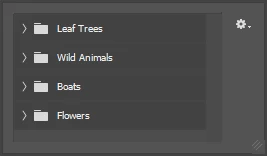
I'm on the latest version of Photoshop CC 2019.  I select custom shape (I want to create a talk bubble) but my basic shapes seem to be gone.  All I get is Tree Leaves, Wild Animals, Boats and Flowers...what gives? I tried to reset default shapes and it just gave me the same choices.


Correct answer Chuck Uebele

 I used to have several shapes with the shapes tool, even basic ones such as arrows, stars etc... but in

Photoshop 2020, I don't find them anymore.


​Are they still there? and how can I get them back?


I check the panel and there is no options to load.

Also, I tried to reset to default but it loads several times the same folders and can't even delete them?


Do you have a link to download them again (for free) so I can import them back?


And how can you delete a shape folder if the option is grayed out?

thank you


[Thread merged by moderator.]


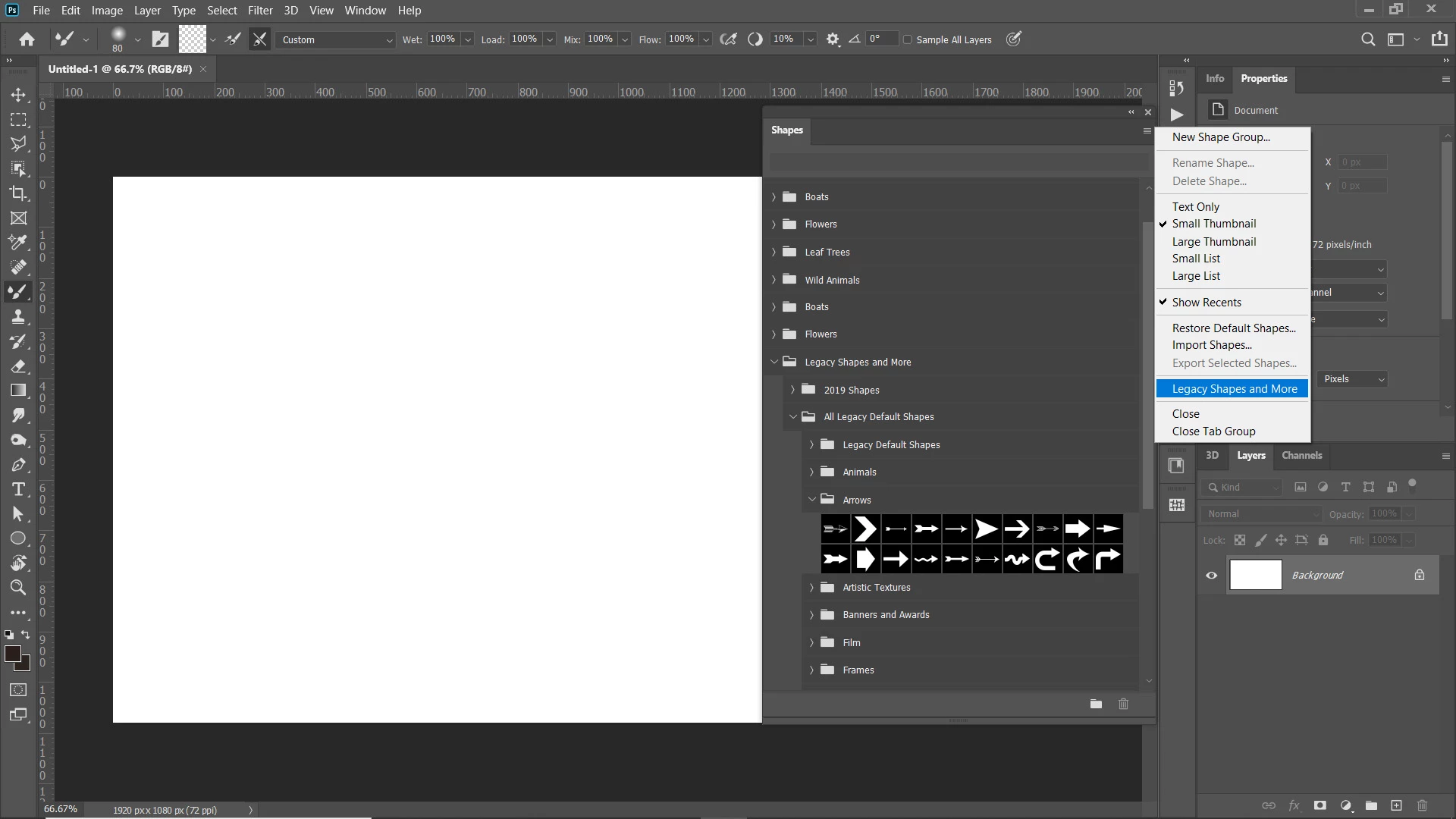
Click on Window in the main menubar, then select "Shapes." In the flyout menu, select "Legacy shapes and more." Find the folder where the shapes that you want are in, and select them from there.

12 replies

SB-W
Inspiring
January 30, 2025

They are organized in folders, is there anyway to show them all at once like the old days [cursing removed]. This is bad!


jane-e
Community Expert
Community Expert
January 30, 2025

@SB-W 


In the Shapes panel, drag and drop the shapes in and out of folders and arrange them as you wish.


Jane


SB-W
Inspiring
January 30, 2025

Do you want to tell me what curse word I said that was removed? I can't seem to see it. AI appears to be doing this too; if you get mad at them, they stop you from using the software to keep your complacency. :'(

Not a big fan, corporations have full censorship mode now because Congress ruled it did not conflict with their working systems, i.e., the post office, which is what we used to communicate back in the day and is protected by free speech, including frustration, expression, and saying a word like Christ. If I recall that is the word I used, that is a curse word now? Ok.


"Khrist" not Christ. Maybe it was Jesus. But that is absolutely bonkers!

It seemed to have been hand-moderated because it was not changed to [cursing removed] until later.

Sad Congress ruled this; its the wrong ruling. A company's virtual asset is not the same as their private building's wall. In all honesty. Sorry to vent, but its not. Especially when its a monopoly of our communication systems. Even larger than the post office.

Participant
June 25, 2024

I am sure nobody reads this comment but found it odd that the feature that is WAS usable is hidden under legacy | Open old menu |  submenu | Then to old menu | add legacy | whatever folder...  AND as default there seems to be no better solution?!?

Participant
August 16, 2023

It's stupid that I had to Google how to find these shapes.  Who at Adobe thought that leaves and animals is what everyone would use and no one would really want, oh I don't know, a freaking rectangle or circle or any of the multitude of actually useful shapes?

Talk about a UX failure.  

jane-e
Community Expert
Community Expert
August 16, 2023

.... a freaking rectangle or circle or any of the multitude of actually useful shapes?

By @default7nccci41woye


Rectangles and Ellipses continue to be available in the Tools panel.


Jane


Participant
May 11, 2023

Why would something like this be buried like that? I've been going crazy trying to figure out where these basic shapes went. What is the purpose of hiding them???

Participant
May 9, 2022

I had the same issue. Any of the resources and tips did not work for me. In my case, I was able to find the preset shapes in this way:

From the shape drop down menu at the upper left corner, selec any one of the scribbled shape icons.

Then, the "shapes" option appears on the top menu bar. Please see the image. I hope this helps your situation. 

jane-e
Community Expert
Community Expert
May 10, 2022

@GMidori wrote:

... I was able to find the preset shapes in this way: From the shape drop down menu at the upper left corner, selec any one of the scribbled shape icons. Then, the "shapes" option appears on the top menu bar. ...


This does not make sense @GMidori . Some of it is confusing; some is incomplete, and some is misleading.

  1. The dropdown menu you are displaying is for the presets for the options for various tools, including the Custom Shape Tool presets that you have drawn arrows toward.
  2. When you use the term "scribbled shape icons", do you mean the Custom Shape Tool? 
  3. When you use the term "top menu bar", do you mean the options bar?
  4. You can select the Custom Shape Tool directly without using the preset menu. It shares space with the other shape tools in the Tools panel.
  5. The options bar in your screenshot shows the Custom Shape Tool options with the Arrow custom shape selected. You will get that dropdown by choosing the Custom Shape Tool the normal way (in the Tools panel).
  6. The issue being discussed in this thread — that you didn't touch on — is that in Photoshop 2019, the Talk Bubbles and other original shapes were no longer available from the menu in the options bar. To re-activate those shapes, users need to go to Window menu > Shapes and enable them from the panel menu (as several have said here). After that the Legacy Shapes will also appear in the options bar.


I hope this helps you,

Jane

Participant
April 24, 2023

It's quiet funny tough. Why in earth someone would hide the most used and needed custom shapes in UI and give only a small option of flowers, animals etc. as pre-loaded custom shapes 🙂

Participant
December 7, 2021

Hi I have done everything here and see the legacy folder but it does not open import or anything. I clicked in the four lines, I right click on the folder. What am I missing?

jane-e
Community Expert
Community Expert
December 8, 2021

@Kathy K. 

Can you please show a screenshot of your Shapes panel (Window menu > Shapes) with the panel menu open and the Legacy Shapes folders expanded?


`Jane

jane-e
Community Expert
Community Expert
December 8, 2021


Like this?


@Kathy K. 

Go to the panel menu in the Shapes panel (Window menu) and click "Legacy Shapes and More" (marked) to add them. They will now appear in the options bar as well as in this panel, but are managed in this panel.


They will be added every time you click. (I now have three and will delete two.)


~ Jane

kevinc81534176
Participant
August 22, 2020

Some of the things that software developers (generally) do, never ceases to amaze me.  Why on earth, would Adobe not have put the legacy shapes as default in the dropdown selector?  Why?  Yet another waste of my time trying to figure out what went wrong!  I'm guessing that developers at Microsoft and Adobe are one and the same thing, right?

Known Participant
August 12, 2020

Thank You 🙏 you saved me a lot of time !

Inspiring
December 4, 2019

Thank you for this answer. What a curious decision to replace the default shapes that have been there since before I can remember with a selection of trees and boats. Why not just leave the "legacy" shapes in there by default in their own tidy folder so people don't have to scratch their heads and go to help forums? 


Anyway, thanks again for the insight. 

Known Participant
April 7, 2024

It's ridiculous. How are rectangles and circles "legacy" shapes? Are Adobe planning to ditch them in the next release because the only shapes that they think we want now are flowers and animals, and nobody needs circles any more?

davescm
Community Expert
Community Expert
November 21, 2019

See my previous post . To add the legacy shapes use Window >Shapes panel

Dave

Inspiring
November 21, 2019

I found my shapes, thank you Dave.  Now I seem to not be able to adjust where the point is pointing.  I want the point on the left, but I can't seem to drag the vectors about.  Any suggestions?

November 21, 2019

Just select the anchor point with the direct selection tool