Exit
  • Global community
    • Language:
      • Deutsch
      • English
      • Español
      • Français
      • Português
  • 日本語コミュニティ
  • 한국 커뮤니티
0

(Mac) Video file issue

Guest
Jan 28, 2023 Jan 28, 2023

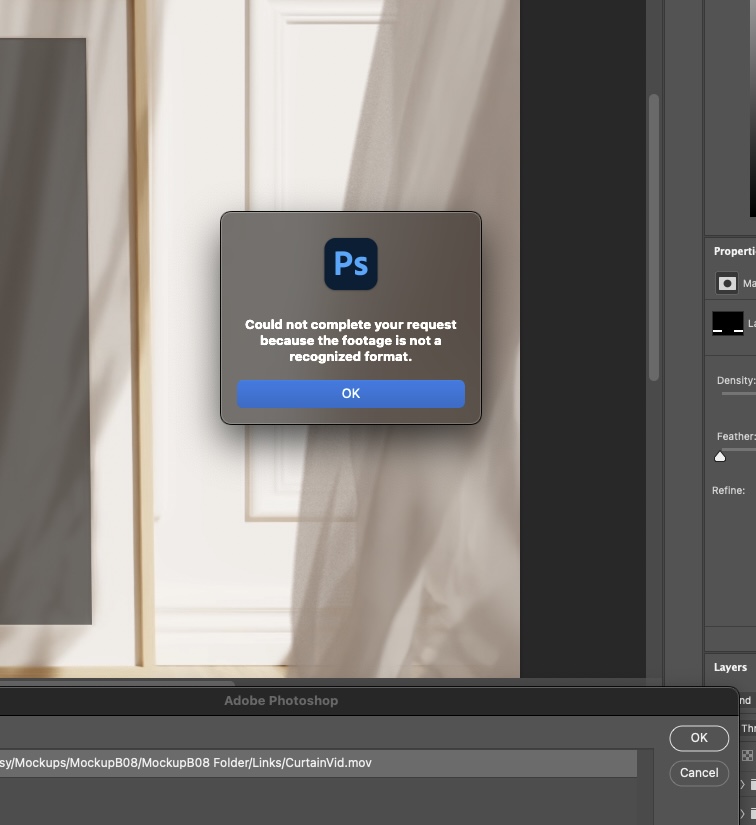
Hello. I purchased a mockup for prints I am selling.  The folder includes the PSD and 2 video files. When I open the PSD file it asks me to link the video ‘’CurtainVid.mov’’ which I do but I get the attached error message. I thought the video file was maybe corrupt and downloaded it again but same issue. It won’t play in QuickTime either and states ‘’This file contains some media that isn’t compatible with QuickTime Player.’’ Any ideas? I am running an M1 Mac Mini and Ventura 13.0 with Photoshop 24.1.1. Thanks in advance.

TOPICS
macOS
868
Translate
Report
Community guidelines
Be kind and respectful, give credit to the original source of content, and search for duplicates before posting. Learn more
community guidelines
Adobe
Guest
Jan 29, 2023 Jan 29, 2023

Anyone?

Translate
Report
Community guidelines
Be kind and respectful, give credit to the original source of content, and search for duplicates before posting. Learn more
community guidelines
Guest
Jan 29, 2023 Jan 29, 2023

Tough crowd. 

Translate
Report
Community guidelines
Be kind and respectful, give credit to the original source of content, and search for duplicates before posting. Learn more
community guidelines
Community Expert ,
Jan 29, 2023 Jan 29, 2023

If you don't get answers right away, it might because the people who have read it so far just don't have a good answer yet.


I don’t have an immediate answer either, but I looked at your screen shots and have a theory. In your screen shot of Get Info, the Codecs list “Linear PCM, Timecode, Animation”. I think the Animation codec might be one of the old 32-bit codecs from the 1990s that Apple stopped supporting in macOS 10.15 Catalina and later. (That might also be true of the other two codecs, but I'm not sure.) If that is the cause, the Animation codec can’t be played in the current version of QuickTime that’s used in the last few major versions of macOS.


This theory is supported by the fact that you said QuickTime Player won’t play them either. That strongly suggests that the problem exists outside Photoshop and could be the .mov files themselves.


One way this could happen is if the mockup was created several years ago, and has been sitting on a server ever since without being tested or updated recently. In that way it could be linked to old, incompatible files.


If this theory is correct, the solution would be to transcode the files using codecs compatible with the current version of QuickTime. (A little web searching suggests that ProRes 4444 is a current codec intended for the types of video that used to use the Animation codec.) That would either be done by whoever provided the mockup, or possibly on your own Mac using a non-Apple video transcoding utility that still supports the old codecs.

Translate
Report
Community guidelines
Be kind and respectful, give credit to the original source of content, and search for duplicates before posting. Learn more
community guidelines
Guest
Jan 30, 2023 Jan 30, 2023

Thanks. I downloaded shutter encoder and converted it to Pro Res but unfortunately I get the same error message. It plays in QuickTime now however. For clarity, the right video with the X is the troublesome one. Really lost at this stage. 

Translate
Report
Community guidelines
Be kind and respectful, give credit to the original source of content, and search for duplicates before posting. Learn more
community guidelines
New Here ,
Jul 31, 2025 Jul 31, 2025

I just had the same issue. I opened iMovie and imported the files from there and they work fine! Perhaps that will help in this case?

Translate
Report
Community guidelines
Be kind and respectful, give credit to the original source of content, and search for duplicates before posting. Learn more
community guidelines
Adobe Employee ,
Aug 01, 2025 Aug 01, 2025
LATEST

Hi @sarahl93341338, welcome to the community!

Since this thread is a little older, it might be a good idea to start a new one with all the details of your issue. That way, your question won’t get overlooked and you’ll likely get help faster.

Thanks a bunch!
Cheers,
Alek

*(If you mention me with an @, like @Aleke, I’ll get a notification and can respond faster.)*
Translate
Report
Community guidelines
Be kind and respectful, give credit to the original source of content, and search for duplicates before posting. Learn more
community guidelines