
Inspiring
March 20, 2025
Answered

Make white background transparent, then change the color of the visible text

  • March 20, 2025
  • 2 replies
  • 2072 views

I needed this more than I can remember, but don't know if it's even possible?

Let's use this image as an example, where it's a white background with black text.
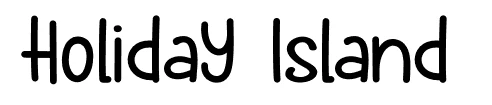
Now I would like to paste it, remove the white, change the color of the black text.

Using Multiply I can "get rid" of the white, at least, visually speaking. Now how would I be able to change the text color from black to red?


I know I could select the white with the magic wand, for example, delete it, etc, but I was looking for some option where I could do this without deleting anything, but also, if possible, a way that allowed me to paste another image with a different font and it would do it automatically for me (via a group or smart object, maybe).


The reason I need this right now, is just because I want to test different fonts on top of a background without having to install more fonts. I just take a screenshot from a fonts website, paste it, see if it works, and move on. If I like it, I install the font. If not, another screenshot, repeat.
Correct answer TiagoRocha

Ok I got pretty close. It's not 100% perfect, but allows me to at least preview it.

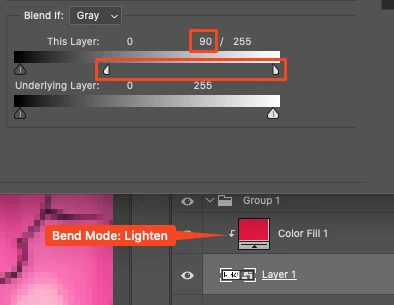
Set the Solid Color layer to Blend Mode Lighten.

Then double click the image layer to open the Blending Options and in the Blend If section, click and hold Option (on Mac) to split the right "handle" and drag it to 90.


Now since I converted the image to smart object, I can just add another image to replace the old one, save it, and I can preview it!

2 replies

Legend
March 20, 2025

Add a solid color adjustment layer in Lighten mode. Pretty much any color is lighter than solid black and darker than white.

Inspiring
March 20, 2025

That changes the color of the text, only if the image is set to Normal as blending mode, but once I change the original layer (image) to Multiply to get rid of the white background, it doesn't work anymore.


I don't know if my original post is being clear enough, so let me explain it again:


Screenshot of a font's website, where the background is white, the text is black.

I want the white background to become transparent.

I want to change the color of the black text.

Basically I'm kinda mimicking a normal scenario with live text, but with a screenshot, so I can type the text I want in the font's website and once I see something I like, I screenshot it, paste it into my PS document and see how it looks like, with the color I want. If I like it, then I download the font and install it. 


Here's an example where the top is what I have with a pasted image with white background and black text, and the bottom is what I want to achieve, without having to select the white and deleting it. I'm looking for a solution where I can paste a different screenshot and it will automatically remove the white background and use the color on the text that I already picked:


I want to see the font in context. Something that may look good on the font's website doesn't necessarily look good in context with my background.

TiagoRochaAuthorCorrect answer
Inspiring
March 20, 2025

Ok I got pretty close. It's not 100% perfect, but allows me to at least preview it.

Set the Solid Color layer to Blend Mode Lighten.

Then double click the image layer to open the Blending Options and in the Blend If section, click and hold Option (on Mac) to split the right "handle" and drag it to 90.


Now since I converted the image to smart object, I can just add another image to replace the old one, save it, and I can preview it!

jane-e
Community Expert
Community Expert
March 20, 2025
quote

The reason I need this right now, is just because I want to test different fonts on top of a background without having to install more fonts.

By @TiagoRocha


Can you show us your Layers panel? Is the text on its own layer as live type? Or has it been rasterized and is now pixels.


Jane


Inspiring
March 20, 2025

"I just take a screenshot from a fonts website, paste it"


There's no live text. It's an image, a screenshot. White background, black text.