



Ivan Zajats
Inspiring
April 2, 2023
解決済み

Merge layers issue

  • April 2, 2023
  • 返信数 9.
  • 5964 ビュー

How to merge several layers so that the name of the bottom one remains?

I just Shift + select them and Ctrl+E, but I get the name of the top one (and lose the color label).
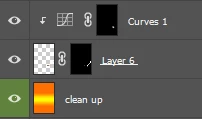


Merged result

 

Though when I turn off the visibility of all other layers, select the corresponding layer and click "Merge visible", I get what I need 🙂 But it's too many extra clicks.

 

Can't PS consider what layer I select first when Shift+select several layers?


UPD.

Created a feature request. Please, vote! https://community.adobe.com/t5/photoshop-ecosystem-ideas/fix-the-merge-layers-issue/idi-p/13700956


解決に役立った回答 Ivan Zajats

Created a new topic as a feature request. Please, vote!

https://community.adobe.com/t5/photoshop-ecosystem-ideas/fix-the-merge-layers-issue/idi-p/13700956

返信数 9

Ivan Zajats
Ivan Zajats作成者解決!
Inspiring
April 3, 2023
PECourtejoie
Community Expert
Community Expert
April 3, 2023

Hi, in order to keep the bottom name, you select the top layer, then CTRL+E until you reach the bottom layer whose name you want to keep.

To avoid the issues you mention, merge all layers besides the one just on top of the bottom one, then hit CTRL+E again.

Ivan Zajats
Ivan Zajats作成者
Inspiring
April 3, 2023

@PECourtejoie you can't "avoid the issues" when there're several clipping masks

If there're 10+ layers, you still suggest merging them one by one? it's easier to merge once and rename


I want PS to consider what layer I select first and retain its name, would be much better

Stephen Marsh
Community Expert
Community Expert
April 3, 2023
quote

I want PS to consider what layer I select first and retain its name, would be much better


By @Ivan Zajats


People select layers for many different reasons, in certain sequences, either using the shift key or the CMD/CTRL key (they are different).


What you are asking for is for Photoshop to "listen" for such layer selections and to store them in memory, just in case the next action performed after the last layer selection is to merge, which it would then use the first layer name selected in memory as the new name.


That sounds possible, not sure how easy it is to implement though.

Jeff Arola
Community Expert
Community Expert
April 3, 2023

You can do something like select all the layers you want to merge, right click on one of Eyes, Hide all other layers, click on the bottom layer of your selected layers to just make that the active layer, then press Shift+Ctrl+E

Ivan Zajats
Ivan Zajats作成者
Inspiring
April 3, 2023

@Jeff Arola nice, it's about 8 clicks 🙂 not much faster than just Shift + select, merge & remane

I want PS to consider what layer I select first and retain its name, would be much better

Nancy OShea
Community Expert
Community Expert
April 3, 2023
Nancy O'Shea— Product User & Community Expert
Jeff Arola
Community Expert
Community Expert
April 3, 2023

To hide the visibilty of all the other layers besides the selected layers, click on one of the

Layer Eyes and click Show/Hide all other layers.


Ivan Zajats
Ivan Zajats作成者
Inspiring
April 3, 2023

Hey, I want to move the topic to the Ideas section as a feature request.

I've used a Report button to contact a moderator, but as I've noticed many times, there are no moderators here 🙂 LOL

Should I start a new topic?

Jeff Arola
Community Expert
Community Expert
April 3, 2023

What your after used to be easy in photoshop before cs2, when Adobe made changes to Layers like being able to select more than one layer at a time, etc. Unfortunately a few of the old tried and true methods for merging layers got left out unless one uses scripting or has an old action from pre cs2 which still works in 2023.


In photoshop 7/CS, for example, one could just link all three layers making sure the bottom layer was selected then press Ctrl+E (Cmd+E) for Layer>Merge Linked Layers into Target Layer. So if the target (selected) layer was the top layer, that layer name would be retained or vice versa if the bottom layer was the target (selected) layer that layer name would be retained.


Quick clip from photoshop cs (ps ver 😎 showing linking layers, then after the target layer is selected using

Cmd+E (mac) or Ctrl+E (windows) to merge layers into the target layer keeping the name of the target layer.


Jeff Arola
Community Expert
Community Expert
April 3, 2023

In your case with the three layers make sure the top layer is active, then do Ctrl+E twice.

That will keep the bottom layers name.

Ivan Zajats
Ivan Zajats作成者
Inspiring
April 3, 2023

may not work properly with clipping masks & blend modes

doesn't work at all if a layer is above another layer with a clipping mask

doesn't work at all if a layer is above an adjustment layer

etc.

D Fosse
Community Expert
Community Expert
April 2, 2023

Merge visible should take the layer name from the layer that is selected/active (not the top layer unless that's selected).


That's how it has always behaved here:

Ivan Zajats
Ivan Zajats作成者
Inspiring
April 2, 2023

@D Fosse I mentioned that in the post. Turning off/on the visibility of all other layers also takes a bit of time. I want PS to consider what layer I select first when Shift+select several layers.

Nancy OShea
Community Expert
Community Expert
April 2, 2023
quote

Turning off/on the visibility of all other layers also takes a bit of time. 


By @Ivan Zajats

===========

Not if you use Alt + Click shortcut on eyeball icon.  Try it.  🙂


Nancy O'Shea— Product User & Community Expert
Myra Ferguson
Community Expert
Community Expert
April 2, 2023

Photoshop will name the merged layers using the top name. There was a previous thread where some other Adobe users recommended some scripts:

Ivan Zajats
Ivan Zajats作成者
Inspiring
April 2, 2023

Thanks for the link, but should I really learn scripting (or using scripts) for merging 3 layers? really? lol

sounds ridiculous


If PS considers the active layer when "Merge visible", why can't it consider what layer I select first when Shift+select several layers? let's make a feature request from this topic then.

jane-e
Community Expert
Community Expert
April 2, 2023

Thanks for the link, but should I really learn scripting (or using scripts) for merging 3 layes?

By @Ivan Zajats


Ivan, why would you need to learn scripting to use a script? I'm not following you...


Jane