Participant
August 13, 2024
Answered

Missing actions in Photoshop

  • August 13, 2024
  • 2 replies
  • 436 views

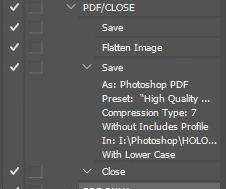
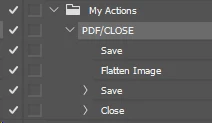
Hi all. First time question. I poked around a bit but cannot find a suitable answer. I'm using the latest version of Photoshop. I have to alter and save, then flatten and convert to PDF to be able to use my work. I set up an Action to save the file, flatten the image and then save as PDF. And it all works correctly and saves the PDF in the same folder. A day later the same action will work in saving the file. Looks to be running through the next steps but no PDF appears. Not sure if it is saving in the Blue Nowhere or what. Is it because the action is tied to a particular folder? I didn't think that would be the case but I am at a loss. Did I miss a step? 
This topic has been closed for replies.
Correct answer M19C66D

Thank you for the offer of assistance but in making this screenshot for you I realized what was happening. I work with several customers and the PDFs were saving in the folder of the original customer I made the action with. I will have to make actions for each customer. Thank you again for the offer.


2 replies

c.pfaffenbichler
Community Expert
Community Expert
August 14, 2024

Could you please post screenshots with the fully expanded Action (so each step that can be expanded being expanded)? 

M19C66DAuthorCorrect answer
Participant
August 14, 2024

Thank you for the offer of assistance but in making this screenshot for you I realized what was happening. I work with several customers and the PDFs were saving in the folder of the original customer I made the action with. I will have to make actions for each customer. Thank you again for the offer.


c.pfaffenbichler
Community Expert
Community Expert
August 14, 2024

Or you could use a Script instead of an Action. 

try67
Community Expert
Community Expert
August 13, 2024