
degibox
Known Participant
October 15, 2019
Answered

Missing Buttons/Menus/Options

  • October 15, 2019
  • 1 reply
  • 647 views


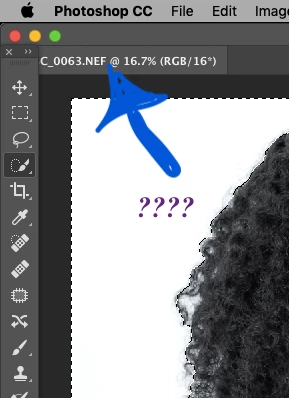
Okay, so in the upper left hand side of the...uh, Photoshop layout-a-rooney, there used to be a little...ya know, box or whatever that allowed me to change the size etc of a brush and also allowed me to toggle back and forth between [+] or "add" and [-] or "erase." It dissapeared months ago. How do I find it and put it back? Thanks.
This topic has been closed for replies.
Correct answer Jeff Arola

Go to Window>Tools or reset your workspace by going to Windpw>Workspace>Reset Workspace

1 reply

Jeff Arola
Community Expert
Jeff ArolaCommunity ExpertCorrect answer
Community Expert
October 15, 2019

Go to Window>Tools or reset your workspace by going to Windpw>Workspace>Reset Workspace

degibox
degiboxAuthor
Known Participant
October 15, 2019
Thank you!
Sebastian Bleak
Community Expert
Community Expert
October 15, 2019
Did that bring it back for you?