


- Home
- Photoshop ecosystem
- Discussions
- Re: Multiple display performance
- Re: Multiple display performance
Multiple display performance

Copy link to clipboard
Copied
I have a second monitor plugged into my laptop. Photoshop files will have lots of screen tearing and scroll choppiness depending on which screen Photoshop is on when I open any given file and/or which screen is set as the "Main display" in display settings . Example scenarios:
1. Set the second monitor is set as "Main display". I have Photoshop open and on the laptop display. Open a psd, and scrolling, zooming or moving the image is very slow and choppy with a lot of screen tearing. Move Photoshop over to the second monitor and the problem persists. However, if I drag photoshop over to the second monitor and open a second psd, the scrolling, zooming, etc is perfect on that file on either screen while the problem persists on both screens on the first file that was opened.
2. Set the laptop display as the "Main display". Photoshop can be on either screen when I open a psd and will not have the issue.
The laptop is new and uses the nvideo 2070 max-q. Drivers and updates are all installed. My previous laptop was not doing this. However, when I switched over to this laptop, there were also some CC updates that came down the pipeline, so I don't know if it is the computer change or the update causing the issue. I've tried different variations within the performance preferences in photoshop and even disabled use of the performance video card. The problem persists.
Has anyone else experience this and found a solution?



Explore related tutorials & articles
 14
Replies
14
14
Replies
14


Copy link to clipboard
Copied
You provide little information. All we know is your laptop uses nvideo 2070 max-q. Most likely you are using some windows OS version and have a Photoshop CC version with some updates installed. You seem to have video performance issue when you have an external display attached.
Supply pertinent information for quicker answers
- The more information you supply about your situation, the better equipped other community members will be to answer. Consider including the following in your question:
- Adobe product and version number
- Operating system and version number
- The full text of any error message(s)
- What you were doing when the problem occurred
- Screenshots of the problem
- Computer hardware, such as CPU; GPU; amount of RAM; etc.
Copy link to clipboard
Copied
Correct...until I know what information will be relevant to the question, it likely won't be provided:
PS version 20.0.4
Windows 10 version 1803
No error messages
Using photoshop
The explanation describes what is happening better than a screenshot will
Inte i7-8750H, Nvidia 2070 Maxq, 32gb ram
Copy link to clipboard
Copied
Perhaps your Photoshop menu help>System info may shed some light on your problem. Other are using 1803 cc 2019 20.04 with 2, 3, and 4 displays without problems. However most are not using laptops. Years ago I user a ThinkPad with and external display and had no problems with the displays, but I was using Windows XP and a CS version of Photoshop.
I have no idea what your screen tearing look like for all I know it may be a nvidia device driver problem.
Copy link to clipboard
Copied
Just installed a recent update to photoshop and I'm finally getting a message from photoshop:
"OpenGL features will be disabled on this window. To enable OopenGl for new windows, close one or more windows...."
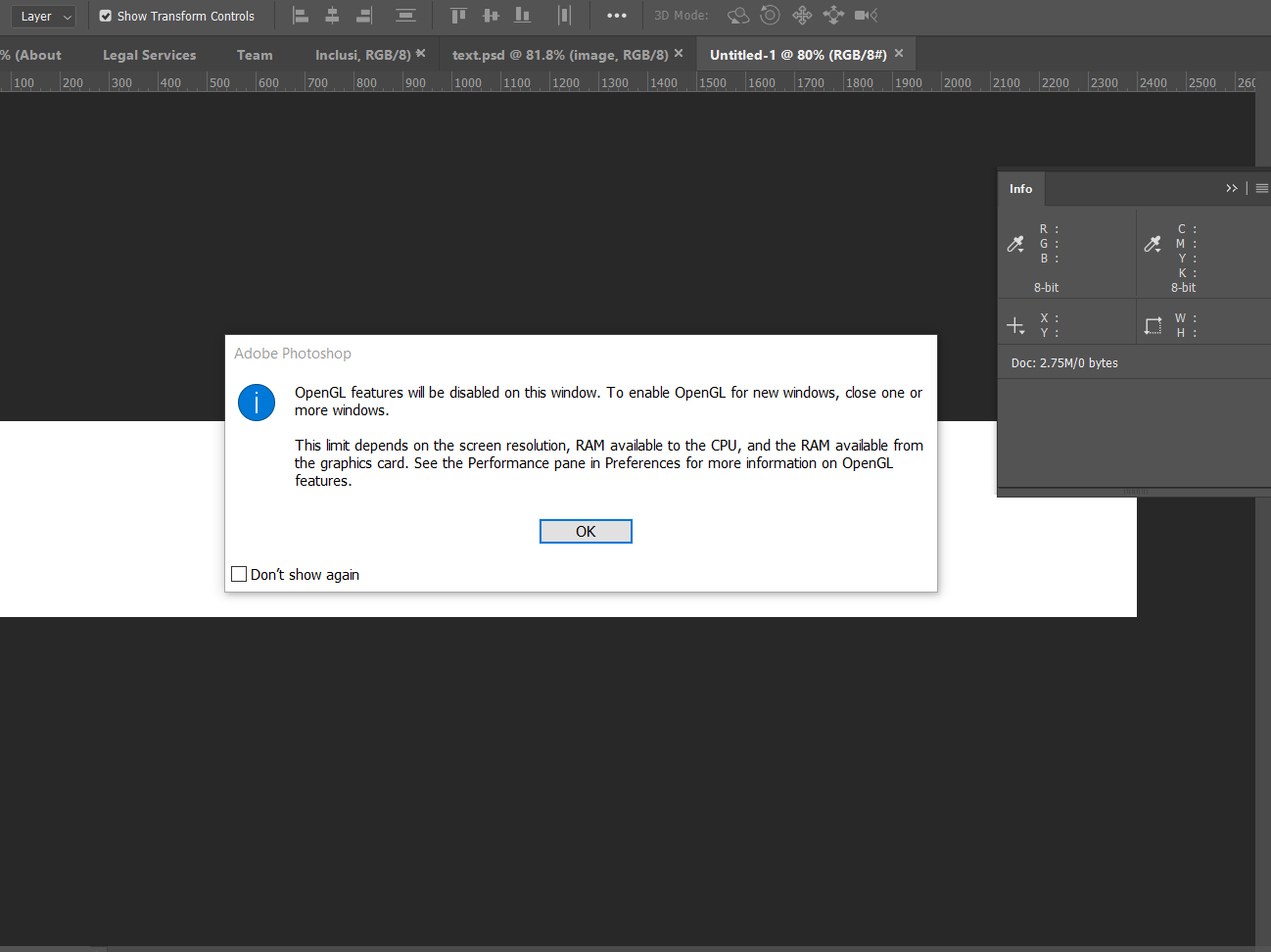
For some reason, photoshop thinks there isn't enough memory either from the computer (32gb available) and/or the graphics card (8gb) and disables OpenGL for the newly opened window. This obviously isn't the case given as long as I open the file while photoshop is on the screen set as the "main display", it will work fine regardless of which screen I actually use it on.
Copy link to clipboard
Copied
Edit your Photoshop preferences and make sure the Performance section see you Photoshop sees your GPU and GPU is enable ask check the advance settings. Then post your Photoshop menu Help>System Info
Copy link to clipboard
Copied
Double checked - it sees the gpu and it is enabled
Adobe Photoshop Version: 20.0.4 20190227.r.76 2019/02/27: 1205725 x64
Number of Launches: 59
Operating System: Windows 10 64-bit
Version: 10 or greater 10.0.17134.753
System architecture: Intel CPU Family:6, Model:14, Stepping:10 with MMX, SSE Integer, SSE FP, SSE2, SSE3, SSE4.1, SSE4.2, AVX, AVX2, HyperThreading
Physical processor count: 6
Logical processor count: 12
Processor speed: 2208 MHz
Built-in memory: 32610 MB
Free memory: 16126 MB
Memory available to Photoshop: 29862 MB
Memory used by Photoshop: 54 %
Alias Layers: Disabled.
Modifier Palette: Enabled.
Highbeam: Enabled.
Image tile size: 1024K
Image cache levels: 4
Font Preview: Medium
TextComposer: Latin
Display: 1
Display Bounds: top=0, left=0, bottom=1080, right=2560
Display: 2
Display Bounds: top=0, left=-1920, bottom=1080, right=0
OpenGL Drawing: Enabled.
OpenGL Allow Old GPUs: Not Detected.
OpenGL Drawing Mode: Advanced
OpenGL Allow Normal Mode: True.
OpenGL Allow Advanced Mode: True.
AIFCoreInitialized=1
AIFOGLInitialized=1
OGLContextCreated=1
NumGLGPUs=2
NumCLGPUs=2
NumNativeGPUs=0
glgpu[0].GLVersion="4.1"
glgpu[0].IsIntegratedGLGPU=0
glgpu[0].GLMemoryMB=8192
glgpu[0].GLName="NVIDIA GeForce RTX 2070 with Max-Q Design"
glgpu[0].GLVendor="NVIDIA Corporation"
glgpu[0].GLVendorID=4318
glgpu[0].GLDriverVersion="26.21.14.3086"
glgpu[0].GLRectTextureSize=32768
glgpu[0].GLRenderer="GeForce RTX 2070 with Max-Q Design/PCIe/SSE2"
glgpu[0].GLRendererID=7952
glgpu[0].HasGLNPOTSupport=1
glgpu[0].GLDriver="C:\Windows\System32\DriverStore\FileRepository\nvmii.inf_amd64_410ce64dd10583c1\nvldumdx.dll,C:\Windows\System32\DriverStore\FileRepository\nvmii.inf_amd64_410ce64dd10583c1\nvldumdx.dll,C:\Windows\System32\DriverStore\FileRepository\nvmii.inf_amd64_410ce64dd10583c1\nvldumdx.dll,C:\Windows\System32\DriverStore\FileRepository\nvmii.inf_amd64_410ce64dd10583c1\nvldumdx.dll"
glgpu[0].GLDriverDate="20190522000000.000000-000"
glgpu[0].CanCompileProgramGLSL=1
glgpu[0].GLFrameBufferOK=1
glgpu[0].glGetString[GL_SHADING_LANGUAGE_VERSION]="4.60 NVIDIA"
glgpu[0].glGetProgramivARB[GL_FRAGMENT_PROGRAM_ARB][GL_MAX_PROGRAM_INSTRUCTIONS_ARB]=[65536]
glgpu[0].glGetIntegerv[GL_MAX_TEXTURE_UNITS]=[4]
glgpu[0].glGetIntegerv[GL_MAX_COMBINED_TEXTURE_IMAGE_UNITS]=[192]
glgpu[0].glGetIntegerv[GL_MAX_VERTEX_TEXTURE_IMAGE_UNITS]=[32]
glgpu[0].glGetIntegerv[GL_MAX_TEXTURE_IMAGE_UNITS]=[32]
glgpu[0].glGetIntegerv[GL_MAX_DRAW_BUFFERS]=[8]
glgpu[0].glGetIntegerv[GL_MAX_VERTEX_UNIFORM_COMPONENTS]=[4096]
glgpu[0].glGetIntegerv[GL_MAX_FRAGMENT_UNIFORM_COMPONENTS]=[4096]
glgpu[0].glGetIntegerv[GL_MAX_VARYING_FLOATS]=[124]
glgpu[0].glGetIntegerv[GL_MAX_VERTEX_ATTRIBS]=[16]
glgpu[0].extension[AIF::OGL::GL_ARB_VERTEX_PROGRAM]=1
glgpu[0].extension[AIF::OGL::GL_ARB_FRAGMENT_PROGRAM]=1
glgpu[0].extension[AIF::OGL::GL_ARB_VERTEX_SHADER]=1
glgpu[0].extension[AIF::OGL::GL_ARB_FRAGMENT_SHADER]=1
glgpu[0].extension[AIF::OGL::GL_EXT_FRAMEBUFFER_OBJECT]=1
glgpu[0].extension[AIF::OGL::GL_ARB_TEXTURE_RECTANGLE]=1
glgpu[0].extension[AIF::OGL::GL_ARB_TEXTURE_FLOAT]=1
glgpu[0].extension[AIF::OGL::GL_ARB_OCCLUSION_QUERY]=1
glgpu[0].extension[AIF::OGL::GL_ARB_VERTEX_BUFFER_OBJECT]=1
glgpu[0].extension[AIF::OGL::GL_ARB_SHADER_TEXTURE_LOD]=1
clgpu[0].CLPlatformVersion="1.2"
clgpu[0].CLDeviceVersion="1.2 CUDA"
clgpu[0].IsIntegratedCLGPU=0
clgpu[0].CLMemoryMB=8192
clgpu[0].CLName="GeForce RTX 2070 with Max-Q Design"
clgpu[0].CLVendor="NVIDIA Corporation"
clgpu[0].CLVendorID=4318
clgpu[0].CLDriverVersion="430.86"
clgpu[0].CLBandwidth=3.02114e+11
clgpu[0].CLCompute=1884.59
glgpu[1].GLVersion="4.1"
glgpu[1].IsIntegratedGLGPU=0
glgpu[1].GLMemoryMB=1024
glgpu[1].GLName="Intel(R) UHD Graphics 630"
glgpu[1].GLVendor="NVIDIA Corporation"
glgpu[1].GLVendorID=32902
glgpu[1].GLDriverVersion="25.20.100.6374"
glgpu[1].GLRectTextureSize=32768
glgpu[1].GLRenderer="GeForce RTX 2070 with Max-Q Design/PCIe/SSE2"
glgpu[1].GLRendererID=16027
glgpu[1].HasGLNPOTSupport=1
glgpu[1].GLDriver="C:\Windows\System32\DriverStore\FileRepository\iigd_dch_base.inf_amd64_b95c9a044993331b\igdumdim64.dll,C:\Windows\System32\DriverStore\FileRepository\iigd_dch_base.inf_amd64_b95c9a044993331b\igd10iumd64.dll,C:\Windows\System32\DriverStore\FileRepository\iigd_dch_base.inf_amd64_b95c9a044993331b\igd10iumd64.dll,C:\Windows\System32\DriverStore\FileRepository\iigd_dch_base.inf_amd64_b95c9a044993331b\igd12umd64.dll"
glgpu[1].GLDriverDate="20181118000000.000000-000"
glgpu[1].CanCompileProgramGLSL=1
glgpu[1].GLFrameBufferOK=1
glgpu[1].glGetString[GL_SHADING_LANGUAGE_VERSION]="4.60 NVIDIA"
glgpu[1].glGetProgramivARB[GL_FRAGMENT_PROGRAM_ARB][GL_MAX_PROGRAM_INSTRUCTIONS_ARB]=[65536]
glgpu[1].glGetIntegerv[GL_MAX_TEXTURE_UNITS]=[4]
glgpu[1].glGetIntegerv[GL_MAX_COMBINED_TEXTURE_IMAGE_UNITS]=[192]
glgpu[1].glGetIntegerv[GL_MAX_VERTEX_TEXTURE_IMAGE_UNITS]=[32]
glgpu[1].glGetIntegerv[GL_MAX_TEXTURE_IMAGE_UNITS]=[32]
glgpu[1].glGetIntegerv[GL_MAX_DRAW_BUFFERS]=[8]
glgpu[1].glGetIntegerv[GL_MAX_VERTEX_UNIFORM_COMPONENTS]=[4096]
glgpu[1].glGetIntegerv[GL_MAX_FRAGMENT_UNIFORM_COMPONENTS]=[4096]
glgpu[1].glGetIntegerv[GL_MAX_VARYING_FLOATS]=[124]
glgpu[1].glGetIntegerv[GL_MAX_VERTEX_ATTRIBS]=[16]
glgpu[1].extension[AIF::OGL::GL_ARB_VERTEX_PROGRAM]=1
glgpu[1].extension[AIF::OGL::GL_ARB_FRAGMENT_PROGRAM]=1
glgpu[1].extension[AIF::OGL::GL_ARB_VERTEX_SHADER]=1
glgpu[1].extension[AIF::OGL::GL_ARB_FRAGMENT_SHADER]=1
glgpu[1].extension[AIF::OGL::GL_EXT_FRAMEBUFFER_OBJECT]=1
glgpu[1].extension[AIF::OGL::GL_ARB_TEXTURE_RECTANGLE]=1
glgpu[1].extension[AIF::OGL::GL_ARB_TEXTURE_FLOAT]=1
glgpu[1].extension[AIF::OGL::GL_ARB_OCCLUSION_QUERY]=1
glgpu[1].extension[AIF::OGL::GL_ARB_VERTEX_BUFFER_OBJECT]=1
glgpu[1].extension[AIF::OGL::GL_ARB_SHADER_TEXTURE_LOD]=1
clgpu[1].CLPlatformVersion="2.1 "
clgpu[1].CLDeviceVersion="2.1 NEO "
clgpu[1].IsIntegratedCLGPU=1
clgpu[1].CLMemoryMB=13043
clgpu[1].CLName="Intel(R) UHD Graphics 630"
clgpu[1].CLVendor="Intel(R) Corporation"
clgpu[1].CLVendorID=32902
clgpu[1].CLDriverVersion="25.20.100.6374"
clgpu[1].CLBandwidth=2.84255e+10
clgpu[1].CLCompute=178.238
License Type: Subscription
Serial number: 90970677612711466205
GUIDBucket:Composite Core (enable_composite_core): onComposite Core UI (comp_core_ui): offDocument Graph (enable_doc_graph): off
Application folder: C:\Program Files\Adobe\Adobe Photoshop CC 2019\
Temporary file path: C:\Users\xpost\AppData\Local\Temp\
Photoshop scratch has async I/O enabled
Scratch volume(s):
Startup, 464.5G, 314.9G free
Required Plug-ins folder: C:\Program Files\Adobe\Adobe Photoshop CC 2019\Required\Plug-Ins\
Primary Plug-ins folder: C:\Program Files\Adobe\Adobe Photoshop CC 2019\Plug-Ins\
Installed components:
A3DLIBS.dll A3DLIB Dynamic Link Library 9.2.0.112
ACE.dll ACE 2018/11/13-18:07:21 79.603421 79.603421
AdbePM.dll PatchMatch 2018/09/10:19:04:15 1.601805 1.601805
AdobeLinguistic.dll Adobe Linguisitc Library 13.0.0.0
AdobeOwl.dll Adobe Owl 5.3.0
AdobePDFL.dll PDFL 2018/08/23-00:56:13 79.301181 79.301181
AdobePIP.dll Adobe Product Improvement Program 8.0.0.52.48027
AdobeSVGAGM.dll AdobeSVGAGM 79.600623 79.600623
AdobeXMP.dll Adobe XMP Core 2018/08/13-16:40:22 79.163499 79.163499
AdobeXMPFiles.dll Adobe XMP Files 2018/08/13-16:40:22 79.163499 79.163499
AdobeXMPScript.dll Adobe XMP Script 2018/08/13-16:40:22 79.163499 79.163499
adobe_caps.dll Adobe CAPS 10,0,0,6
AGM.dll AGM 2018/08/14-01:11:25 79.600623 79.600623
ahclient.dll AdobeHelp Dynamic Link Library 4.0.0.0
AIDE.dll AIDE 2018/08/10-16:31:38 79.600470 79.600470
ARE.dll ARE 2018/08/14-01:11:25 79.600623 79.600623
AXE8SharedExpat.dll AXE8SharedExpat 2018/06/25-18:00:38 79.598424 79.598424
AXEDOMCore.dll AXEDOMCore 2018/06/25-18:00:38 79.598424 79.598424
Bib.dll BIB 2018/08/14-01:11:25 79.600623 79.600623
BIBUtils.dll BIBUtils 2018/08/14-01:11:25 79.600623 79.600623
boost_date_time.dll photoshopdva 12.1.0
boost_filesystem.dll photoshopdva 12.1.0
boost_system.dll photoshopdva 12.1.0
boost_threads.dll photoshopdva 12.1.0
cg.dll NVIDIA Cg Runtime 3.0.00007
cgGL.dll NVIDIA Cg Runtime 3.0.00007
CITThreading.dll Adobe CITThreading 2.1.0.1 2.1.0.1
CoolType.dll CoolType 2018/08/14-01:11:25 79.600623 79.600623
CRClient.dll Adobe Crash Reporter Client DLL 2.0.3.0
dnssd.dll Bonjour 3,0,0,2
dvaaccelerate.dll photoshopdva 12.1.0
dvaappsupport.dll photoshopdva 12.1.0
dvaaudiodevice.dll photoshopdva 12.1.0
dvacore.dll photoshopdva 12.1.0
dvacrashhandler.dll Adobe Audition CC 2017 10.0.0
dvamarshal.dll photoshopdva 12.1.0
dvamediatypes.dll photoshopdva 12.1.0
dvametadata.dll photoshopdva 12.1.0
dvametadataapi.dll photoshopdva 12.1.0
dvametadataui.dll photoshopdva 12.1.0
dvaplayer.dll photoshopdva 12.1.0
dvascripting.dll photoshopdva 12.1.0
dvatransport.dll photoshopdva 12.1.0
dvaui.dll photoshopdva 12.1.0
dvaunittesting.dll photoshopdva 12.1.0
dynamiclink.dll photoshopdva 12.1.0
ExtendScript.dll ExtendScript 2017/08/31-12:13:14 81.1157194 81.1157194
icucnv58.dll International Components for Unicode 58, 2, 0, 0
icudt58.dll International Components for Unicode 58, 2, 0, 0
icuuc58.dll International Components for Unicode 58, 2, 0, 0
igestep30.dll IGES Reader 9.3.0.113
JP2KLib.dll JP2KLib 2018/06/25-18:00:38 79.271024 79.271024
libifcoremd.dll Intel(r) Visual Fortran Compiler 10.0 (Update A)
libiomp5md.dll Intel(R) OpenMP* Runtime Library 5.0
libmmd.dll Intel(R) C/C++/Fortran Compiler 18.0.0
LogSession.dll LogSession 8.0.0.52.48027
mediacoreif.dll photoshopdva 12.1.0
MPS.dll MPS 2018/08/06-15:20:35 79.600183 79.600183
pdfsettings.dll Adobe PDFSettings 1.04
Photoshop.dll Adobe Photoshop CC 2019 20.0
Plugin.dll Adobe Photoshop CC 2019 20.0
PlugPlugExternalObject.dll Adobe(R) CEP PlugPlugExternalObject Standard Dll (64 bit) 9.2.1
PlugPlugOwl.dll Adobe(R) CSXS PlugPlugOwl Standard Dll (64 bit) 9.2.1.39
PSCloud.dll 1.0.0.1
PSViews.dll Adobe Photoshop CC 2019 20.0
SCCore.dll ScCore 2017/08/31-12:13:14 81.1157194 81.1157194
SVGRE.dll SVGRE 79.600623 79.600623
svml_dispmd.dll Intel(R) C/C++/Fortran Compiler 18.0.0
tbb.dll Intel(R) Threading Building Blocks for Windows 2018, 0, 2017, 1205
tbbmalloc.dll Intel(R) Threading Building Blocks for Windows 2018, 0, 2017, 1205
TfFontMgr.dll FontMgr 9.3.0.113
TfKernel.dll Kernel 9.3.0.113
TFKGEOM.dll Kernel Geom 9.3.0.113
TFUGEOM.dll Adobe, UGeom© 9.3.0.113
VulcanControl.dll Vulcan Application Control Library 5.3.0.16
VulcanMessage5.dll Vulcan Message Library 5.3.0.16
WinRTSupport.dll Adobe Photoshop Windows RT Support 20.0.0.0
WRServices.dll WRServices Tue August 14 2018 12:26:24 Build 0.23627 0.23627
wu3d.dll U3D Writer 9.3.0.113
Required plug-ins:
3D Studio 20.0 (20190227.r.76 2019/02/27: 1205725) - from the file “U3D.8bi”
Accented Edges 20.0 - from the file “Filter Gallery.8bf”
Adaptive Wide Angle 20.0 - from the file “Adaptive Wide Angle.8bf”
Angled Strokes 20.0 - from the file “Filter Gallery.8bf”
Average 20.0 (20190227.r.76 2019/02/27: 1205725) - from the file “Average.8bf”
Bas Relief 20.0 - from the file “Filter Gallery.8bf”
BMP 20.0 - from the file “Standard MultiPlugin.8bf”
Camera Raw 11.3 - from the file “Camera Raw.8bi”
Camera Raw Filter 11.3 - from the file “Camera Raw.8bi”
Chalk && Charcoal 20.0 - from the file “Filter Gallery.8bf”
Charcoal 20.0 - from the file “Filter Gallery.8bf”
Chrome 20.0 - from the file “Filter Gallery.8bf”
Cineon 20.0 (20190227.r.76 2019/02/27: 1205725) - from the file “Cineon.8bi”
Clouds 20.0 (20190227.r.76 2019/02/27: 1205725) - from the file “Clouds.8bf”
Collada 20.0 (20190227.r.76 2019/02/27: 1205725) - from the file “U3D.8bi”
Color Halftone 20.0 - from the file “Standard MultiPlugin.8bf”
Colored Pencil 20.0 - from the file “Filter Gallery.8bf”
Conté Crayon 20.0 - from the file “Filter Gallery.8bf”
Craquelure 20.0 - from the file “Filter Gallery.8bf”
Crop and Straighten Photos 20.0 (20190227.r.76 2019/02/27: 1205725) - from the file “CropPhotosAuto.8li”
Crop and Straighten Photos Filter 20.0 - from the file “Standard MultiPlugin.8bf”
Crosshatch 20.0 - from the file “Filter Gallery.8bf”
Crystallize 20.0 - from the file “Standard MultiPlugin.8bf”
Cutout 20.0 - from the file “Filter Gallery.8bf”
Dark Strokes 20.0 - from the file “Filter Gallery.8bf”
De-Interlace 20.0 - from the file “Standard MultiPlugin.8bf”
Dicom 20.0 - from the file “Dicom.8bi”
Difference Clouds 20.0 (20190227.r.76 2019/02/27: 1205725) - from the file “Clouds.8bf”
Diffuse Glow 20.0 - from the file “Filter Gallery.8bf”
Displace 20.0 - from the file “Standard MultiPlugin.8bf”
Dry Brush 20.0 - from the file “Filter Gallery.8bf”
Eazel Acquire 20.0 (20190227.r.76 2019/02/27: 1205725) - from the file “EazelAcquire.8ba”
Entropy 20.0 (20190227.r.76 2019/02/27: 1205725) - from the file “statistics.8ba”
Export Color Lookup Tables 20.0 (20190227.r.76 2019/02/27: 1205725) - from the file “Export3DLUT.8be”
Extrude 20.0 - from the file “Standard MultiPlugin.8bf”
FastCore Routines 20.0 (20190227.r.76 2019/02/27: 1205725) - from the file “FastCore.8bx”
Fibers 20.0 - from the file “Standard MultiPlugin.8bf”
Film Grain 20.0 - from the file “Filter Gallery.8bf”
Filter Gallery 20.0 - from the file “Filter Gallery.8bf”
Flash 3D 20.0 (20190227.r.76 2019/02/27: 1205725) - from the file “U3D.8bi”
Fresco 20.0 - from the file “Filter Gallery.8bf”
Glass 20.0 - from the file “Filter Gallery.8bf”
Glowing Edges 20.0 - from the file “Filter Gallery.8bf”
Google Earth 4 20.0 (20190227.r.76 2019/02/27: 1205725) - from the file “U3D.8bi”
Grain 20.0 - from the file “Filter Gallery.8bf”
Graphic Pen 20.0 - from the file “Filter Gallery.8bf”
Halftone Pattern 20.0 - from the file “Filter Gallery.8bf”
Halide Bottlenecks 20.0 (20190227.r.76 2019/02/27: 1205725) - from the file “HalideBottlenecks.8bx”
HDRMergeUI 20.0 - from the file “HDRMergeUI.8bf”
HSB/HSL 20.0 - from the file “Standard MultiPlugin.8bf”
IFF Format 20.0 - from the file “Standard MultiPlugin.8bf”
IGES 20.0 (20190227.r.76 2019/02/27: 1205725) - from the file “U3D.8bi”
Ink Outlines 20.0 - from the file “Filter Gallery.8bf”
JPEG 2000 20.0 - from the file “JPEG2000.8bi”
Kurtosis 20.0 (20190227.r.76 2019/02/27: 1205725) - from the file “statistics.8ba”
Lens Blur 20.0 - from the file “Lens Blur.8bf”
Lens Correction 20.0 - from the file “Lens Correction.8bf”
Lens Flare 20.0 - from the file “Standard MultiPlugin.8bf”
Liquify 20.0 - from the file “Liquify.8bf”
Matlab Operation 20.0 (20190227.r.76 2019/02/27: 1205725) - from the file “ChannelPort.8bf”
Maximum 20.0 (20190227.r.76 2019/02/27: 1205725) - from the file “statistics.8ba”
Mean 20.0 (20190227.r.76 2019/02/27: 1205725) - from the file “statistics.8ba”
Measurement Core 20.0 (20190227.r.76 2019/02/27: 1205725) - from the file “MeasurementCore.8me”
Median 20.0 (20190227.r.76 2019/02/27: 1205725) - from the file “statistics.8ba”
Mezzotint 20.0 - from the file “Standard MultiPlugin.8bf”
Minimum 20.0 (20190227.r.76 2019/02/27: 1205725) - from the file “statistics.8ba”
MMXCore Routines 20.0 (20190227.r.76 2019/02/27: 1205725) - from the file “MMXCore.8bx”
Mosaic Tiles 20.0 - from the file “Filter Gallery.8bf”
Multiprocessor Support 20.0 (20190227.r.76 2019/02/27: 1205725) - from the file “MultiProcessor Support.8bx”
Neon Glow 20.0 - from the file “Filter Gallery.8bf”
Note Paper 20.0 - from the file “Filter Gallery.8bf”
NTSC Colors 20.0 (20190227.r.76 2019/02/27: 1205725) - from the file “NTSC Colors.8bf”
Ocean Ripple 20.0 - from the file “Filter Gallery.8bf”
OpenEXR 20.0 - from the file “Standard MultiPlugin.8bf”
Paint Daubs 20.0 - from the file “Filter Gallery.8bf”
Palette Knife 20.0 - from the file “Filter Gallery.8bf”
Patchwork 20.0 - from the file “Filter Gallery.8bf”
Paths to Illustrator 20.0 - from the file “Standard MultiPlugin.8bf”
PCX 20.0 (20190227.r.76 2019/02/27: 1205725) - from the file “PCX.8bi”
Photocopy 20.0 - from the file “Filter Gallery.8bf”
Picture Package Filter 20.0 (20190227.r.76 2019/02/27: 1205725) - from the file “ChannelPort.8bf”
Pinch 20.0 - from the file “Standard MultiPlugin.8bf”
Pixar 20.0 (20190227.r.76 2019/02/27: 1205725) - from the file “Pixar.8bi”
Plaster 20.0 - from the file “Filter Gallery.8bf”
Plastic Wrap 20.0 - from the file “Filter Gallery.8bf”
PLY 20.0 (20190227.r.76 2019/02/27: 1205725) - from the file “U3D.8bi”
Pointillize 20.0 - from the file “Standard MultiPlugin.8bf”
Polar Coordinates 20.0 - from the file “Standard MultiPlugin.8bf”
Portable Bit Map 20.0 (20190227.r.76 2019/02/27: 1205725) - from the file “PBM.8bi”
Poster Edges 20.0 - from the file “Filter Gallery.8bf”
PRC 20.0 (20190227.r.76 2019/02/27: 1205725) - from the file “U3D.8bi”
Radial Blur 20.0 - from the file “Standard MultiPlugin.8bf”
Radiance 20.0 (20190227.r.76 2019/02/27: 1205725) - from the file “Radiance.8bi”
Range 20.0 (20190227.r.76 2019/02/27: 1205725) - from the file “statistics.8ba”
Render Color Lookup Grid 20.0 (20190227.r.76 2019/02/27: 1205725) - from the file “Export3DLUT.8be”
Reticulation 20.0 - from the file “Filter Gallery.8bf”
Ripple 20.0 - from the file “Standard MultiPlugin.8bf”
Rough Pastels 20.0 - from the file “Filter Gallery.8bf”
Save for Web 20.0 - from the file “Save for Web.8be”
ScriptingSupport 20.0 - from the file “ScriptingSupport.8li”
Shake Reduction 20.0 - from the file “Shake Reduction.8bf”
Shear 20.0 - from the file “Standard MultiPlugin.8bf”
Skewness 20.0 (20190227.r.76 2019/02/27: 1205725) - from the file “statistics.8ba”
Smart Blur 20.0 - from the file “Standard MultiPlugin.8bf”
Smudge Stick 20.0 - from the file “Filter Gallery.8bf”
Solarize 20.0 (20190227.r.76 2019/02/27: 1205725) - from the file “Solarize.8bf”
Spaces 20.0 - from the file “Spaces.8li”
Spatter 20.0 - from the file “Filter Gallery.8bf”
Spherize 20.0 - from the file “Standard MultiPlugin.8bf”
Sponge 20.0 - from the file “Filter Gallery.8bf”
Sprayed Strokes 20.0 - from the file “Filter Gallery.8bf”
Stained Glass 20.0 - from the file “Filter Gallery.8bf”
Stamp 20.0 - from the file “Filter Gallery.8bf”
Standard Deviation 20.0 (20190227.r.76 2019/02/27: 1205725) - from the file “statistics.8ba”
STL 20.0 (20190227.r.76 2019/02/27: 1205725) - from the file “U3D.8bi”
Sumi-e 20.0 - from the file “Filter Gallery.8bf”
Summation 20.0 (20190227.r.76 2019/02/27: 1205725) - from the file “statistics.8ba”
Targa 20.0 - from the file “Standard MultiPlugin.8bf”
Texturizer 20.0 - from the file “Filter Gallery.8bf”
Tiles 20.0 - from the file “Standard MultiPlugin.8bf”
Torn Edges 20.0 - from the file “Filter Gallery.8bf”
Twirl 20.0 - from the file “Standard MultiPlugin.8bf”
U3D 20.0 (20190227.r.76 2019/02/27: 1205725) - from the file “U3D.8bi”
Underpainting 20.0 - from the file “Filter Gallery.8bf”
Vanishing Point 20.0 - from the file “VanishingPoint.8bf”
Variance 20.0 (20190227.r.76 2019/02/27: 1205725) - from the file “statistics.8ba”
Virtual Reality Modeling Language | VRML 20.0 (20190227.r.76 2019/02/27: 1205725) - from the file “U3D.8bi”
Water Paper 20.0 - from the file “Filter Gallery.8bf”
Watercolor 20.0 - from the file “Filter Gallery.8bf”
Wave 20.0 - from the file “Standard MultiPlugin.8bf”
Wavefront|OBJ 20.0 (20190227.r.76 2019/02/27: 1205725) - from the file “U3D.8bi”
WIA Support 20.0 (20190227.r.76 2019/02/27: 1205725) - from the file “WIASupport.8li”
Wind 20.0 - from the file “Standard MultiPlugin.8bf”
Wireless Bitmap 20.0 (20190227.r.76 2019/02/27: 1205725) - from the file “WBMP.8bi”
ZigZag 20.0 - from the file “Standard MultiPlugin.8bf”
Optional and third party plug-ins: NONE
Duplicate and Disabled plug-ins: NONE
Plug-ins that failed to load: NONE
Extensions:
com.adobe.Butler.backend 2.1.1 - from the file “C:\Program Files\Adobe\Adobe Photoshop CC 2019\Required\CEP\extensions\com.adobe.Butler.backend\index.html”
com.adobe.inapp.purchase 1.0.0 - from the file “C:\Program Files (x86)\Common Files\Adobe\CEP\extensions\CC_LIBRARIES_PANEL_EXTENSION_3_2_108\purchaseStock.html”
com.adobe.stock.panel.licensing 0.1.0 - from the file “C:\Program Files\Adobe\Adobe Photoshop CC 2019\Required\CEP\extensions\com.adobe.stock.panel.licensing\index.html”
Libraries 1.0.0 - from the file “C:\Program Files (x86)\Common Files\Adobe\CEP\extensions\CC_LIBRARIES_PANEL_EXTENSION_3_2_108\index.html”
New Document 2.5.1 - from the file “C:\Program Files (x86)\Common Files\Adobe\CEP\extensions\com.adobe.ccx.fnft-2.5.1\fnft.html?v=2.5.1.8”
com.adobe.inapp.typekit.purchase 1.0.0 - from the file “C:\Program Files (x86)\Common Files\Adobe\CEP\extensions\CC_LIBRARIES_PANEL_EXTENSION_3_2_108\purchaseTypekit.html”
Home 2.7.0 - from the file “C:\Program Files (x86)\Common Files\Adobe\CEP\extensions\com.adobe.ccx.start-2.7.0\index.html?v=2.7.0.66”
Adobe Color Themes 6.1.0 - from the file “C:\Program Files\Adobe\Adobe Photoshop CC 2019\Required\CEP\extensions\com.adobe.KulerPanel.html\index.html”
Export As 4.6.7 - from the file “C:\Program Files\Adobe\Adobe Photoshop CC 2019\Required\CEP\extensions\com.adobe.photoshop.crema\index.html”
Export As 4.6.7 - from the file “C:\Program Files\Adobe\Adobe Photoshop CC 2019\Required\CEP\extensions\com.adobe.photoshop.crema\index.html”
Installed TWAIN devices: NONE
Copy link to clipboard
Copied
You have two different GPU in you machine Photoshop has problems with that, Use the Nvidia control panel to set Photoshop Prefers to use the Nvidia graphics.
Copy link to clipboard
Copied
The nvidia graphics card is already selected as the preferred graphics card. I also have set the gpu sniffer to prefer the nvidia graphics card.
I have even tried setting the globally preferred graphics card to the nvidia card so every program will use it as the preferred card and the problem persists

Copy link to clipboard
Copied
Matticus289,
What happened with this issue? Was it resolved? I have the same issue except a Dell laptop connecting to two Dell monitors thru a Dell docking station.
Copy link to clipboard
Copied
No solution yet, unfortunately. I've just been dragging photoshop to the screen that is set to the "Main display" each time I open a new photoshop file and then drag it back to deal with the issue for the time being.
What kind of setup are you running? Video card, etc? Maybe we can find a common thread to the problem

Copy link to clipboard
Copied
My name is Manuel and I am part of the NVIDIA Customer Care team. Would you mind filling out the driver feedback form below so we can look into this? Make sure to include the make and model of your monitor so at least we know the display specs for it:
NVIDIA Display Driver Feedback
Regards,
Manuel
NVIDIA Customer Care
Copy link to clipboard
Copied
Thanks, Manuel. I've filled out the form
Copy link to clipboard
Copied
Manuel, has anything come of this? There was a recent driver update that I downloaded and installed, but the problem persists, so it appears this issue was not addressed in the most recent driver update

Copy link to clipboard
Copied
Hey Matticus, any update on this? This happened to me a few days ago. Been running Photoshop fine on 2 displays for no issues for the last 6 months or so and now this. Happens everytime now. Any help?


Get ready! An upgraded Adobe Community experience is coming in January.
Learn more
 AdChoices