Exit
  • Global community
    • Language:
      • Deutsch
      • English
      • Español
      • Français
      • Português
  • 日本語コミュニティ
  • 한국 커뮤니티
0

My asian fonts stop working.

New Here ,
Jun 10, 2019 Jun 10, 2019

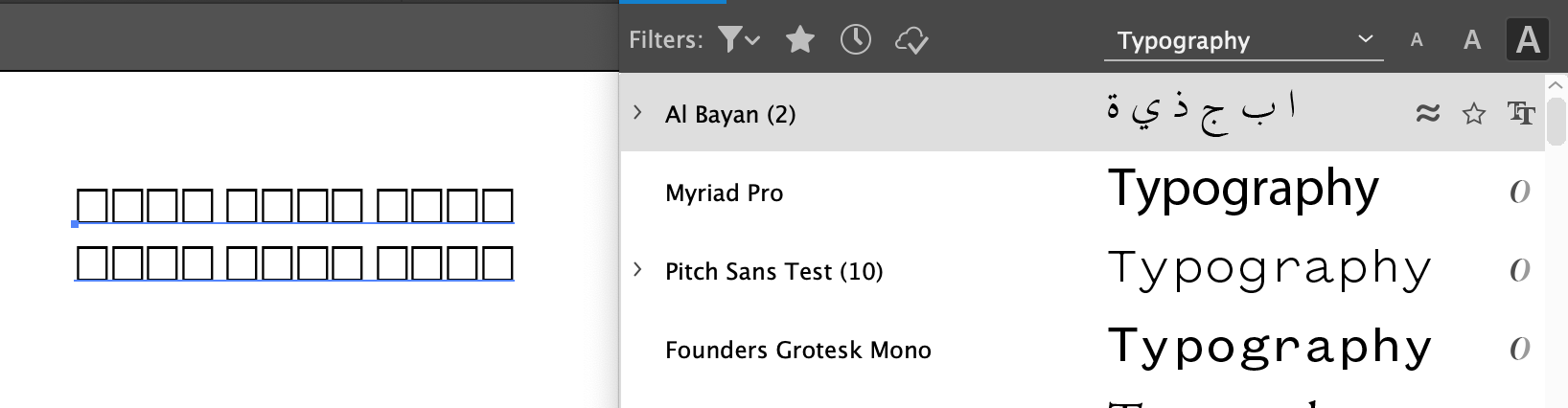
They show eather a square glyth or regular western alphabet. dus anybody know what happend? or know how to fix this?

thanks

1.8K
Translate
Report
Community guidelines
Be kind and respectful, give credit to the original source of content, and search for duplicates before posting. Learn more
community guidelines
Adobe
Adobe Employee ,
Jun 10, 2019 Jun 10, 2019

Hi,

Which Adobe applications are you using?

Translate
Report
Community guidelines
Be kind and respectful, give credit to the original source of content, and search for duplicates before posting. Learn more
community guidelines
New Here ,
Jun 12, 2019 Jun 12, 2019

Hi, It happens on Illustrato and Photoshop.

Translate
Report
Community guidelines
Be kind and respectful, give credit to the original source of content, and search for duplicates before posting. Learn more
community guidelines
Adobe Employee ,
Jun 12, 2019 Jun 12, 2019

Hi,

If you are on Windows OS please check the language and font packs are correctly installed. See Compose text Asian languages

Translate
Report
Community guidelines
Be kind and respectful, give credit to the original source of content, and search for duplicates before posting. Learn more
community guidelines
New Here ,
Jun 12, 2019 Jun 12, 2019

thank you but im not I,m on the latest Mojave 10.14.

Translate
Report
Community guidelines
Be kind and respectful, give credit to the original source of content, and search for duplicates before posting. Learn more
community guidelines
Adobe Employee ,
Jun 12, 2019 Jun 12, 2019

Thanks,

In your mac System Preferences>Language & Region do you have the required languages and keyboard preferences set?

If they have been set correctly then:

  • Do you have the same problem in any other applications or only Photoshop and Illustrator?
  • Are these Adobe fonts that you are using? It might be useful to see a screen shot of the fonts panel.
  • If they are fonts attached to your ID you might want to check that you are still logged in with the same Adobe ID or try signing in again.
Translate
Report
Community guidelines
Be kind and respectful, give credit to the original source of content, and search for duplicates before posting. Learn more
community guidelines
New Here ,
Jun 12, 2019 Jun 12, 2019

Hi thank you.

the thing is i have done notning. thy just stopetapearing properly.

I will try to un instal and install again and sewhat happends.

But the wierd thing is that it is the same in both psd an ai. havent looed in indesign or other application yet.

im swedish so my keybord i set on swedish. the language on the adobe cc apps is engelish. im makeing a art for an asian klient.

and have som text i want to write in asian text. have done it befor. But now i cant.
Screenshot 2019-06-12 at 12.31.01.pngScreenshot 2019-06-12 at 12.31.43.png

Translate
Report
Community guidelines
Be kind and respectful, give credit to the original source of content, and search for duplicates before posting. Learn more
community guidelines
Adobe Employee ,
Jun 12, 2019 Jun 12, 2019

Thanks,

I found that I had to add the required language and keyboard support in the Mac OS Preferences, then I needed to select the language from the top bar of the Finder.

Translate
Report
Community guidelines
Be kind and respectful, give credit to the original source of content, and search for duplicates before posting. Learn more
community guidelines
New Here ,
Jun 12, 2019 Jun 12, 2019

it doesn't work unfortunately, and i don t understanfwhy i would need to do like that when i have nerver dun it like that before

Ii have even uninstalled and reinstalled the apps but the problem presist.

How come this is happening?!

Translate
Report
Community guidelines
Be kind and respectful, give credit to the original source of content, and search for duplicates before posting. Learn more
community guidelines
Adobe Employee ,
Jun 12, 2019 Jun 12, 2019

OK, I'll also add this thread to the Photoshop forums as I think you will get a wider response there.

You can also open a case with support via Contact Customer Care

Discussion moved from Enterprise & Teams to Photoshop

Translate
Report
Community guidelines
Be kind and respectful, give credit to the original source of content, and search for duplicates before posting. Learn more
community guidelines
New Here ,
Jun 12, 2019 Jun 12, 2019
LATEST

Thank you for you effoert.

Translate
Report
Community guidelines
Be kind and respectful, give credit to the original source of content, and search for duplicates before posting. Learn more
community guidelines