

Pillowpants 77
Participant
November 11, 2021
Answered

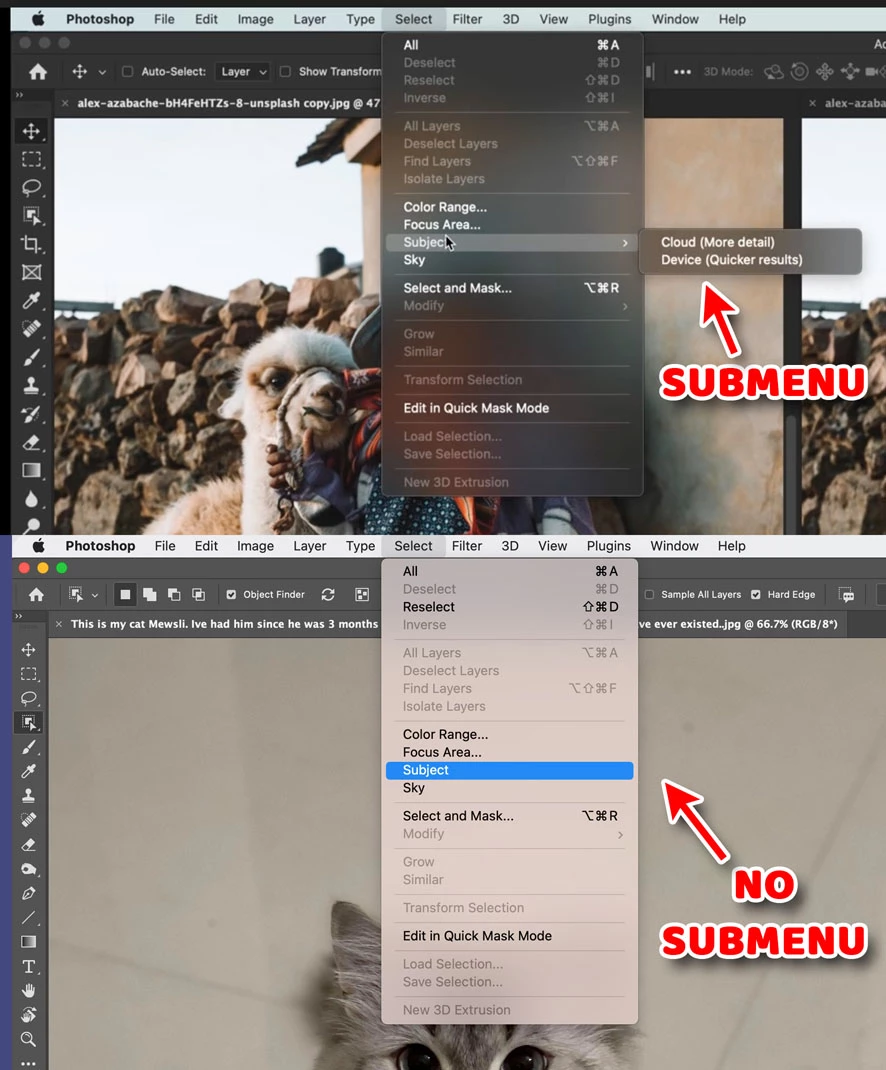
My "Select Subject" is missing the Cloud/Device option

  • November 11, 2021
  • 1 reply
  • 804 views

This YouTube video (https://www.youtube.com/watch?v=Z4kKbfA5R9c)

... shows MENU < Select < Subject having a submenu for Cloud vs Device.

Does anyone know why this is missing in my Photoshop, and how I can get it to appear?

THANK YOU!

Photoshop 2022, version 23.0.0.

macOS 11.6 Big Sur


This topic has been closed for replies.
Correct answer Pete.Green

Thanks for the report @Pillowpants 77 !


This cloud feature is available only in the Photoshop beta today, you can read more about the feature and provide feedback on the results to the product team here: https://community.adobe.com/t5/photoshop-beta-discussions/select-subject-cloud-processing-in-photoshop-beta/td-p/12511967


You can find and install the Photoshop beta in the Creative Cloud desktop app in the Beta apps section. Look for Photoshop (Beta). 

Hopefully this helps clear up the confusions, let me know if you have any trouble.

Regards,

Pete

1 reply

Pete.Green
Community Manager
Pete.GreenCommunity ManagerCorrect answer
November 11, 2021

Thanks for the report @Pillowpants 77 !


This cloud feature is available only in the Photoshop beta today, you can read more about the feature and provide feedback on the results to the product team here: https://community.adobe.com/t5/photoshop-beta-discussions/select-subject-cloud-processing-in-photoshop-beta/td-p/12511967


You can find and install the Photoshop beta in the Creative Cloud desktop app in the Beta apps section. Look for Photoshop (Beta). 

Hopefully this helps clear up the confusions, let me know if you have any trouble.

Regards,

Pete

Pillowpants 77
Participant
November 11, 2021

Ah, that makes perfect sense!

Thank you, Pete.Green!

🙂