var imagePath = "";
var dir = Folder(imagePath);
selectAIfile = dir.openDlg("Select .ai File" , "Select:*.ai");
if ( selectAIfile == null ) {                                   // User canceled
        alert("Selection Canceled");
        }
else {
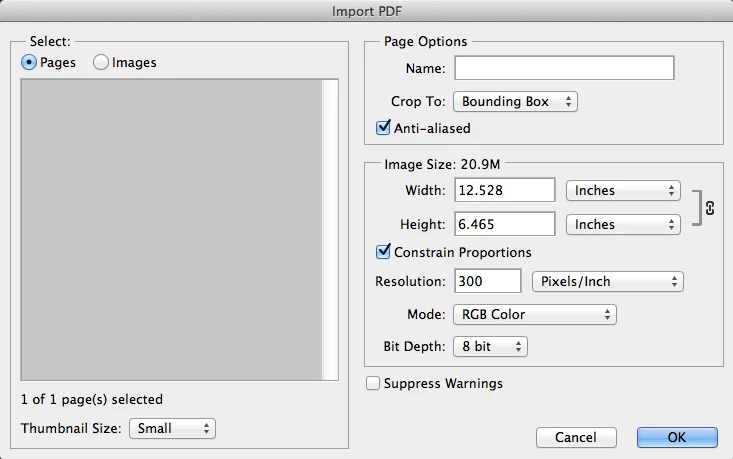
  //you noted the Photohop UI Open UI would open an IMPORT PDF dialog when you try ti open and .ai file
  //that script did no open the Import PDF dialog but works and seems defauls to RGB mode, antialias etc
  //tad you need to set antialias off abd mode to  CMYK

  //open(File(selectAIfile));    // application Open opend like you stated.

  //So I recorded the UI open via Scriptlistener and included the code to turn off antialias and set CMYK
  //you stated much work however you often have to resort to Action Manager Code scripting.

  //The Photoshop Javascript Guide I saw had open option for some file type:
  //CameraRAWOpenOptions
  //DICOMOpenOptions
  //EPSOpenOptions
  //PDFOpenOptions
  //PhotoCDOpenOptions
  //RawFormatOpenOptions

  //I don't know javascript only hack at it PDFOpenOptions looked promising so I tried
  var opts = new PDFOpenOptions();
  opts.antiAlias = false;
  opts.mode =  OpenDocumentMode.CMYK;
  app.open(File(selectAIfile),opts);
        }
var imagePath = ""; // no defult path
var dir = Folder(imagePath); // Declare a folder object
var opts = new PDFOpenOptions(); // Declare PDFOpenOptions
opts.antiAlias = false; // Antialias Faulse
Still I prefer a separate select that allows cancel and let you work on option for file selected. Like this: Have a problem with size though. DPI resolution make a big change in size.
var orig_ruler_units = app.preferences.rulerUnits;
app.preferences.rulerUnits = Units.PIXELS; // Set the ruler units to PIXELS


var imagePath = "";
var dir = Folder(imagePath);
selectAIfile = dir.openDlg("Select .ai File" , "Select:*.ai");
if ( selectAIfile == null ) {                                   // User canceled
        alert("Selection Canceled");
        }
else {
  //open(File(selectAIfile));    // application Open opened like you stated.
  //you noted the Photohop UI Open UI would open an IMPORT PDF dialog when you try ti open and .ai file
  //that script did no open the Import PDF dialog but works and seems defauls to RGB mode, antialias etc
  //you need to set antialias off and mode to CMYK

  //I don't know javascript only hack at it PDFOpenOptions looked promising so I tried

        // Isolate File Name for document name strip moff the .ai
        var Name =  decodeURI(selectAIfile).replace(/\.[^\.]+$/, '');   // strip the extension off
        var imagePath = "";
        while (Name.indexOf("/") != -1 ) {                              // Strip Path
                imagePath= imagePath + Name.substr(0, Name.indexOf("/") + 1);   // get path
                Name = Name.substr(Name.indexOf("/") + 1 ,);
                }

  var opts = new PDFOpenOptions();
  opts.antiAlias = false; // No AnitAlias
  opts.bitsPerChannel = BitsPerChannelType.EIGHT // 8BIT or BitsPerChannelType.SIXTEEN;
  //opts.constrainProportions = true; // Keep original Aspect Ratio
  opts.cropPage = CropToType.BOUNDINGBOX; // don't know if it matters with .ai file ARTBOX BLEEDBOX BOUNDINGBOX CROPBOX MEDIABOX TRIMBOX
  //opts.height =  "6000 pixels"; // set height and with the same let constrain take care of this
  opts.mode  = OpenDocumentMode.CMYK; // Set mode to CMYK GRAYSCALE LAB RGB
  opts.name  =  Name; // document name
  //opts.page  = ; // true/false Don't know if page is valid for .ai file seem to be a switch Pane number and image number PDF
  opts.resolution = 300; // I work at 300DPI the number here make a big difference in document size opened.
  opts.suppressWarnings  = true; // Not warnings
  //opts.typename = ; // Read Only can not be set
  //opts.usePageNumber = ; // Don't know if page/image number is valid for .ai file
  //opts.width = "6000 pixels";   // make width sane as height does not seem to work in cc

  // there is a note "DEPRECATED for Adobe Photoshop CC." for constrainProportions, height and width ...................

  app.open(File(selectAIfile),opts);
        }
app.preferences.rulerUnits = orig_ruler_units; // Reset units to original settings

 AdChoices