

Pattie-F
Legend
August 31, 2021
Question

New features on the Community
  • August 31, 2021
  • 6 replies
  • 2555 views


Community feature updates

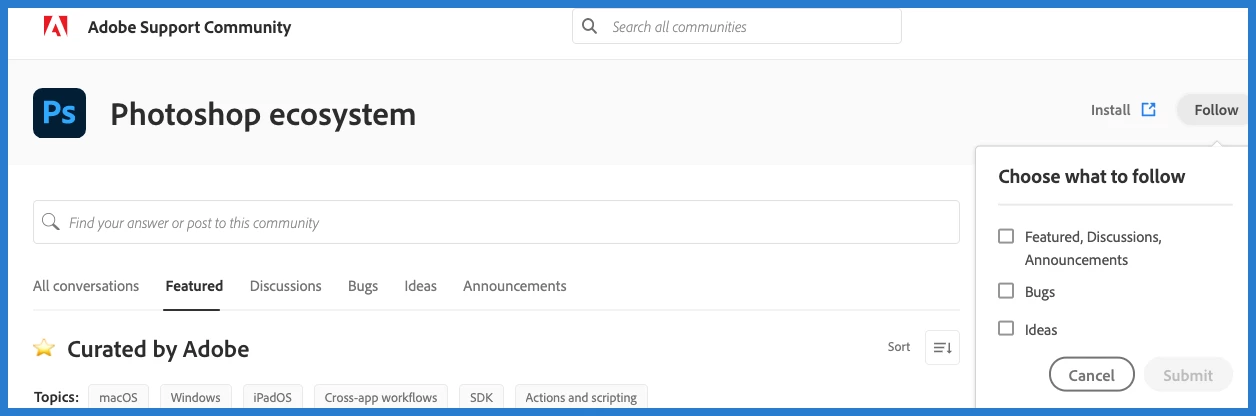
You may have noticed that the landing page of the Photoshop community looks a little different now.

We added several new features that we think you will like.


Here are some things you can do on the Photoshop community now:

  • Designate your topic as a discussion, bug, or idea when you create a post
  • Label your post from a consolidated list of topics: macOS, Windows, iPadOS, Cross-app workflows, SDK, Actions and scripting
  •  Search in a selected topic,  such as discussions or featured
  •  Search for answers with a dropdown of suggested posts and a shortcut to create a post within one click
  •  Filter posts by label across all content types
  •  Preview the latest announcements and featured posts
  •  Add votes to existing bugs and ideas
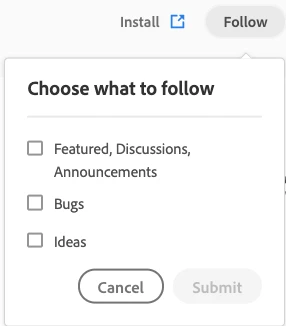
  •  Subscribe to updates for the conversation type you want to follow 


Click on the type of conversation to filter the results:

Click on one or more labels to filter conversations by topic:

 

Click  "Follow" in the top right of the screen and choose which conversation types you want to follow:  


This topic has been closed for replies.

6 replies

Community Expert
September 1, 2021

I should also mention that you cannot expand the reply field. There is a little triangle icon in the bottom right corner and the mouse pointer changes, but you cannot expand the reply field. It's an annoying bug I have been living with since the forum was ported over to the new system.

Kukurykus
Legend
September 2, 2021

What you mean by non-expandable reply field, where's that bottom right corner triangle icon?

Ged_Traynor
Community Expert
Community Expert
September 2, 2021

I assume @Rick Gerard is referring to this, I've never had any issues expanding the reply dialog

PECourtejoie
Community Expert
Community Expert
September 1, 2021

That said, I noticed that there is no URL visible when I hover the blue/grey message buttons here...


AND I can join an empty thread when I click on the join this conversation link at the bottom. (tested on the suggestions forum)

Kukurykus
Legend
September 1, 2021

Yestarday when I clicked a link in E-Mail notification to this conversation it opened non-existing forum thread. On the second time when I clicked the link it worked. Later, after about an hour after getting the notification to another reply on same topic it happened again, to be resolved when attempting to open the page on the second time.

PECourtejoie
Community Expert
Community Expert
September 1, 2021

And now, I am not able to answer on the bugs posted. I'm brought to the end of the thread, as if I had clicked on the go to the last reply button... even if the message button gives me a different url than the "go to last" one.

(for instance: https://community.adobe.com/t5/photoshop-ecosystem-bugs/error-in-photoshop-canva/idi-p/12355927#comment-on-this )

Pete.Green
Community Manager
September 1, 2021

Do you have a reply button if you goto the top Pierre (I seem to 😕😕 )?

c.pfaffenbichler
Community Expert
Community Expert
September 1, 2021

It seems I cannot »like« replies under »Bugs« and »Ideas« – was that a deliberate decision? 

Ged_Traynor
Community Expert
Community Expert
September 1, 2021

@c.pfaffenbichler 

I was going to post the same, also no spell check by default you have to click on the expand toolbar button

PECourtejoie
Community Expert
Community Expert
September 1, 2021

When trying to edit one of my threads, I did not get the "desktop" tag available, hence the cross apps workflow I had to add: https://community.adobe.com/t5/photoshop-ecosystem-ideas/photoshop-new-layer-style-cast-shadow/idi-p/12250254


Also, it might be useful to get the ability to change a thread to a Bug report or Feature Request.

jane-e
Community Expert
Community Expert
September 1, 2021


We've lost the ability to filter to unanswered threads.


~ Jane


Kukurykus
Legend
September 1, 2021

Isn't it equivalent to last item of Filter called No Replies?

Kukurykus
Legend
August 31, 2021

Actions and scripting lablel is excluded from Bugs and Ideas conversation types, should it be like it?


There is already one Actions and scripting bug found but can't be marked with this label as the type of coversation doesn't have it as opposed to all others (All conversations, Featured, Disscusions, Annoucements).


I found another Actions bug, but in this situation I postponded to post it until the above will be clarified.


Ps. all other lables exist also for Ideas and Bugs (beside mentioned ones).

Pete.Green
Community Manager
August 31, 2021

Thanks for letting us know @Kukurykus , I'll get Actions and Scripting added to bugs and ideas ASAP. Back here shortly.


Kukurykus
Legend
September 2, 2021

Another side-effect change making forum unfriendly for users after consolidation.


So far we had problem with blocks containing codes. In opposed to Jive platform, here on Khoros the scrpting lines are wrapped to next line when they are too long. It's something that allegedly can't be changed. As from beginning of September all codes are one font size too big. They're unreadable and have to be sized down (by Ctrl-) when I analyze them. Together with earlier problem they became now very bad to catch at one glance, as the whole, as the lines of codes are wrapped even earlier than previously (because of bigger font).


May you look at Admin panel to see if there is option to change the size back, so one down?


Just open one thread (or more if needed) on Actions and scripting page to see it yourself...