Copiar vínculo al Portapapeles
Copiado
Everytime I try to do anything on photoshop 2018 - these annoying little pop ups appear and get in the way of me seeing my full photo or document
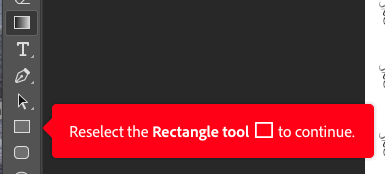
and then when I DO click the rectangle tool even if that's not the tool I needed or have been trying to use another blue pop up saying a new layer has been created shows up.
How do I get these to stop appearing because I am about to lose my mind.

Hi gracer3200511
Sorry that you're getting the tool-tip pop ups in Photoshop. Please refer the steps below to disable them in app preferences:
Copiar vínculo al Portapapeles
Copiado
Hi gracer3200511
Sorry that you're getting the tool-tip pop ups in Photoshop. Please refer the steps below to disable them in app preferences:
![]() |
Let us know if that helps.
Thanks,
Akash
Copiar vínculo al Portapapeles
Copiado
thank you!
Copiar vínculo al Portapapeles
Copiado
Thank you SO MUCH, it's been so annoying.
Sasha
Copiar vínculo al Portapapeles
Copiado
It doesnt work for me. Do I need to restart the app?
Copiar vínculo al Portapapeles
Copiado
It doesnt work for me. Do I need to restart the app?
By @mareille29445036elf6
You answered a question from five years ago. Are you also using PS 2018? If not, give us your version and your OS.
Jane
Copiar vínculo al Portapapeles
Copiado
I am using an IMAC w/ Apple M3 with Ventura 13.6.3, but I can't bypass the "Suggestions"
Copiar vínculo al Portapapeles
Copiado
Today I got an annoying popup about changing perspective when I opened Photoshop. I pressed the "not now button" or whatever it said, and it would go away. I have had tool tips off for ages. I was forced to click through this to use Photoshop. Is Adobe trying to send all of the experienced users to "I hate Adobe"???
Encuentra más inspiración, eventos y recursos en la nueva comunidad de Adobe
Explorar ahora
