
Participating Frequently
February 27, 2023
Answered

One custom Keyboard shortcut has stopped working. Changed to "Image Size" dialog

  • February 27, 2023
  • 2 replies
  • 3044 views

Just updated to 24.2.0 but don't know if that is the cause. A long time Keyboard Shortcut (F11) should give me "Full Screen Mode With Menu Bar". Suddenly it has started opening the Image Size dialog box. I tried resetting in Edit > Keyboard Shortcuts with no change. All my other custom Keyboard Shortcuts are working. I tried replacing with a saved Preference file with no difference. The keyboard shortcut appears properly set in preferences. I saved a summary of my keyboard shortcuts and the .htm file shows F11 as Full Screen Mode With Menu Bar.


Any idea where I can fix this?
This topic has been closed for replies.
Correct answer Jeff Arola

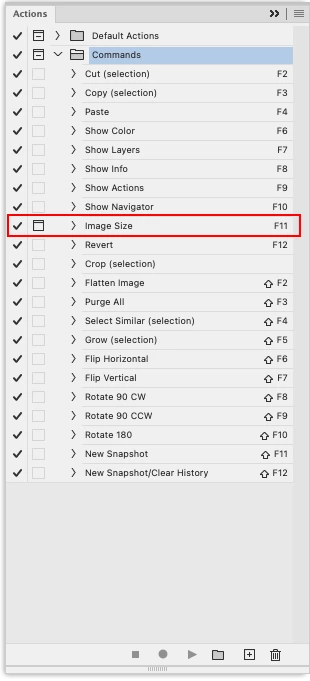
Look at your Actions panel and see if you have the Commands set loaded.

That has the Image Size shortcut set as F11 which will supersede the assigned

keyboard shortcuts from Edit>Keyboard Shortcuts.

You can safely Delete the Commands set from the Actions panel.


2 replies

Jeff Arola
Community Expert
Jeff ArolaCommunity ExpertCorrect answer
Community Expert
February 27, 2023

Look at your Actions panel and see if you have the Commands set loaded.

That has the Image Size shortcut set as F11 which will supersede the assigned

keyboard shortcuts from Edit>Keyboard Shortcuts.

You can safely Delete the Commands set from the Actions panel.


Ric CohnAuthor
Participating Frequently
February 28, 2023

Jeff, bingo! THANK YOU! I never even heard of the Commands action set. Any idea how it got loaded? Maybe by default in the last update?

Ric CohnAuthor
Participating Frequently
February 27, 2023

Update: I have discovered more lost keyboard shortcuts. Only some are still working properly.

Kevin Stohlmeyer
Community Expert
Community Expert
February 27, 2023
Ric CohnAuthor
Participating Frequently
February 27, 2023

Kevin, thanks for the suggestion. However, some of my Function Key shortcuts are working and those that are not are triggering Photoshop not the OS. I do have Function Keys in Preferences set to "Use as standard function keys".  Also, I just realized I still have PS 2022 and when I opened it the keyboard shortcuts are working!