Hi there. I found/created a fast workaround that works perfectly for me and probably for everyone else.
I used the actions-panel to solve this problem, because there is an underestimated backdoor:
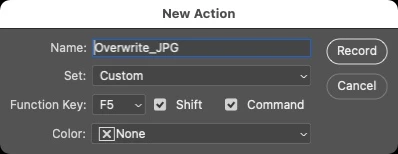
The moment you create a new action (BEFORE you start recording it), you can set a keyboard-shortcut for the action.
So what ever you will record will be "launched" by simply using the given shortcut.
I recorded the following:
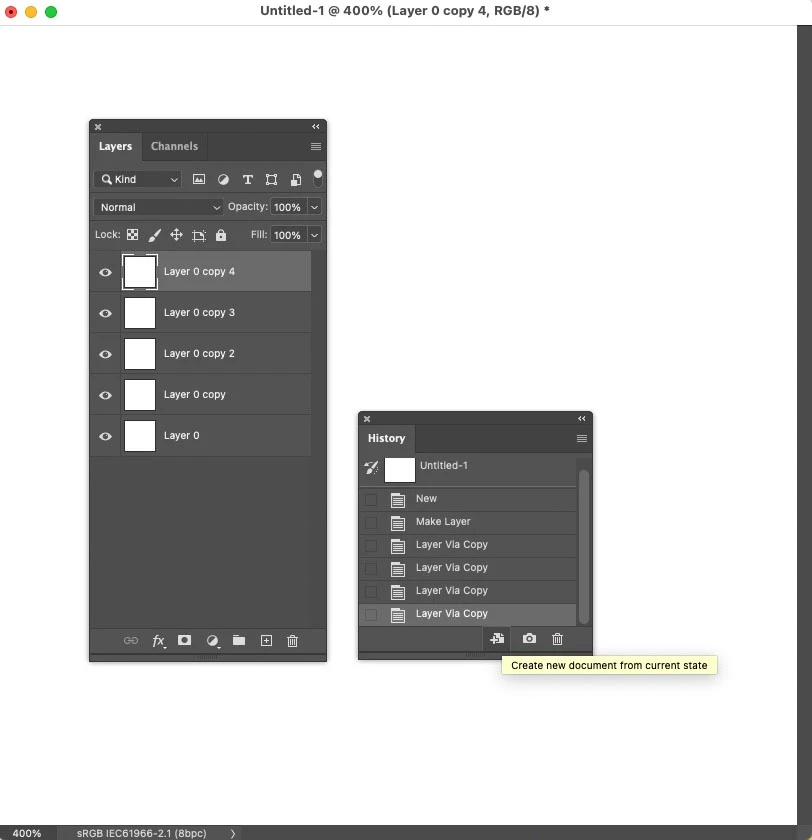
• "create new document from current state" in the history panel
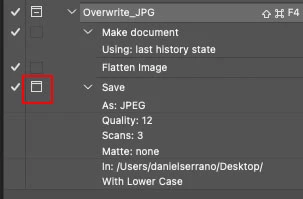
• then: Layer-> Flatten Image (most important step, as only flattend images will overwrite existing JPGs)
• then: File->Save-As (all JPG options you are chosing are not important)
• stop recording the action.
• in the recorded action click on the folder icon next to the SAVE action. This ensures that the save-as-window will pop up where you can just click on the JPG you want to overwrite and define the quality.
And as it's a flattend file, it will overwrite the existing JPG.
I was used to press CMD-SHIFT-S for saving as JPG (but it didn't overwrite).
Now its CMD-SHIFT-F5 that saves and overwrites the JPGs.
I will use this as long as Adobe doesn't fix the problem.
Hope it helps you too.

 AdChoices