
January 8, 2020
Answered

P: Document window resize

  • January 8, 2020
  • 30 replies
  • 9393 views

Since the release of photoshop cc 2018 (photoshop ver 19.0) thru the
current photoshop 2020 (photoshop version 21.0.2) on both windows and mac, although it's most apparent on the mac side when the Application Frame is turned Off, when using floating document windows with the option to Open as Tabs enabled, the document windows resizes depending on the size
(pixel dimensions) of the next document being opened.This also happens i with vertical documents versus horizontal documents and windows with small documents will be sized up if a larger document is opened.

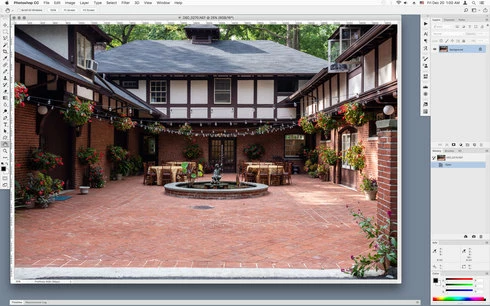
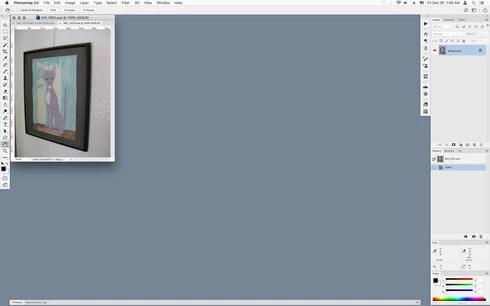
In other words, for example, if you have a larger document of say 8000 px x 4000 px open and you open a much smaller document of say 640 px x 480 px, the document window will resize down to the small file just opened as shown in the screenshots below.


Large document open that fills much of the screen when opened


Document window resizes when much smaller documents is opened


This did not occur on photoshop versions cs4 thru photoshop cc 2017. which would keep the window size of the original opened document.
Is this a deliberate change?

This topic has been closed for replies.
Correct answer Mohit Goyal

Hi all,


We're happy to announce the MAX 2021 release of Photoshop 23.0. This update includes the fix for this issue. To see the list of all fixed issues, click here


To update Photoshop to 23.0, click "Update" in the Creative Cloud desktop app next to Photoshop. More detailed instructions for updating


Let us know if the update resolves the problem for those affected and share your feedback with us.


Thanks,

Mohit

30 replies

Jeff Arola
Community Expert
Community Expert
June 25, 2021

Still not fixed in photoshop 22.4.2

Jeff Arola
Community Expert
Community Expert
February 9, 2021

Still not fixed in photoshop 2021 (photoshop version 22.2)

Inspiring
February 5, 2021

@JeffreyTranberry A status update would be nice if you have one. It's been a year since engineering was notified by you, so I would assume some progress has been made?

Inspiring
December 16, 2020

When I use the new feature "Sky Replacement" in Photoshop 2021, a panel opens up and I can work on it. But when I try to save, the buttons at the bottom are off screen and I have to move my Windows taskbar to the side, to enable me just to click a button! There isn't any way to resize this menu! Very frustrating! How do I resize the whole box so that I can easily work with it? (See screen print...)

Jeff Arola
Community Expert
Community Expert
November 16, 2020

Still not fixed in photoshop 2021 (photoshop version 22).

If anybody at adobe uses Floating Document Windows they know how utterly frustrating this issue is.

Inspiring
November 2, 2020

Same here. Any news on this?

Inspiring
July 13, 2020
I'm wondering, too.  It's still a daily annoyance.
Inspiring
July 12, 2020
Any response from engineering?
Inspiring
February 5, 2020


A very annoying and time wasting bug that appeared in version 15 (maybe 16?) and is still there in version 21.  This occurs with the Application Frame off.  In previous version one would set the size of the documents window and it would stay, but now any document opened will resize the documents window to fit the size of the new document.  I'm constantly having to drag the window to the right size as a result.  Defeats the purpose of the Window > Arrange feature.
Legend
January 8, 2020
Thanks. I've asked engineering to take a look.