Participant
May 13, 2021
Answered

P: Photoshop 22.4 - Missing Save as formats from the menu

  • May 13, 2021
  • 107 replies
  • 450665 views

I just updated to the mentioned version and the formats dropdown list only shows 3 formats: Photoshop (*.PSD;*.PDD;*.PSDT), *.PSB and TIFF (*.TIF;*.TIFF).
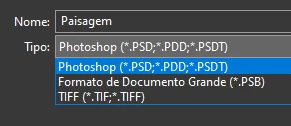

This topic has been closed for replies.
Correct answer Noelle Shamroukh

Hi All,


We appreciate your feedback on the recent “Save a Copy” change. To address your concerns, we have created two new options in Photoshop 22.4.2 that will enable both revert to the legacy “Save As” workflow and/or omit the addended “copy” when saving as a copy. These options can be found in the File Saving Options section under Preferences > File Handling.


To quickly summarize, you will now have the option to revert to the legacy “Save As” workflow (from before recent changes) on both macOS and Windows. Enabling this preference will make both the “Save As” and “Save a Copy” commands operate within the same “Save As” dialog box with all its previous options, including the “as a copy” checkbox. The only difference between the two commands will be whether the checkbox is automatically selected (when using “Save a Copy”). Additionally, you will now have the option to not append copy when saving a copy. On macOS, if you enable the legacy workflow, the option to not append copy will be forced ‘on’ due to the changes made in macOS 10.15 and later. On Windows, the two preferences will operate independently.


We hope these preference options will help ease some of the frustration you encountered using the new “Save a Copy” command.


Please note, reverting to the legacy “Save As” workflow may increase the risk of overwriting file names and lost work. A new dialog will pop-up warning customers of this risk when selecting either one of these preferences on macOS. On Windows, the legacy “Save As” operates in a manner that is safe, so a warning dialog will only pop-up when selecting the option to not append copy to the file name.


For more details on each preference and how they differ by platform, please see our updated new feature summary page.


Thanks, 

Noelle

107 replies

hcbphoto
Known Participant
May 24, 2021

Hello,

I'm running Windows 10 and using the latest version of Photoshop CC.

Up until today, I was able to save my work in JPG format.

Today, the option doesn't appear.

 I did Flatten Image. 
My mode is set to sRGB.  
 I save my files by File > Save As.  When I click to change the format, the JPG as well as other options no longer appear.

I have worked with this image before and never had a problem.

Any thoughts as to why this is happening?

Thank you in advance for all the help. 

D Fosse
Community Expert
Community Expert
May 24, 2021

"Save As" now lists only the formats that support all the current properties of the file. All other formats, with limited support, are now moved to "Save A Copy".

This was changed because the Save As jpeg function had already been broken for over a year on the Mac side, since Catalina. Saving over a jpeg resulted in a separate file with "-copy" appended. The programming function to strip "-copy" from the filename had been removed by Apple, and there was no way for Adobe to work around it. The Save As jpeg function was rendered useless by this and had to be totally rewritten.


This is not a bug, but a deliberate policy from Apple.

To be clear, saving a layered/16 bit file as jpeg saved out a copy the whole time. That is important to understand! The jpeg format does not allow 16 bit depth, layers, transparency or alpha channels. That fact was just hidden by Photoshop, by removing "-copy", but with Catalina it was no longer possible and "-copy" would always appear regardless.

Everybody should keep in mind that the direct save to jpeg, from 16 bit/layered files, was introduced in Photoshop CS5 in 2010. Prior to that, it was not possible at all to save directly to jpeg. First you had to remove every property in the file that wasn't supported in the jpeg specification. Only then could you save it. So this is nothing new - but this time you can use Save A Copy.

Platform parity has always been important in Photoshop, for the sake of actions, plugins, tutorials and so on. So it had to be changed in the Windows version as well, even though it never was a problem on Windows. But it may well be in the future, if Microsoft adopts the same policy.

hcbphoto
Known Participant
May 24, 2021

Thank you for the reply. I will give it a try.

Thank you,
Helen Bradshaw

Helen Bradshaw Photography LLC
[Email removed by moderator]

Participant
May 24, 2021

Only shows PS, TIF or Large Document Format. I tried with the latest version, then installed the previous version, but still doesn't work.

davescm
Community Expert
Community Expert
May 24, 2021

Since v22.4, if your file contains items that are not supported in your required format (e.g. layers or 16 bits/channel or hidden pixels etc) then the file format is moved from Save As (Shift+Ctrl+S) to the Save a Copy command (Alt+Ctrl+S). This was driven by changes in the Mac Operating System, although the changes are applied to both Mac and Windows versions to keep them aligned.

In the case of PDF it will appear in Save a Copy as the dialogues that follow the choice of the PDF format, allow elements of the file to be lost (e.g. downsampling or not keeping editability). So it is in the Save a Copy category.


https://helpx.adobe.com/photoshop/using/whats-new.html


Dave

Participant
May 24, 2021

I tried save as copy as well, it wrote system error.

Participant
May 24, 2021

I have been using the same psd template file for the last year for graphics on my website. After the update 22.4.1 it won't let me save anything other than photoshop, large document, or tiff. This is completely screwing up my workflow. I've tried everything. Even creating any new file won't let me save other than previously mentioned. I've even tried uninstalling and reinstalling photoshop. What gives Adobe!? 

Known Participant
May 24, 2021

You now have to click Save a Copy which is next to the menu item for the file formats. You can save it as jpg that way, but now you have to remove "copy" from the name. WHo's idea is this. It made things harder and added extra steps.

D Fosse
Community Expert
Community Expert
May 24, 2021
quote

WHo's idea is this.


By @Fred-Clayjar


Apple. They removed the API that made it possible to strip "-copy" from the filename. With the new API, Photoshop has to present the full filename before entering the dialog. And that name has to contain "-copy" because it is a copy. If it wasn't a copy, your original would be overwritten and lost.


https://www.apple.com/feedback/macos.html 


To be clear, this is a deliberate security policy from Apple. It is not a bug.

Participant
May 24, 2021

I originally thought my photoshop was having issues too. Then I discovered this was intentional. I hate this update becasue it causes me extra steps. I now have to go in a remove the word "copy" from my file name. It's already on my last nerve! I wish there was a setting that I could turn that automatic word "copy" addition off. I never use the word copy in my file names. The file name extension (ex: jpg or png ) is enough to remind me it is a copy of the original psd file. I no longer trust updates are for the better. 

Participant
May 23, 2021

Hi why can't I save as any project or image as a jpeg or PNG? I know I can save for web legacy but it's a slower process, I just want to hit save as and save out as a JPEG why are all the options I usually have gone? 


D Fosse
Community Expert
Community Expert
May 23, 2021

"Save As" now lists only the formats that support all the current properties of the file. All other formats, with limited support, are now moved to "Save A Copy".

This was changed because the Save As jpeg function had already been broken for over a year on the Mac side, since Catalina. Saving over a jpeg resulted in a separate file with "-copy" appended. The programming function to strip "-copy" from the filename had been removed by Apple, and there was no way for Adobe to work around it. The Save As jpeg function was rendered useless by this and had to be totally rewritten.


This is not a bug, but a deliberate policy from Apple.

To be clear, saving a layered/16 bit file as jpeg saved out a copy the whole time. That is important to understand! The jpeg format does not allow 16 bit depth, layers, transparency or alpha channels. That fact was just hidden by Photoshop, by removing "-copy", but with Catalina it was no longer possible and "-copy" would always appear regardless.

Everybody should keep in mind that the direct save to jpeg, from 16 bit/layered files, was introduced in Photoshop CS5 in 2010. Prior to that, it was not possible at all to save directly to jpeg. First you had to remove every property in the file that wasn't supported in the jpeg specification. Only then could you save it. So this is nothing new - but this time you can use Save A Copy.

Platform parity has always been important in Photoshop, for the sake of actions, plugins, tutorials and so on. So it had to be changed in the Windows version as well, even though it never was a problem on Windows. But it may well be in the future, if Microsoft adopts the same policy.

Participant
May 23, 2021

Gosh would be nice to have an explanation warning dialog for average users who don't read the update notes in detail when you hit save as, not just flying blind.....

davescm
Community Expert
Community Expert
May 22, 2021

No lies - no sugar coating - so keep it civil or risk a ban. I am not cheerleading anything.


Plain and simply put (again) -  On the current Mac OS Adobe can no longer choose to add or remove "Copy" once the Save APIs have been called in the operating system. They have to do it before or not at all. Not at all risks overwriting files so they chose to do it before using Save a Copy. 


Dave


davescm
Community Expert
Community Expert
May 22, 2021

'Can you point out The part(s) that's not true in my statements'

Yes

Apple's operating system was inadequate or faulty

No, Apple made a deliberate and considered change to their operating system. This change meant that adding or removing 'copy' during the Save process to prevent overwrites was no longer an option. Adobe had to change the process that used those APIs in Photoshop.

'Adobe's solution was to remove the feature completely

Again no, when saving to a format such as jpeg which did not support the file content, since CS5 the saving as a copy happened in the background during the Save process as did the decision to add copy or not.  That decision is now up front and, as the filename now has to be decided before using the saving routines of the operating system, the sensible decision was made to add it to all in the Save a Copy menu. If not, it would have to be removed from all and risk overwrites. This was not about removing a feature, it is just up front and visible now.


Dave

JJMack
Community Expert
Community Expert
May 22, 2021

As has been explained to you several times now, in various threads where your posts are now bordering on spamming, Adobe like any other developer has to work with the APIs of the operating system.  When those changed on the Mac, leading to many complaints in the forums, Adobe had to change Photoshop and sensibly introduced Save a Copy. Introducing the change on Windows was technically optional but keeping parity between the platform versions is important for users who use both platforms and for developers of plug ins and actions. 

Dave


If Adobe had to change Photoshop because of Apple API changes that is well and good.   However, how they changed it is not well and is not good. They did not have to change Photoshop the way they did. Many  Mac and PC use  do not want the change.  On a PC it is very easy for a user to do what they want overwrite their jpeg. I posted an action that used before  Save As could save a jpeg from a layer document.  The action simply Flatted the document  then has a interactive Save As step that default to Jpeg.  You can select where to save it.  I defaulted it to C:\Temp.  You can set the file name the default is the current document name.  You can also change the file type from Jpeg.  However, the document has been flattened so if you change to  file type there will only be one layer with no transparency.  After the Save As the action recovers the document layers.   This works on windows for saving Jpeg from layer documents.  The Action may not work  on a new Mac because of Apple system change .  Apple may create a new copy version.  F2 is for saving Jpeg use Save As UI to save your layered file.

JJMack
davescm
Community Expert
Community Expert
May 22, 2021

As has been explained to you several times now, in various threads where your posts are now bordering on spamming, Adobe like any other developer has to work with the APIs of the operating system.  When those changed on the Mac, leading to many complaints in the forums, Adobe had to change Photoshop and sensibly introduced Save a Copy. Introducing the change on Windows was technically optional but keeping parity between the platform versions is important for users who use both platforms and for developers of plug ins and actions. 

Dave


Participant
May 21, 2021

If everyone sends the link to this thread to Apple I’m sure they’ll get right on it. Or not.

Here’s the magic link again: https://www.apple.com/feedback/macos.html