Participant
May 13, 2021
Answered

P: Photoshop 22.4 - Missing Save as formats from the menu

  • May 13, 2021
  • 107 replies
  • 448800 views

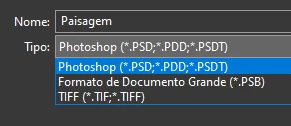
I just updated to the mentioned version and the formats dropdown list only shows 3 formats: Photoshop (*.PSD;*.PDD;*.PSDT), *.PSB and TIFF (*.TIF;*.TIFF).

This topic has been closed for replies.
Correct answer Noelle Shamroukh

Hi All,


We appreciate your feedback on the recent “Save a Copy” change. To address your concerns, we have created two new options in Photoshop 22.4.2 that will enable both revert to the legacy “Save As” workflow and/or omit the addended “copy” when saving as a copy. These options can be found in the File Saving Options section under Preferences > File Handling.


To quickly summarize, you will now have the option to revert to the legacy “Save As” workflow (from before recent changes) on both macOS and Windows. Enabling this preference will make both the “Save As” and “Save a Copy” commands operate within the same “Save As” dialog box with all its previous options, including the “as a copy” checkbox. The only difference between the two commands will be whether the checkbox is automatically selected (when using “Save a Copy”). Additionally, you will now have the option to not append copy when saving a copy. On macOS, if you enable the legacy workflow, the option to not append copy will be forced ‘on’ due to the changes made in macOS 10.15 and later. On Windows, the two preferences will operate independently.


We hope these preference options will help ease some of the frustration you encountered using the new “Save a Copy” command.


Please note, reverting to the legacy “Save As” workflow may increase the risk of overwriting file names and lost work. A new dialog will pop-up warning customers of this risk when selecting either one of these preferences on macOS. On Windows, the legacy “Save As” operates in a manner that is safe, so a warning dialog will only pop-up when selecting the option to not append copy to the file name.


For more details on each preference and how they differ by platform, please see our updated new feature summary page.


Thanks, 

Noelle

107 replies

Inspiring
May 26, 2021

Seriously. This is annoying (profanity removed by moderator).

Participant
May 26, 2021

Hey i recently rest my computer and have Mojave 10.14.6 installed and the latest versions of photoshop.  This is my fir time experience the save as copy function which is terrible btw.   But right now whenever i save files like PSD or tiff files it is not saving them with extensions.  Anyone kow how to fix this?

MKSA
Known Participant
May 27, 2021

I had the same on Mojave, not sure if it's a Mojave or Photoshop bug on Mojave, what happens is that the entire filename including the extension is highlighted so when you start typing your new filename during the save you end uo saving a file without the extension, most annoying. I went back to High Sierra and CC 2019 and have zero problems anymore especially I still have the old save functions.

Participant
May 26, 2021

The new "Save a Copy" option does nothing to improve work flow - if anything it has slowed down and the automatic "copy" added to the name of the file is not needed.


The keyboard short keys do NOT work for this new prompt.  This was an unneccessary "improvement" It needs to be removed and returned to the previous options. Or at the absolutely least the "copy" should be cleared from the file name and the keyboard shortcut keys need too work.

davescm
Community Expert
Community Expert
May 26, 2021

The keyboard shortcuts work here. Have you reassigned those shortcuts in your operating system to other functions?


Dave

Aabh
Known Participant
May 26, 2021

I swear that Adobe is trying to ween me off of using Photoshop...

So, I routinely build artwork, then save it as a .psd and then save it AGAIN as a .jpg for social media and the like.

But with this last update I noticed that my Save As dialogue box only gives me .psd and .TIFF options... in order to actually save as a Jpg I have to click the "Save As" box (in the SAVE AS Dialog box, by the way) and save it as *Copy.jpg and rename it BACK to *.jpg

I have zero idea why saving as a Jpg has been removed from the Save As dialog and now needs to be saved under the Save As/Save As dialog box (with the insistance to add "Copy" to it)...

What is going on?  There have been a number of changes made recently which ADDED steps to everyones workflow...  I almost had to ditch Photoshop after the Line tool changed...  Did Adobe fire their UX/UI folks? 


Can we please bring back the original Save As dialogue box?  Or at least bring back the various file formats?   I know it doesn't sound like a lot, but those two extra steps are enough to drive me crazy when I have to make jpgs out of 263 master psds.  This makes it a week long job instead of a 2 day job.

nikunj.m
Community Manager
Community Manager
May 26, 2021

Hi,


We're sorry about the trouble due to the changes to the Save As workflow after the recent Photoshop update. Please check out the conversation about this change here: https://feedback.photoshop.com/conversations/photoshop/photoshop-224-save-as-formats-have-disappeared/60a034d6e077c600a462ba23


You can also leave a comment on the thread with your feedback & suggestions about this change.


Regards,

Nikunj

JJMack
Community Expert
Community Expert
May 25, 2021

It best for Window users to keep using  version of Photoshop prior to version 22.4 when you switch to a Mac you should update to 22.4+

JJMack
Participant
May 25, 2021

I have similiar issues. Old psd files have been reduced to 3 'save as' options. In new projects save as still gives me all the old ones. Those from 'save as' are now in 'save copy as'.(didnt 'save as' work exactly like 'save a copy as'?) Why do we need 3 options to save a file, four even with export. Come on adobe...photoshop runs slower and slower and this are the things you decide to fix?

jane-e
Community Expert
Community Expert
May 25, 2021

Hi @Dominik5E88 

When the OS changes, it requires the software to adapt. See the expanation here:

https://petapixel.com/2021/05/18/photoshops-save-as-function-has-changed-on-mac-heres-why/

~ Jane

Participant
May 25, 2021

Not running on mac. But thanks for a reply.
~ Dom

Participating Frequently
May 25, 2021

One of the most infuriating workflow changes today, please revert ASAP

I am sick and tired of navigating to the location twice because evrytime i forget to "save a copy" i have to click the "save a copy" and the navigating starts all over again. 

TheDigitalDog
Inspiring
May 25, 2021

@PimVibe wrote:

One of the most infuriating workflow changes today, please revert ASAP


This is a user to user support forum. Your request is in a vacuum.
To provide feedback and suggestions about what you desire from Adobe, you should go here and comment after selecting the appropriate product:

https://feedback.photoshop.com/categories/products/5f5f2090785c1f1e6cc40864

Author “Color Management for Photographers" & "Photoshop CC Color Management/pluralsight"
Participant
May 25, 2021

I have the same problem conserning the save as features which have been removed. The list of options which included the most used by me included the jpeg option now we have to save a copy which changes the file name to add "copy"  not sure why this was changed. 

D Fosse
Community Expert
Community Expert
May 25, 2021

It has been explained about 50 times in this thread alone.


Yes, I get that some people such as na59973511 don't like it, but that doesn't change the facts.


Apple removed the API that allowed Photoshop to strip "-copy" from the filename. Photoshop is now required to write out the base filename before entering the Save dialog. That name has to contain "-copy" because it is a copy. If it wasn't a copy, your original would be overwritten and lost.


This is a deliberate security policy from Apple. It is not incompetence as some seem to think.


It was changed in Windows too because a whole ecosystem of actions, scripts, tutorials and so on relies on Photoshop working the same way on both platforms. Again, some might not like this, but it would make things difficult for all of us if we had two segregated Photoshop communities. People make a living from this.


It could well be that Microsoft will eventually adopt the same policy. That's probably what the engineers figured too.


Community Expert
May 25, 2021

We all understand what happened - we just don't like how Adobe implemented the change. 

Saying that it is a copy and your original would be overwritten is not true - you can same filename and different extensions - that's fine. So you I can have Image 1.psd Image 1.jpeg Image 1.pdf all in the same folder.

We understand the function of a Save a Copy - but you're not saving a copy - a COPY is identical to the one you're working on. Identical. And unfortunately, saving a copy actually can destroy layers, so it's not a copy is it?


Nobody is saying it's incompetence - but it was a bad decision. And these things happen - I think Adobe are well aware now that this change and how they implemented it isn't working for many users - so they really need to think about it and have a middle ground. Or they will lose customers. 


I will not be updating Photoshop for this reason - I can't - there's 100s of people using actions/scripts etc that rely on the previous workflow. 


The only thing I agree with is 'people make a living from this' - which is why so many people are frustrated with this huge UI change that has angst a lot of people.


We get it - we know why it happened - we don't like it - and Adobe needs to take that on board. Or customers will drift to other software.

TheDigitalDog
Inspiring
May 24, 2021

@na59973511 wrote

Everyone should go to the Adobe suggestion form and recommend they un-break the Save As > JPG/PNG feature
https://feedback.photoshop.com/photoshop_family 


Yes, although it will do no good. But at least some figured out where to go to get Adobe's attention instead of a User to User forum.

Author “Color Management for Photographers" & "Photoshop CC Color Management/pluralsight"
TheDigitalDog
Inspiring
May 24, 2021

@na59973511 wrote:

To be fair, the way the "Adobe Experts" on this forum act makes it not very clear that its a User to User forum. It's not hard to imagine people thinking you're all part of Adobe support.


It isn't clear to some to actually read the release notes or inspect what they are blindly updating before doing so either. 

Anyway there's this:

https://community.adobe.com/t5/using-the-community/bd-p/Using-the-Community?page=1&sort=latest_replies&filter=all

Author “Color Management for Photographers" & "Photoshop CC Color Management/pluralsight"
Participant
May 24, 2021

This stupid "save a copy" change now requires that I use two different dialogue boxes every time I want to save a file. Instead of all the save options in one place I have to go to a second place to save a jpeg version of the file I'm working on! Why would I want to have to go to two differnet menus just to save a jpeg version of the file? Saving a jpeg doesn't affect the psd file. And why would you force me to add the word "copy" to the end of every file which I have to go in and manually delete?!

Can I downgrade so I dont have to deal with this? It is literally the worst change since I stared using photoshop 15 years ago and it has slowed down my ENTIRE work process.

jane-e
Community Expert
Community Expert
May 24, 2021

@adampicz wrote:

Can I downgrade so I dont have to deal with this?


Yes, you can downgrade to a previous version using the CC app.

https://helpx.adobe.com/download-install/using/install-previous-version.html

~ Jane