Participant
May 13, 2021
Answered

P: Photoshop 22.4 - Missing Save as formats from the menu

  • May 13, 2021
  • 107 replies
  • 448800 views

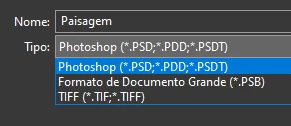
I just updated to the mentioned version and the formats dropdown list only shows 3 formats: Photoshop (*.PSD;*.PDD;*.PSDT), *.PSB and TIFF (*.TIF;*.TIFF).

This topic has been closed for replies.
Correct answer Noelle Shamroukh

Hi All,


We appreciate your feedback on the recent “Save a Copy” change. To address your concerns, we have created two new options in Photoshop 22.4.2 that will enable both revert to the legacy “Save As” workflow and/or omit the addended “copy” when saving as a copy. These options can be found in the File Saving Options section under Preferences > File Handling.


To quickly summarize, you will now have the option to revert to the legacy “Save As” workflow (from before recent changes) on both macOS and Windows. Enabling this preference will make both the “Save As” and “Save a Copy” commands operate within the same “Save As” dialog box with all its previous options, including the “as a copy” checkbox. The only difference between the two commands will be whether the checkbox is automatically selected (when using “Save a Copy”). Additionally, you will now have the option to not append copy when saving a copy. On macOS, if you enable the legacy workflow, the option to not append copy will be forced ‘on’ due to the changes made in macOS 10.15 and later. On Windows, the two preferences will operate independently.


We hope these preference options will help ease some of the frustration you encountered using the new “Save a Copy” command.


Please note, reverting to the legacy “Save As” workflow may increase the risk of overwriting file names and lost work. A new dialog will pop-up warning customers of this risk when selecting either one of these preferences on macOS. On Windows, the legacy “Save As” operates in a manner that is safe, so a warning dialog will only pop-up when selecting the option to not append copy to the file name.


For more details on each preference and how they differ by platform, please see our updated new feature summary page.


Thanks, 

Noelle

107 replies

jmyler
Participating Frequently
May 28, 2021

'Can you point out The part(s) that's not true in my statements'

Yes

Apple's operating system was inadequate or faulty

No, Apple made a deliberate and considered change to their operating system. This change meant that adding or removing 'copy' during the Save process to prevent overwrites was no longer an option. Adobe had to change the process that used those APIs in Photoshop.

'Adobe's solution was to remove the feature completely

Again no, when saving to a format such as jpeg which did not support the file content, since CS5 the saving as a copy happened in the background during the Save process as did the decision to add copy or not.  That decision is now up front and, as the filename now has to be decided before using the saving routines of the operating system, the sensible decision was made to add it to all in the Save a Copy menu. If not, it would have to be removed from all and risk overwrites. This was not about removing a feature, it is just up front and visible now.


Dave


Thinking about this problem, I'm surprised they didn't solve it with the Apple method, which is pop up a dialog to confirm the user is okay with an overwrite to a file. Or better yet a checkbox saying "user is well aware of the program making a change to the filename, and will accept all concequences of change from now on" 

Legend
May 28, 2021

There is a simple workaround. :sigh:


Open a file.

Action panel->New Action

Action panel->Insert menu item

Select File->Save a Copy menu item

Click Action panel->Stop recording button

Assign a function key to that action


This brings back the old functionality- you can save directly in any format, without "copy" appended to the filename.

Lisa Shea Author
Inspiring
May 28, 2021

For some reason, this sequence isn't working for me.


Action panel - > New Action == this works, I start up a new action

Action panel -> Insert menu item == it gives an error: Menu Item: None Selected. To record a menu item, select a menu item using the mouse.


If I then try to select File - Save a Copy it is greyed out.

Legend
May 28, 2021

Do the entire sequence of steps exactly as laid out above.

ltrecord1
Participant
May 28, 2021

Quit wasting time! Get back to work! Just gripe once and move on. You are not getting paid if you are trolling here.

corentin.harbelot
Participant
May 28, 2021

Please please please, remove this stupid save as fonction!!!!

Time wasted, no one wants this!!!


corentin.harbelot
Participant
May 28, 2021

I work with windows 10, so there must be no technical issue to brind it back, no?

davescm
Community Expert
Community Expert
May 28, 2021

"I work with windows 10, so there must be no technical issue to brind it back, no?"


Technical - no you are correct today - assuming that microsoft do not introduce the same security steps into the Windows OS. But, that would mean Photoshop menu items doing different things on the two platforms. So for the many users that use both platforms, organisations that use both, developers of actions and plug ins, diverging the platforms would create a new set of problems.


Dave

Participating Frequently
May 28, 2021

That is most stupid change they ever made.

Especially that save a copy is not pointing the same directory you have original file and adding stupid copy word to a tile name. That's clearly showing they don't have another problems (they think).

D Fosse
Community Expert
Community Expert
May 28, 2021

I get that you and a million others don't like this, but the fact is that there is precisely zero Adobe can do about it.


Apple removed the API that allowed Photoshop to strip "-copy" from the filename. With the new API, Photoshop is forced to finalize the filename before entering the Save dialog. That filename has to contain "-copy", because it is a copy. If it wasn't a copy, your original file would have to be overwritten as a flat 8 bit file to satisfy the jpeg specification.

And no, Photoshop can't just write its own filename into the dialog. You can do that, an application cannot, not on its own. This is basic IT security.

This is not a bug or mistake, but a deliberate security policy from Apple. Microsoft may well follow suit and adopt the same policy.


As for the save path, I suspect it's the same issue - Photoshop now has a lot less control over what's in the Save dialog. I'll need to look a little more into this.

Community Expert
May 28, 2021

It's not a copy - a copy is an identical file - not a flattened file or any changes to the structure. 


I don't care what the reasons are behind it - but Adobe's solution is not working for lots of people. 

Hopefully, they will listen to the feedback. 


Dearborn2020
Participating Frequently
May 27, 2021

Hey Y'all,


If any of you use AutoHotKey (AHK) I've written a script that seems to be pretty effective at removing the 'copy' text along with the space that comes before it.  It script clears your clipboard and it might not work all the time, but it's working well for me in the few tests I've done today.  I tried to make it save the clipboard, but I kept getting bugs with it where it would paste whatever you previously copied (as upposed to the corrected file name).  If it doesn't work for you, you might need to add some pauses in there to slow down the script and give your computer the chance to catch up.


~^+s::GoSub, RemoveCopy

RemoveCopy:
WinWait, Save a Copy
; ClipSaved := Clipboard
; Sleep, 500
Clipboard :=
Send, ^c
ClipWait, 1
FileDelete, %A_ScriptDir%\Script File Appends\BadFileName.txt
FileAppend, %Clipboard%, %A_ScriptDir%\Script File Appends\BadFileName.txt
FileRead, GoodFileName, %A_ScriptDir%\Script File Appends\BadFileName.txt
Clipboard := StrReplace(GoodFileName, " copy.",".",0)
; Sleep, 1000
Send, ^v
; Clipboard := Clipsaved
Return

TheDigitalDog
Inspiring
May 27, 2021

@Dearborn2020 wrote:

Hey Y'all,


If any of you use AutoHotKey (AHK) I've written a script that seems to be pretty effective at removing the 'copy' text along with the space that comes before it. 


And on Mac, one can use a Folder Action or (better, more poweful but not free) Hazel. 

https://www.noodlesoft.com

Author “Color Management for Photographers" & "Photoshop CC Color Management/pluralsight"
Inspiring
May 27, 2021

The "Save a Copy" is the stupidest work flow thing ever. It is absolute [removed by moderator]! I use templates which have long names that I then Save As X.jpg. This just adds additional effort and is STUPID [removed by moderator].


Dearborn2020
Participating Frequently
May 27, 2021

Could you at least make a it a setting to NOT put the word "COPY" in the file name?  Please Please Please?

D Fosse
Community Expert
Community Expert
May 27, 2021

That's the core of the whole issue. Apple removed the API that allowed Photoshop to strip "-copy" from the filename. With the new API, Photoshop is forced to finalize the filename before entering the Save dialog. That filename has to contain "-copy", because it is a copy. If it wasn't a copy, your original file would have to be overwritten as a flat 8 bit file to satisfy the jpeg specification.

And no, Photoshop can't just write its own filename into the dialog. You can do that, an application cannot, not on its own. This is basic IT security.

This is not a bug or mistake, but a deliberate security policy from Apple. Microsoft may well follow suit and adopt the same policy.

Participant
May 21, 2021

Exactly


Adobe,


What is the point of "Save As" now? Why would I want to "Save As" a PSD that is already a PSD? Also, Why are you adding "copy" to the filename. Why did you remove the file formats from "Save As"? This might be the dumbest update I have ever seen. 

Participant
May 27, 2021

The only options Photoshop 24.4.1 gives me when I go to "save as" is .tiff, .psd file and Large Document Format. I have been saving .jpg's and .psd fand .pdf iles as .jpgs for years from "save as". It used to give me about seven or eight options. This started happening right after I tried saving a file as large document format, the first time I ever tried to do that. I am on Mac OS 11.2.1. This started happening before the last update. 

Known Participant
May 27, 2021

With the latest update, I am no longer able to save psds as jpgs, pngs, etc. I have to flatten the file and then save as a jpg. This is a pretty easy way to accidentally save a layered psd as a flat file when you go to close it out and it asks if you want to save any changes. Please fix this adobe, it's really annoying.

jane-e
Community Expert
Community Expert
May 27, 2021

Hi @Leanne5CE2 

You can still save a jpegs, etc.,  from a PSD.
When Apple made changes to the API and broke the Save As in Photoshop, the developers were left to find a fix that was cross-platform. Choose File > Save a Copy (not Save As) to be able to save a JPEG. 


Details here:

https://helpx.adobe.com/photoshop/using/whats-new/2021-4.html#save-a-copy 

https://petapixel.com/2021/05/18/photoshops-save-as-function-has-changed-on-mac-heres-why/ 


~ Jane