Rafaelis
Inspiring
December 13, 2024
Question

P: (Win) PS 2025 v26 Error: Could not complete the Liquify command due to a disk error

  • December 13, 2024
  • 8 replies
  • 6389 views

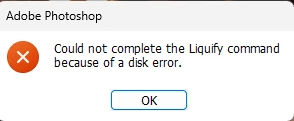
Whenever I try using liquify, I eventually get this error. Works fine at first until it doesn't. I tried reinstalling Photoshop to no avail. 


8 replies

Participant
September 4, 2025

Liquify not working

bleach027
Participating Frequently
February 4, 2025

I am using Photoshop version 26.3 on Windows 11 with an Intel Iris Xe Graphics card, and I cannot get Liquify to work. After choosing the command, a dialog appears saying "Could not complete the Liquify command because of a disk error." I've tried everything: turning off my GPU, updating the drivers, installing a different GPU, reinstalling Photoshop while resetting preferences, increasing my RAM allocation, making sure my scratch disks have enough space, deleting temporary Photoshop files, and nothing is working. I have done online searches and see a lot of posts about this, but haven't found a fix. Does anybody have any ideas about what's going on? I'm about to downgrade my version of Photoshop, but it's just so frustrating that I have to keep resetting up my workspace over the past two days that I have been messing around with this. I don't even know what version to go back to, as I have seen this problem appearing from as far back as 2021 in this forum.

Participant
February 4, 2025

Hi I am using Photoshp 26.3.0 and the "Liquify" functionality doesn't work: "Could not complete the Liquify command because of a disk error". I would like to know how I can fix it. The sytem info is attached.

Many thanks in advance.

David G.


Participating Frequently
January 24, 2025

Hallo, ich habe ein Problem mit dem Verflüssigen. Es konnte nicht Angewendet werden wegen Volumenfehler. Bei Photoshop habe das Arbeitsvolumen schon über der Empfehlung hinaus erhöht. Speicher geht auf eine Festplatte wo das Programm nicht installiert ist. Photoshop habe ich die neuste Version auch schon deinstalliert und neu drauf gemacht. Zum Rechner, Es ist ein win11 Rechner, Prozessor ein ryzen9 5000 Serie. Abeitsspeicher ist 64GB DDR4. Auf der Festplatte ist noch über 600 GB frei. Grafikkarte ist eine Geforce gtx 3070. Wran kann es noch liegen, es nervt einfach.

BrettN
Community Manager
Community Manager
January 24, 2025

Google translate: 

Hello, I have a problem with liquefaction. It could not be applied due to volume error. With Photoshop, the work volume has already increased beyond the recommendation. Memory goes to a hard drive where the program is not installed. I have already uninstalled the latest version of Photoshop and reinstalled it. Regarding the computer, it is a win11 computer, processor a ryzen9 5000 series. Memory is 64GB DDR4. There is still over 600 GB free on the hard drive. Graphics card is a Geforce gtx 3070. It can still be a problem, it's just annoying


Reply:

Sounds like you are encountering a Scratch Disk error when running Liquify. The first thing you'll want to do is check out the documentation here: https://helpx.adobe.com/photoshop/kb/troubleshoot-scratch-disk-is-full.html 

Participating Frequently
January 24, 2025

Hello. I have a bug, after i update Camera RAW, in Photoshop after i call camera raw i have error.
Even after i delete all my Photoshop version on my PC and after re-install photoshop i still have this error.

What i can fix this?

D Fosse
Community Expert
Community Expert
January 24, 2025

This is a bug that they're looking into now. It's not just Camera Raw, other modules also fail to respond. See this thread (read/scroll to the end):

https://community.adobe.com/t5/photoshop-ecosystem-discussions/liquify-bug/m-p/15106236#M849152 

c.pfaffenbichler
Community Expert
Community Expert
January 10, 2025

What have you done for all-purpose trouble-shooting so far?
Restoring Preferences after making sure all customized presets like Actions, Patterns, Brushes etc. have been saved might be a good starting point:
https://helpx.adobe.com/photoshop/using/preferences.html
https://helpx.adobe.com/photoshop/kb/basic-trouble-shooting-steps.html
https://helpx.adobe.com/photoshop/kb/troubleshoot-gpu-graphics-card.html

Sameer K
Community Manager
Community Manager
January 8, 2025

Hey, @Rafaelis. Welcome to the Photoshop Community. I'll need more info to help you figure this out. Press share the system info from Photoshop Help > System info > Copy & paste into a text document > upload & attach here. 


Do you notice a specific set of steps, or pattern before the error appears? Try updating the GPU drivers on this machine. Head here to troubleshoot the GPU: https://adobe.ly/4gHvoOz


Thanks!
Sameer K

(Type '@' and type my name to mention me when you reply)

Participating Frequently
January 16, 2025

Liquify error :    "Could not complete this command  due to a disk error"


None of the solutions / protocols offered in any forum or the Adobe support staff have resolved this Liquify error.  The only reports or proper Liquify tool function have been from those users that have rolled back Photoshop to Vesrion 22 or prior.


 NOTE: Many users have  had the system confirm that their GPU IS compatable .


These solutions have NOT corrected the problem: 

- updating Photoshop ;

-updating or clean instal of  GPU studio drivers;

- deleting and recreating preference file ;

- clearing cache ;

- updating camera raw or creative cloud app ;

- adding significant size  separate scratch disk dedicated to Photoshop;

- allowing up to 80% RAM usage for Photoshop of 64Gb;

- turning off GPU in preferences, closing Photoshop, restarting Photoshop then re-enabling GPU;

- ensuring that ( Windows) uses the GPU for high performance when using Photoshop ;

- turning off Open CL is equivalent to turning of the GPU - workflows are affected as well as Photoshop's peformance;

- increasing cache levels whilst improving Photoshop performance marginally, DOES NOT solve the disk error;

- disabling integrated graphics cards ;


The Liquify error appears inconsistently when attempting to use the tool since Photoshop 22.1.  Despite various methods to attempt to recreate the disk error in the current version of Photoshop (2025),  the error can occur with the first attempted use of Liquify; or after several successful uses of that tool; or  after the creation of merging layers.  On the occurance of the disk error, i have opened Windows Task Manager. The system shows that the allocated scratch disk is less than 1% used, memory use by Photoshop varies between 60 - 69%.


No solution attempted / offered by Adobe support corrects this Photoshop behaviour.


D Fosse
Community Expert
Community Expert
January 16, 2025

@stant36740534 

@Sameer K 


@Mohit Goyal 


I think someone should pass this up the chain to engineering.


There's a bigger picture here, and it's not about module functionality; it's about bringing up the dialog on screen.


  • I first noticed a while ago that the Camera Raw filter would occasionally and unpredictably stop working, with a "program error" message.
  • Then I noticed that Save For Web failed at the same time, without any message (yes, legacy, I know).
  • Then recently I noticed that some of the filters (modal or otherwise), including Liquify, also stopped working, with different error messages or none at all.


Red flag #1: They all still work perfectly in actions, where the UI doesn't come up.


Red flag #2: When one stops working, they all stop working, at precisely the same time.


Red flag#3: This all started with version 25.11. Earlier versions, 25.9 and back, do not exhibit any of these symptoms.


Relaunch the application, and they all start working properly again, and do so for an unpredictable period. Then at some point they fail.

Participating Frequently
December 13, 2024

I'm getting this errors on two absolutely different PCs with Win11:

Notebook (PSh v26.3.1 beta):
MECHREVO KuangshiG16 Series GM6AR0Q
12th Gen Intel(R) Core(TM) i7-12650H 2.30 GHz,  16GB RAM DDR5
NVIDIA GeForce RTX 4060 Laptop GPU (8 GB video RAM)

PC (PSh v25.12 stable):
Intel Core i7-14700F s-1700 5.4GHz/33MB 

Asus PCI-E GeForce RTX3060 LHR 12GB DDR6 (DUAL-RTX3060-O12G-V2) 
64GB RAM

This error appears at least since may 2024 on different versions of PS. Sometimes switching off Hardware acceleration helps, sometimes not, but it is not normal to work without HW acc

Participating Frequently
February 4, 2025

Current ver on one of the several PCs (main PC used by my wife for work) with this problem is Adobe Photoshop Version: 26.3.0 20250122.r.156 bfca642 x64


Compatibility dialog:

Pass: DirectX available

Pass: DirectX feature level 12.2 available, feature level 12.0 required

Pass: Above required VRAM (12115 MB of 1500 MB required) GPU Detected: NVIDIA GeForce RTX 3060 (NVIDIA)

Remove tool prefs changed now, but wife will be back to work only tomorrow.

Scratch disk is used separate physical drive (not the disk or partition where windows is installed), it is used only as data disk and as a scratch, it is a pretty fast and new SKC3000S1024G. The same error occures on laptop with a single disk, as well as this error occured on the past PC (the whole PC was changed)
