

Rafaelis
Inspiring
December 13, 2024
Question

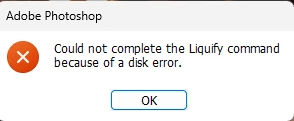
P: (Win) PS 2025 v26 Error: Could not complete the Liquify command due to a disk error

  • December 13, 2024
  • 8 replies
  • 6344 views

Whenever I try using liquify, I eventually get this error. Works fine at first until it doesn't. I tried reinstalling Photoshop to no avail. 


8 replies

Participant
September 4, 2025

Liquify not working

bleach027
Participating Frequently
February 4, 2025

I am using Photoshop version 26.3 on Windows 11 with an Intel Iris Xe Graphics card, and I cannot get Liquify to work. After choosing the command, a dialog appears saying "Could not complete the Liquify command because of a disk error." I've tried everything: turning off my GPU, updating the drivers, installing a different GPU, reinstalling Photoshop while resetting preferences, increasing my RAM allocation, making sure my scratch disks have enough space, deleting temporary Photoshop files, and nothing is working. I have done online searches and see a lot of posts about this, but haven't found a fix. Does anybody have any ideas about what's going on? I'm about to downgrade my version of Photoshop, but it's just so frustrating that I have to keep resetting up my workspace over the past two days that I have been messing around with this. I don't even know what version to go back to, as I have seen this problem appearing from as far back as 2021 in this forum.

Participant
February 4, 2025

Hi I am using Photoshp 26.3.0 and the "Liquify" functionality doesn't work: "Could not complete the Liquify command because of a disk error". I would like to know how I can fix it. The sytem info is attached.

Many thanks in advance.

David G.


Participating Frequently
January 24, 2025

Hallo, ich habe ein Problem mit dem Verflüssigen. Es konnte nicht Angewendet werden wegen Volumenfehler. Bei Photoshop habe das Arbeitsvolumen schon über der Empfehlung hinaus erhöht. Speicher geht auf eine Festplatte wo das Programm nicht installiert ist. Photoshop habe ich die neuste Version auch schon deinstalliert und neu drauf gemacht. Zum Rechner, Es ist ein win11 Rechner, Prozessor ein ryzen9 5000 Serie. Abeitsspeicher ist 64GB DDR4. Auf der Festplatte ist noch über 600 GB frei. Grafikkarte ist eine Geforce gtx 3070. Wran kann es noch liegen, es nervt einfach.

BrettN
Community Manager
Community Manager
January 24, 2025

Google translate: 

Hello, I have a problem with liquefaction. It could not be applied due to volume error. With Photoshop, the work volume has already increased beyond the recommendation. Memory goes to a hard drive where the program is not installed. I have already uninstalled the latest version of Photoshop and reinstalled it. Regarding the computer, it is a win11 computer, processor a ryzen9 5000 series. Memory is 64GB DDR4. There is still over 600 GB free on the hard drive. Graphics card is a Geforce gtx 3070. It can still be a problem, it's just annoying


Reply:

Sounds like you are encountering a Scratch Disk error when running Liquify. The first thing you'll want to do is check out the documentation here: https://helpx.adobe.com/photoshop/kb/troubleshoot-scratch-disk-is-full.html 

Participating Frequently
January 24, 2025

Hello. I have a bug, after i update Camera RAW, in Photoshop after i call camera raw i have error.
Even after i delete all my Photoshop version on my PC and after re-install photoshop i still have this error.

What i can fix this?

D Fosse
Community Expert
Community Expert
January 24, 2025

This is a bug that they're looking into now. It's not just Camera Raw, other modules also fail to respond. See this thread (read/scroll to the end):

https://community.adobe.com/t5/photoshop-ecosystem-discussions/liquify-bug/m-p/15106236#M849152 

c.pfaffenbichler
Community Expert
Community Expert
January 10, 2025

What have you done for all-purpose trouble-shooting so far?
Restoring Preferences after making sure all customized presets like Actions, Patterns, Brushes etc. have been saved might be a good starting point:
https://helpx.adobe.com/photoshop/using/preferences.html
https://helpx.adobe.com/photoshop/kb/basic-trouble-shooting-steps.html
https://helpx.adobe.com/photoshop/kb/troubleshoot-gpu-graphics-card.html

Sameer K
Community Manager
Community Manager
January 8, 2025

Hey, @Rafaelis. Welcome to the Photoshop Community. I'll need more info to help you figure this out. Press share the system info from Photoshop Help > System info > Copy & paste into a text document > upload & attach here. 


Do you notice a specific set of steps, or pattern before the error appears? Try updating the GPU drivers on this machine. Head here to troubleshoot the GPU: https://adobe.ly/4gHvoOz


Thanks!
Sameer K

(Type '@' and type my name to mention me when you reply)

Participating Frequently
January 16, 2025

Liquify error :    "Could not complete this command  due to a disk error"


None of the solutions / protocols offered in any forum or the Adobe support staff have resolved this Liquify error.  The only reports or proper Liquify tool function have been from those users that have rolled back Photoshop to Vesrion 22 or prior.


 NOTE: Many users have  had the system confirm that their GPU IS compatable .


These solutions have NOT corrected the problem: 

- updating Photoshop ;

-updating or clean instal of  GPU studio drivers;

- deleting and recreating preference file ;

- clearing cache ;

- updating camera raw or creative cloud app ;

- adding significant size  separate scratch disk dedicated to Photoshop;

- allowing up to 80% RAM usage for Photoshop of 64Gb;

- turning off GPU in preferences, closing Photoshop, restarting Photoshop then re-enabling GPU;

- ensuring that ( Windows) uses the GPU for high performance when using Photoshop ;

- turning off Open CL is equivalent to turning of the GPU - workflows are affected as well as Photoshop's peformance;

- increasing cache levels whilst improving Photoshop performance marginally, DOES NOT solve the disk error;

- disabling integrated graphics cards ;


The Liquify error appears inconsistently when attempting to use the tool since Photoshop 22.1.  Despite various methods to attempt to recreate the disk error in the current version of Photoshop (2025),  the error can occur with the first attempted use of Liquify; or after several successful uses of that tool; or  after the creation of merging layers.  On the occurance of the disk error, i have opened Windows Task Manager. The system shows that the allocated scratch disk is less than 1% used, memory use by Photoshop varies between 60 - 69%.


No solution attempted / offered by Adobe support corrects this Photoshop behaviour.


D Fosse
Community Expert
Community Expert
January 22, 2025

@D Fosse , when things go south, can you try checking the string that appears in the status bar next to 'GPU mode' at the bottom of the doc?


Will do, thanks!

Participating Frequently
December 13, 2024

I'm getting this errors on two absolutely different PCs with Win11:

Notebook (PSh v26.3.1 beta):
MECHREVO KuangshiG16 Series GM6AR0Q
12th Gen Intel(R) Core(TM) i7-12650H 2.30 GHz,  16GB RAM DDR5
NVIDIA GeForce RTX 4060 Laptop GPU (8 GB video RAM)

PC (PSh v25.12 stable):
Intel Core i7-14700F s-1700 5.4GHz/33MB 

Asus PCI-E GeForce RTX3060 LHR 12GB DDR6 (DUAL-RTX3060-O12G-V2) 
64GB RAM

This error appears at least since may 2024 on different versions of PS. Sometimes switching off Hardware acceleration helps, sometimes not, but it is not normal to work without HW acc

Participating Frequently
December 16, 2024

second computer (notebook)

Версия Adobe Photoshop: 26.3.0 20241208.m.2899 5af8791 x64
Количество запусков: 159
Операционная система: Windows 11 64-бит
Версия: 11 или больше 10.0.22631.4460
Архитектура системы: cемейство процессоров Intel: 6, модель: 10, пошаговая обработка: 3 с MMX, SSE для целых чисел, SSE для чисел с плавающей точкой, SSE2, SSE3, SSE4.1, SSE4.2, AVX, AVX2, AVX-VNNI, HybridCPU(6:4), HyperThreading
Счетчик физического процессора: 10
Счетчик логического процессора: 16
Частота процессора: 2688 МГц
Встроенная память: 16116 МБ
Свободная память: 10320 МБ
Память, доступная для программы Photoshop: 11869 МБ
Память, используемая программой Photoshop: 70 %
Обработчик сбоев: Adobe
DCX Version: 7.24.8
SAM SDK Version: 9.1.0.1-fio
ACP.local Status:
- SDK Version: 4.0.0.5
- Core Sync Status: Reachable and compatible
- Core Sync Running: 7.2.0.58
- Min Core Sync Required: 4.3.66.28
Версия SDK клиента с возможностью редактирования в реальном времени: 4.0.6
Adobe Firefly: чтобы просмотреть последнюю версию, воспользуйтесь любой функцией генеративного ИИ.
Версия OpenColorIO: 2.4.0
Версия библиотеки C2PA: adobe_c2pa/0.12.2 c2pa-rs/0.32.5
Версия NGL: 1.39.0.9
Информация о Sophia:
- Ps_Feature_Flag, Feature Flag URL (AEM) campaignID:91851 variationID:285010
Меловая доска: Отключено.
Создать документ «Доска»: Отключено.
D3D12Средство рендеринга деформации: Отключено.
Точное управление цветом для отображения HDR: Отключено.
Слои-псевдонимы: Отключено.
Highbeam: Включен.
Wintab Digitizer Services
Spec Version 1.4
Impl Version 1.39
Num Devices 0
Размер фрагмента изображения: 1024 Кб
Уровней кэш-памяти изображений: 4
Просмотр шрифта: Большой
Версия HarfBuzz: 7.3.0
TextEngine: универсальный текстовый редактор
======= GPU
Стабильный встроенный API: True
Стабильный API OpenCL: True
GPUDeny: 0
GPUForce: 0
useGPU: 1
useOpenCL: 1
isGPUCapable: 1
isGPUAllowed: 1
GPUName: NVIDIA GeForce RTX 4060 Laptop GPU
GPUVendor: NVIDIA
NVIDIA GeForce RTX 4060 Laptop GPU UNKNOWN, NVIDIA
Intel(R) UHD Graphics UNKNOWN, INTEL
IsNativeGPUCapable: 1
IsOpenCLGPUCapable: 1
HasSufficientRAM: 1
GPU accessible RAM: 7,957 MB
Required GPU accessible RAM: 1,500 MB
UseGraphicsProcessorChecked: 1
UseOpenCLChecked: 1
Windows remote desktop: 0
Windows available feature level: 12.2
Windows required feature level: 12.0
Windows has required feature level: 1
Экран: 1
Границы отображения: (0, 0) -> (2560, 1599,99)
Масштаб отображения: 1,5
Основной экран
Тип отображения: SDR
Профиль отображения: sRGB IEC61966-2.1
------- Sniffer output
[0 ms]
Launch GPUSnifferThread

[1 ms]
Start RunAllAPIs

[1 ms]
C:\Program Files\Adobe\Adobe Photoshop (Beta)\sniffer.exe -baseTimeMS=956242110 -comment=Photoshop Version: Adobe Photoshop 26.3.0 20241208.m.2899 5af8791 x64

[1 ms]
Start GetSnifferResult

[1149 ms]
Start sniffer 2024-12-16 21:38:26
# Photoshop Version: Adobe Photoshop 26.3.0 20241208.m.2899 5af8791 x64
C:\Program Files\Adobe\Adobe Photoshop (Beta)\sniffer.exe -baseTimeMS=956242110 -comment=Photoshop Version: Adobe Photoshop 26.3.0 20241208.m.2899 5af8791 x64

{75 ms}
Start platform native
# displays: 1
Display 0
Display: \\.\DISPLAY1
Main: TRUE
Built in: FALSE
Stereo: FALSE
Bounds: (0, 0) -> (2,560, 1,600)
Dimensions: (2,560 1,600)
Display scale: 1.5
Physical size: (0 0)
Pixel size: (0 0)
Dynamic range: (0 1)
Attached Device: (DeviceID name=NVIDIA GeForce RTX 4060 Laptop GPU index=0)

# devices: 2
Device 0
Name: NVIDIA GeForce RTX 4060 Laptop GPU
Preferred: TRUE
Power Envelope: UNKNOWN
Attachment: UNKNOWN
# attached displays: 1
\\.\DISPLAY1
GPU accessible RAM: 7,957 MB
VRAM: 7,957 MB
Dedicated System RAM: 0 MB
Shared System RAM: 8,449 MB
API version: 12.2 (12.2)
Device version: 12.0 (12.0)
Vendor name: NVIDIA
Driver date: 2024-09-26 000000.000000-000
Driver age: 3 months
Driver version: 32.0.15.6590
Supports UMA: UNSUPPORTED
D3D-ID: 10400

Device 1
Name: Intel(R) UHD Graphics
Preferred: FALSE
Power Envelope: UNKNOWN
Attachment: UNKNOWN
# attached displays: 0
GPU accessible RAM: 8,577 MB
VRAM: 128 MB
Dedicated System RAM: 0 MB
Shared System RAM: 8,449 MB
API version: 12.2 (12.2)
Device version: 12.0 (12.0)
Vendor name: INTEL
Driver date: 2024-01-18 000000.000000-000
Driver age: 11 months
Driver version: 31.0.101.5186
Supports UMA: SUPPORTED
D3D-ID: 18083
End platform native
{866 ms}

{866 ms}
Start platform OpenCL
# displays: 0

# devices: 2
Device 0
Name: NVIDIA GeForce RTX 4060 Laptop GPU
Preferred: TRUE
Power Envelope: DISCRETE
Attachment: UNKNOWN
# attached displays: 0
GPU accessible RAM: 8,585 MB
VRAM: 8,585 MB
Dedicated System RAM: 0 MB
Shared System RAM: 0 MB
API version: 3.0 (OpenCL 3.0 CUDA)
Device version: 3.0 (OpenCL 3.0 CUDA)
Vendor name: NVIDIA
Driver date: UNKNOWN
Driver age: UNKNOWN
Driver version: UNKNOWN
Bandwidth: 746 GB / s
Compute score: 6,205.32
Device name string: NVIDIA GeForce RTX 4060 Laptop GPU
Device vendor string: NVIDIA Corporation
Platform name string: NVIDIA CUDA
Platform vendor string: NVIDIA Corporation

Device 1
Name: Intel(R) UHD Graphics
Preferred: FALSE
Power Envelope: INTEGRATED
Attachment: UNKNOWN
# attached displays: 0
GPU accessible RAM: 7,470 MB
VRAM: 7,470 MB
Dedicated System RAM: 0 MB
Shared System RAM: 0 MB
API version: 3.0 (OpenCL 3.0 )
Device version: 3.0 (OpenCL 3.0 NEO )
Vendor name: INTEL
Driver date: UNKNOWN
Driver age: UNKNOWN
Driver version: UNKNOWN
Bandwidth: 48 GB / s
Compute score: 597.217
Device name string: Intel(R) UHD Graphics
Device vendor string: Intel(R) Corporation
Platform name string: Intel(R) OpenCL Graphics
Platform vendor string: Intel(R) Corporation
End platform OpenCL
{1113 ms}

Exit code kExitNormal
End sniffer 2024-12-16 21:38:27
[kStatusNormal, kExitNormal]

[1149 ms]
Finish RunAllAPIs

[1152 ms]
Finish GetSnifferResult

------- Sniffer output
======= GPU
Тип лицензии: Подписка
Серийный номер: 90970531720414207567
GUIDBucket:
Composite Core GPU (comp_core_gpu): off
Composite Core Threads (MultithreadedCompositing): on
Composite Core UI (CompositingDocumentTabUI): off
Composite Core Feature Prefs (CompCoreFeaturePrefs): off

Программная папка: C:\Program Files\Adobe\Adobe Photoshop (Beta)\
Путь для временных файлов: C:\Users\iluhi\AppData\Local\Temp\
Асинхронный ввод/вывод рабочей памяти Photoshop включен
Рабочие диски:
Загрузочный, 953,8Г, 314,0Г пусто
Папка обязательных подключаемых модулей: C:\Program Files\Adobe\Adobe Photoshop (Beta)\Required\Plug-ins\
Папка основных подключаемых модулей: C:\Program Files\Adobe\Adobe Photoshop (Beta)\Plug-ins\

Установленные компоненты:
ACE.dll ACE 2024/11/15-19:08:23 79.c61e7a2 79.c61e7a2
act_tracing.dll Copyright (c) 2021 Adobe. All Rights Reserved 1.0.58
AdobeLinguistic.dll Adobe Linguistic Library 1d87f11
AdobeOwl.dll Adobe Owl 5.5.0
AdobePDFL.dll PDFL 2024/11/15-19:08:23 79.bd975a7 79.bd975a7
AdobePIP.dll Adobe Product Improvement Program 8.2.0.16
AdobeSVGAGM.dll AdobeSVGAGM 79.6336193 79.6336193
AdobeXMP.dll Adobe XMP Core 2024/11/11-19:08:46 79.a1cd12f 79.a1cd12f
AdobeXMPFiles.dll Adobe XMP Files 2024/11/11-19:08:46 79.a1cd12f 79.a1cd12f
AdobeXMPScript.dll Adobe XMP Script 2024/11/11-19:08:46 79.a1cd12f 79.a1cd12f
AGM.dll AGM 2024/11/15-19:08:23 79.c61e7a2 79.c61e7a2
AID.dll AID DLL 1.0.0.58
AIDE.dll AIDE 2024/11/13-13:16:23 79.af94bee 79.af94bee
aifm.dll AIFM 1.0 23.68434
AILib.dll Adobe Illustrator 2024 29.0.0
aiport.dll AIPort 1.0 23.68434
ARE.dll ARE 2024/11/15-19:08:23 79.c61e7a2 79.c61e7a2
AXE8SharedExpat.dll AXE8SharedExpat 2024/05/17-16:39:40 79.c6ae425 79.c6ae425
AXEDOMCore.dll AXEDOMCore 2024/05/17-16:39:40 79.c6ae425 79.c6ae425
BIB.dll BIB 2024/11/15-19:08:23 79.c61e7a2 79.c61e7a2
BIBUtils.dll BIBUtils 2024/11/15-19:08:23 79.c61e7a2 79.c61e7a2
CoolType.dll CoolType 2024/11/15-19:08:23 79.c61e7a2 79.c61e7a2
CRClient.dll Adobe Crash Reporter Client DLL 16.7.0.202408221003_c7c60a5
DirectML.dll DirectML Redistributable Library 1.13.1+240111-2204.1.dml-1.13.9b0890f
dnssd.dll Bonjour 3,0,0,2
dvaaccelerate.dll Adobe DVA 2025 25.1.0
dvaadameve.dll Adobe DVA 2025 25.1.0
dvaappsupport.dll Adobe DVA 2025 25.1.0
dvaaudiodevice.dll Adobe DVA 2025 25.1.0
dvaaudiotoolkit.dll Adobe DVA 2025 25.1.0
dvacore.dll Adobe DVA 2025 25.1.0
dvacrashhandler.dll Adobe DVA 2025 25.1.0
dvaeve.dll Adobe DVA 2025 25.1.0
dvaevefactory.dll Adobe DVA 2025 25.1.0
dvamarshal.dll Adobe DVA 2025 25.1.0
dvamediatypes.dll Adobe DVA 2025 25.1.0
dvametadata.dll Adobe DVA 2025 25.1.0
dvametadataapi.dll Adobe DVA 2025 25.1.0
dvametadataUI.dll Adobe DVA 2025 25.1.0
dvanet.dll Adobe DVA 2025 25.1.0
dvaplayer.dll Adobe DVA 2025 25.1.0
dvascripting.dll Adobe DVA 2025 25.1.0
dvastorage.dll Adobe DVA 2025 25.1.0
dvatemporalxmp.dll Adobe DVA 2025 25.1.0
dvatransport.dll Adobe DVA 2025 25.1.0
dvaui.dll Adobe DVA 2025 25.1.0
dvavulcansupport.dll Adobe DVA 2025 25.1.0
dvaworkspace.dll Adobe DVA 2025 25.1.0
dynamic-torqnative.dll Unified Extensibility Platform uxp-8.1.0-1-bcbb734
dynamiclink.dll Adobe DVA 2025 25.1.0
ExtendScript.dll ExtendScript 2022/08/18-12:50:45 82.4 82.4
filterport.dll FilterPort 1.1 O
icucnv74.dll International Components for Unicode Build 14.0.1.04ee3a5
icuin74.dll International Components for Unicode Build 14.0.1.04ee3a5
icuuc74.dll International Components for Unicode Build 14.0.1.04ee3a5
ippcc.dll ippCC. Intel(R) Integrated Performance Primitives. Color Conversion. 2021.6 (r0xbffe3c5b)
ippcck0.dll ippCC. Intel(R) Integrated Performance Primitives. Color Conversion. 2021.6 (r0xbffe3c5b)
ippccl9.dll ippCC. Intel(R) Integrated Performance Primitives. Color Conversion. 2021.6 (r0xbffe3c5b)
ippccy8.dll ippCC. Intel(R) Integrated Performance Primitives. Color Conversion. 2021.6 (r0xbffe3c5b)
ippcore.dll core. Intel(R) Integrated Performance Primitives. Core Library. 2021.6 (r0xbffe3c5b)
ippcv.dll ippCV. Intel(R) Integrated Performance Primitives. Computer Vision. 2021.6 (r0xbffe3c5b)
ippcvk0.dll ippCV. Intel(R) Integrated Performance Primitives. Computer Vision. 2021.6 (r0xbffe3c5b)
ippcvl9.dll ippCV. Intel(R) Integrated Performance Primitives. Computer Vision. 2021.6 (r0xbffe3c5b)
ippcvy8.dll ippCV. Intel(R) Integrated Performance Primitives. Computer Vision. 2021.6 (r0xbffe3c5b)
ippi.dll ippIP. Intel(R) Integrated Performance Primitives. Image Processing. 2021.6 (r0xbffe3c5b)
ippik0.dll ippIP. Intel(R) Integrated Performance Primitives. Image Processing. 2021.6 (r0xbffe3c5b)
ippil9.dll ippIP. Intel(R) Integrated Performance Primitives. Image Processing. 2021.6 (r0xbffe3c5b)
ippiy8.dll ippIP. Intel(R) Integrated Performance Primitives. Image Processing. 2021.6 (r0xbffe3c5b)
ipps.dll ippSP. Intel(R) Integrated Performance Primitives. Signal Processing. 2021.6 (r0xbffe3c5b)
ippsk0.dll ippSP. Intel(R) Integrated Performance Primitives. Signal Processing. 2021.6 (r0xbffe3c5b)
ippsl9.dll ippSP. Intel(R) Integrated Performance Primitives. Signal Processing. 2021.6 (r0xbffe3c5b)
ippsy8.dll ippSP. Intel(R) Integrated Performance Primitives. Signal Processing. 2021.6 (r0xbffe3c5b)
ippvm.dll ippVM. Intel(R) Integrated Performance Primitives. Vector Math. 2021.6 (r0xbffe3c5b)
ippvmk0.dll ippVM. Intel(R) Integrated Performance Primitives. Vector Math. 2021.6 (r0xbffe3c5b)
ippvml9.dll ippVM. Intel(R) Integrated Performance Primitives. Vector Math. 2021.6 (r0xbffe3c5b)
ippvmy8.dll ippVM. Intel(R) Integrated Performance Primitives. Vector Math. 2021.6 (r0xbffe3c5b)
JP2KLib.dll JP2KLib 2024/11/13-19:07:24 79.6111b85 79.6111b85
libcrypto-3-x64.dll The OpenSSL Toolkit 3.0.14
libifcoremd.dll Intel(r) Visual Fortran Compiler 10.0 (Update A)
libiomp5md.dll Intel(R) OpenMP* Runtime Library 5.0
libmmd.dll Intel(R) C/C++/Fortran Compiler Mainline
libssl-3-x64.dll The OpenSSL Toolkit 3.0.14
LogSession.dll LogSession 8.2.0.16
mediacoreif.dll Adobe DVA 2025 25.1.0
Microsoft.AI.MachineLearning.dll Microsoft® Windows® Operating System 1.17.20240223.4.8f5c79c
mkl_avx2.2.dll Intel(R) oneAPI Math Kernel Library 2022.1
mkl_avx512.2.dll Intel(R) oneAPI Math Kernel Library 2022.1
mkl_core.2.dll Intel(R) oneAPI Math Kernel Library 2022.1
mkl_def.2.dll Intel(R) oneAPI Math Kernel Library 2022.1
mkl_mc3.2.dll Intel(R) oneAPI Math Kernel Library 2022.1
mkl_sequential.2.dll Intel(R) oneAPI Math Kernel Library 2022.1
mkl_vml_avx2.2.dll Intel(R) oneAPI Math Kernel Library 2022.1
mkl_vml_avx512.2.dll Intel(R) oneAPI Math Kernel Library 2022.1
mkl_vml_def.2.dll Intel(R) oneAPI Math Kernel Library 2022.1
mkl_vml_mc3.2.dll Intel(R) oneAPI Math Kernel Library 2022.1
MPS.dll MPS 2024/11/08-19:06:18 79.9f6b795 79.9f6b795
onnxruntime.dll Microsoft® Windows® Operating System 1.17.20240223.4.8f5c79c
opencv_world452.dll OpenCV library 4.5.2
pdfport.dll PDFPort 2020/11/19-11:34:27 79.625377 79.625377
Plugin.dll Adobe Photoshop 2025 26.3
PlugPlugExternalObject.dll Adobe(R) CEP PlugPlugExternalObject Standard Dll (64 bit) 12.0.0
PlugPlugOwl.dll Adobe(R) CSXS PlugPlugOwl Standard Dll (64 bit) 12.0.0.14
PSCloud.dll 1.0.0.1
PSRes.dll Adobe Photoshop 2025 26.3
PSViews.dll Adobe Photoshop 2025 26.3
ScCore.dll ScCore 2022/08/18-12:50:45 82.4 82.4
SVGRE.dll SVGRE 79.5bf4e2c 79.5bf4e2c
svml_dispmd.dll Intel(R) C/C++/Fortran Compiler Mainline
VulcanControl.dll Vulcan Application Control Library 7.2.0.34
VulcanMessage5.dll Vulcan Message Library 7.2.0.34
WinRTSupport.dll Adobe Photoshop Windows RT Support 1.0.1.0
Платформа UXP uxp-8.1.0-1-bcbb734
UPIC 2.6.0


Обязательные подключаемые модули:

"Умное" размытие 26.3 - из файла “Standard MultiPlugin.8bf”
BMP 26.3 - из файла “Standard MultiPlugin.8bf”
Camera Raw 17.0.1 - из файла “Camera Raw.8bi”
Cineon 26.3 - из файла “Cineon.8bi”
Dicom 26.3 - из файла “Dicom.8bi”
Halide Bottlenecks 26.3 - из файла “HalideBottlenecks.8bx”
HDRMergeUI 26.3 - из файла “HDRMergeUI.8bf”
HSB/HSL 26.3 - из файла “Standard MultiPlugin.8bf”
IFF формат 26.3 - из файла “Standard MultiPlugin.8bf”
JPEG 2000 26.3 - из файла “JPEG2000.8bi”
Matlab Operation 26.3 - из файла “ChannelPort.8bf”
Measurement Core 26.3 - из файла “MeasurementCore.8me”
OpenEXR 26.3 - из файла “Standard MultiPlugin.8bf”
Parametric Filter NO VERSION - из файла “MaterialFilter.8bf”
PCX 26.3 - из файла “PCX.8bi”
Pixar 26.3 - из файла “Pixar.8bi”
Portable Bit Map 26.3 - из файла “PBM.8bi”
ScriptingSupport 26.3 - из файла “ScriptingSupport.8li”
SP Substance Suite NO VERSION - из файла “MaterialSuite.8li”
Substance 3D Viewer NO VERSION - из файла “Substance3DViewerForPs.8bi”
Targa 26.3 - из файла “Standard MultiPlugin.8bf”
Wireless Bitmap 26.3 - из файла “WBMP.8bi”
Адаптивный широкий угол 26.3 - из файла “Adaptive Wide Angle.8bf”
Акварель 26.3 - из файла “Filter Gallery.8bf”
Акцент на краях 26.3 - из файла “Filter Gallery.8bf”
Аппликация 26.3 - из файла “Filter Gallery.8bf”
Ассиметрия 26.3 - из файла “statistics.8ba”
Аэрограф 26.3 - из файла “Filter Gallery.8bf”
Блик 26.3 - из файла “Standard MultiPlugin.8bf”
Ветер 26.3 - из файла “Standard MultiPlugin.8bf”
Витраж 26.3 - из файла “Filter Gallery.8bf”
Волна 26.3 - из файла “Standard MultiPlugin.8bf”
Волокна 26.3 - из файла “Standard MultiPlugin.8bf”
Волшебный карандаш 26.3 - из файла “Filter Gallery.8bf”
Галерея фильтров 26.3 - из файла “Filter Gallery.8bf”
Гипс 26.3 - из файла “Filter Gallery.8bf”
Губка 26.3 - из файла “Filter Gallery.8bf”
Диапазон 26.3 - из файла “statistics.8ba”
Дисторсия 26.3 - из файла “Standard MultiPlugin.8bf”
Зернистость фотопленки 26.3 - из файла “Filter Gallery.8bf”
Зерно 26.3 - из файла “Filter Gallery.8bf”
Зигзаг 26.3 - из файла “Standard MultiPlugin.8bf”
Излучение 26.3 - из файла “Radiance.8bi”
Искривление 26.3 - из файла “Standard MultiPlugin.8bf”
Исправление перспективы 26.3 - из файла “VanishingPoint.8bf”
Кадрировать и выпрямить фотографию 26.3 - из файла “CropPhotosAuto.8li”
Контуры в Illustrator 26.3 - из файла “Standard MultiPlugin.8bf”
Коррекция дисторсии 26.3 - из файла “Lens Correction.8bf”
Кракелюры 26.3 - из файла “Filter Gallery.8bf”
Кристаллизация 26.3 - из файла “Standard MultiPlugin.8bf”
Ксерокопия 26.3 - из файла “Filter Gallery.8bf”
Линогравюра 26.3 - из файла “Filter Gallery.8bf”
Максимальное 26.3 - из файла “statistics.8ba”
Масляная живопись 26.3 - из файла “Filter Gallery.8bf”
Медиана 26.3 - из файла “statistics.8ba”
Мел и уголь 26.3 - из файла “Filter Gallery.8bf”
Меццо-тинто 26.3 - из файла “Standard MultiPlugin.8bf”
Минимальное 26.3 - из файла “statistics.8ba”
Мозаичные фрагменты 26.3 - из файла “Filter Gallery.8bf”
Мокрая бумага 26.3 - из файла “Filter Gallery.8bf”
Наклонные штрихи 26.3 - из файла “Filter Gallery.8bf”
Неоновый свет 26.3 - из файла “Filter Gallery.8bf”
Несовпадения 26.3 - из файла “statistics.8ba”
Обводка 26.3 - из файла “Filter Gallery.8bf”
Облака 26.3 - из файла “Clouds.8bf”
Облака с наложением 26.3 - из файла “Clouds.8bf”
Океанские волны 26.3 - из файла “Filter Gallery.8bf”
Очерченные края 26.3 - из файла “Filter Gallery.8bf”
Пастель 26.3 - из файла “Filter Gallery.8bf”
Перекрестные штрихи 26.3 - из файла “Filter Gallery.8bf”
Пластика 26.3 - из файла “Liquify.8bf”
Поддержка WIA 26.3 - из файла “WIASupport.8li”
Поддержка нескольких процессоров 26.3 - из файла “MultiProcessor Support.8bx”
Полутоновой узор 26.3 - из файла “Filter Gallery.8bf”
Полярные координаты 26.3 - из файла “Standard MultiPlugin.8bf”
Почтовая бумага 26.3 - из файла “Filter Gallery.8bf”
Программы FastCore 26.3 - из файла “FastCore.8bx”
Программы MMXCore 26.3 - из файла “MMXCore.8bx”
Пуантилизм 26.3 - из файла “Standard MultiPlugin.8bf”
Радиальное размытие 26.3 - из файла “Standard MultiPlugin.8bf”
Разбиение 26.3 - из файла “Standard MultiPlugin.8bf”
Разбрызгивание 26.3 - из файла “Filter Gallery.8bf”
Размытие объектива 26.3 - из файла “Lens Blur.8bf”
Рассеянное свечение 26.3 - из файла “Filter Gallery.8bf”
Растушевка 26.3 - из файла “Filter Gallery.8bf”
Рваные края 26.3 - из файла “Filter Gallery.8bf”
Рельеф 26.3 - из файла “Filter Gallery.8bf”
Рендеринг таблицы поиска цвета 26.3 - из файла “Export3DLUT.8be”
Ретикуляция 26.3 - из файла “Filter Gallery.8bf”
Рисование на обороте 26.3 - из файла “Filter Gallery.8bf”
Рябь 26.3 - из файла “Standard MultiPlugin.8bf”
Свечение краев 26.3 - из файла “Filter Gallery.8bf”
Скручивание 26.3 - из файла “Standard MultiPlugin.8bf”
Смещение 26.3 - из файла “Standard MultiPlugin.8bf”
Соляризация 26.3 - из файла “Solarize.8bf”
Сохранить для Web 26.3 - из файла “Save for Web.8be”
Среднее 26.3 - из файла “Average.8bf”
Стандартные отклонения 26.3 - из файла “statistics.8ba”
Стекло 26.3 - из файла “Filter Gallery.8bf”
Суми-э 26.3 - из файла “Filter Gallery.8bf”
Суммирование 26.3 - из файла “statistics.8ba”
Сухая кисть 26.3 - из файла “Filter Gallery.8bf”
Сферизация 26.3 - из файла “Standard MultiPlugin.8bf”
Текстуризатор 26.3 - из файла “Filter Gallery.8bf”
Темные штрихи 26.3 - из файла “Filter Gallery.8bf”
Тушь 26.3 - из файла “Filter Gallery.8bf”
Уголь 26.3 - из файла “Filter Gallery.8bf”
Усреднение 26.3 - из файла “statistics.8ba”
Устранение чересстрочной развертки 26.3 - из файла “Standard MultiPlugin.8bf”
Фильтр Camera Raw 17.0.1 - из файла “Camera Raw.8bi”
Фильтр кадрирования и выпрямления фотографии 26.3 - из файла “Standard MultiPlugin.8bf”
Фильтр раскладки изображения 26.3 - из файла “ChannelPort.8bf”
Фреска 26.3 - из файла “Filter Gallery.8bf”
Хром 26.3 - из файла “Filter Gallery.8bf”
Цвета NTSC 26.3 - из файла “NTSC Colors.8bf”
Цветная плитка 26.3 - из файла “Filter Gallery.8bf”
Цветные карандаши 26.3 - из файла “Filter Gallery.8bf”
Цветные полутона 26.3 - из файла “Standard MultiPlugin.8bf”
Целлофановая упаковка 26.3 - из файла “Filter Gallery.8bf”
Шпатель 26.3 - из файла “Filter Gallery.8bf”
Экспорт таблиц поиска цвета 26.3 - из файла “Export3DLUT.8be”
Экструзия 26.3 - из файла “Standard MultiPlugin.8bf”
Эксцессы 26.3 - из файла “statistics.8ba”
Энтропия 26.3 - из файла “statistics.8ba”

Дополнительные и сторонние подключаемые модули: НЕТ


Повторяющиеся и отключенные подключаемые модули: НЕТ


Незагруженные подключаемые модули: НЕТ

Платформа UXP — расширения:

Home Screen (Загруженный) 8.0.0.78 — из файла «Требуемая папка»
CmdN: 1.22.26
UAB: 2.18.0-8
Время загрузки: 362 мс — Влияние на время запуска: 73 мс
ccx-timeline (Подготовленный) 3.1.12.0 — из файла «Требуемая папка»
CCX Commenting UXP Webview (Загруженный) 30.7.0.0 — из файла «Требуемая папка»
Время загрузки: 5310 мс — Влияние на время запуска: 0 мс
Beta Feedback (Подготовленный) 1.15.5.0 — из файла «Требуемая папка»
CCX Sharesheet UXP (Подготовленный) 30.20.1.0 — из файла «Требуемая папка»
In app notifications (Загруженный) 2.0.25.0 — из файла «Требуемая папка»
Время загрузки: 380 мс — Влияние на время запуска: 0 мс
Logi Options+ Ps (Загруженный) 1.82.0.0 — из файла «Магазин плагинов»
Время загрузки: 11299 мс — Влияние на время запуска: 0 мс
Content Credentials (Загруженный) 0.46.0.0 — из файла «Требуемая папка»
Время загрузки: 4034 мс — Влияние на время запуска: 1 мс
CC Libraries Panel (Подготовленный) 4.8.173.0 — из файла «C:\Program Files\Common Files\Adobe/CEP/Extensions\CC_LIBRARIES_PANEL_EXTENSION_4_8_173\»
CAPTURE: 2.0.41 STOCK: 4.2.6
Generative Workspace (Подготовленный) 0.0.20.0 — из файла «Требуемая папка»
Параметрический фильтр (Подготовленный) 1.0.0.0 — из файла «Требуемая папка»
Photoshop Adjustments Panel (Загруженный) 2.2.8.0 — из файла «Требуемая папка»
Время загрузки: 5310 мс — Влияние на время запуска: 2 мс
Photoshop UXP Export-As (Подготовленный) 5.11.2.0 — из файла «Требуемая папка»
Photoshop In App Messaging (Загруженный) 4.5.0.0 — из файла «Требуемая папка»
Время загрузки: 5311 мс — Влияние на время запуска: 11 мс
Information Alert (Подготовленный) 0.5.0.0 — из файла «Требуемая папка»
Photoshop Selection Feedback (Подготовленный) 0.5.0.0 — из файла «Требуемая папка»
Share Panel (Подготовленный) 1.0.7.0 — из файла «Требуемая папка»
Plugins Panel (Подготовленный) 1.6.9.0 — из файла «Требуемая папка»
Substance 3D Viewer Plugin for Photoshop (Подготовленный) 1.0.0.0 — из файла «C:\Program Files\Common Files\Adobe/UXP/Extensions\com.adobe.substance-3d.viewer.ps\»
IC popup message (Загруженный) 1.0.0.0
Время загрузки: 4083 мс — Влияние на время запуска: 0 мс
Multilayer Protection (Загруженный) 1.0.0.0
Время загрузки: 4084 мс — Влияние на время запуска: 0 мс
Discover Panel (Загруженный) 2411.112.0.18 — из файла «Требуемая папка»
Время загрузки: 7789 мс — Влияние на время запуска: 2 мс
Neural Filters (Зарегистрированный) 1.15.0.102 — из файла «Требуемая папка»
Время сканирования: 1 мс - записи: 38

Расширения:

Библиотеки 1.0.0 — из файла “C:\Program Files\Common Files\Adobe\CEP\extensions\CC_LIBRARIES_PANEL_EXTENSION_4_8_173\index.html”
com.adobe.stock.panel.licensing-embedded 4.0.35 — из файла “C:\Program Files\Common Files\Adobe\CEP\extensions\CC_LIBRARIES_PANEL_EXTENSION_4_8_173\extensions\stock-panel-licensing\index.html”
com.adobe.capture.extension 2.0.41 — из файла “C:\Program Files\Common Files\Adobe\CEP\extensions\CC_LIBRARIES_PANEL_EXTENSION_4_8_173\extensions\capture\capture.html”
Экспорт как 4.8.16 — из файла “C:\Program Files\Adobe\Adobe Photoshop (Beta)\Required\CEP\extensions\com.adobe.photoshop.crema\index.html”
com.adobe.cclibraries.manager 1.0.0 — из файла “C:\Program Files\Common Files\Adobe\CEP\extensions\CC_LIBRARIES_PANEL_EXTENSION_4_8_173\manager.html”
Logi Options+ v1.85.655119.0 7.0.0 — из файла “C:\Program Files\Common Files\Adobe\CEP\extensions\LogiOptionsPlusAdobe\index.html”

Установленные TWAIN-устройства: НЕТ

Community Manager
December 26, 2024

Hi @Iluhis,

Thanks for providing the System Info! Could you share more details about the issue? Does the error happen every time you use the tool, or only sometimes? I noticed you're using Photoshop Beta—does the tool work correctly in the latest non-Beta version (Photoshop 26.2)?

Also, please check if your drivers have any updates available.

Thanks a lot!
Alek

*(If you mention me with an @, like @Aleke, I’ll get a notification and can respond faster.)*
