

mlavdh
Participant
December 4, 2015
Answered

Paint bucket tool is missing after recent update Photoshop CC
  • December 4, 2015
  • 9 replies
  • 187870 views

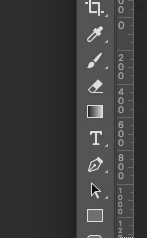
After the new update i can not find the fill bucket icon under the gradient icon anymore is the bucket relocated somewhere else. Or is this some sort of bug / error?

Correct answer Jeff Arola

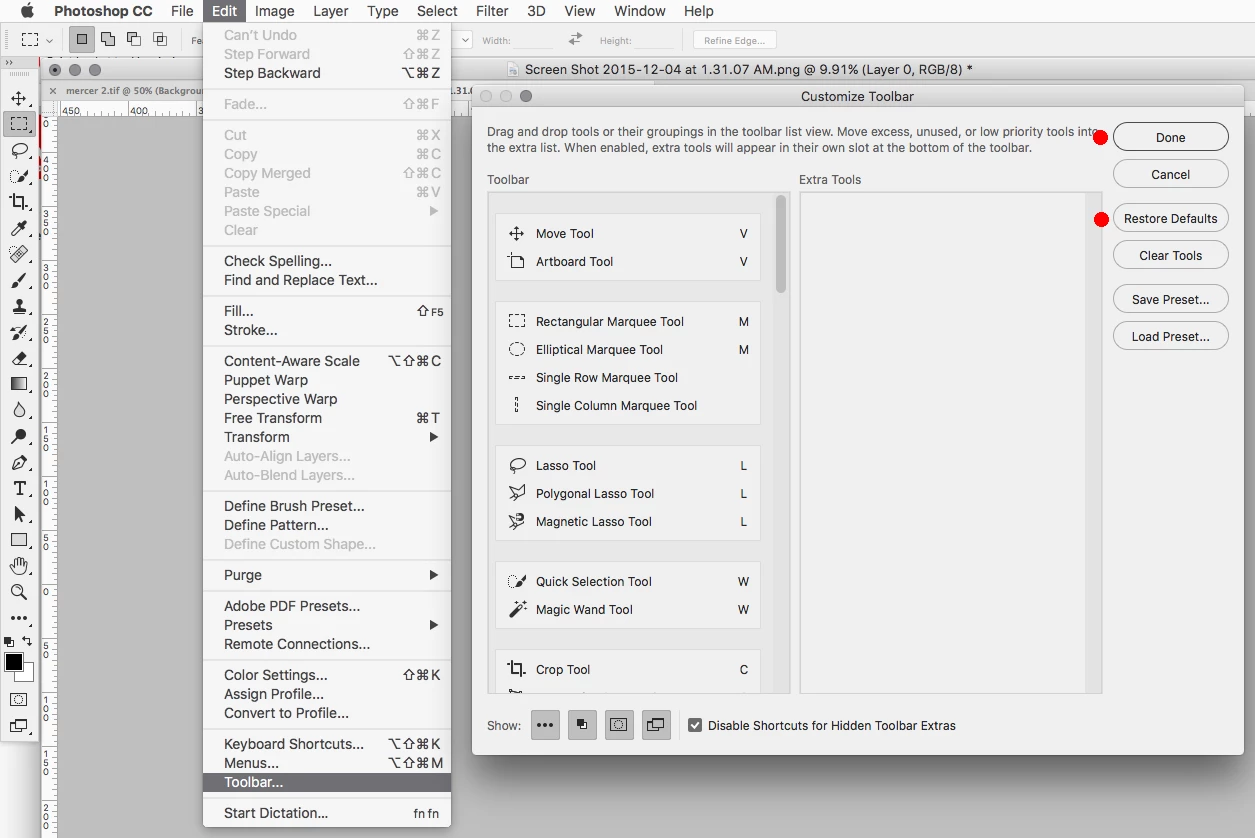
Go to Edit>Toolbar, click Restore Defaults and Done.

See if that gets things back to normal.
9 replies

Participant
March 30, 2022

window> workspace> essentials(default ). 
Its probably just in some other workspace.

THansen51
Participant
September 22, 2021

Like many issues with Software, I did not realize I also had Illustrator open and the windows were not presenting clearly.  Once I closed Illustrator, the Photoshop menu was visible, complete with Paint Bucket. 

Participant
June 13, 2020

I have a new PS 2020 and there is no fill tool. I did the steps above and still nothing. I am a beginner so maybe missing something g, but there is no bucket icon even after resetting defaults.

rogsonl
Known Participant
January 4, 2021

I had the exact same problem.

1. Edit>ToolBar You get


go down the left and right move bars until you find the Gradient tool on the left and the paint bucket tool on the right.

Move the paint bucket to the Gradient tool and both will appear. Problem solved.

I was helped by the hints provided before by this thread.

Participant
April 7, 2020

OMG, thank you!!

Inspiring
March 1, 2018

I get the same error spontaneously after my workspace completely disappeared.  It was not a matter of long pressing or ALT-clicking the tool but going to Edit > Toolbar... (as mentioned above) but instead of resetting the toolbar, I moved the paint bucket took back to its rightful place.  See visual below.

Edit > Toolbar...

Move to toolbar

Good luck ya'll.

sagem8608751
Participant
May 19, 2018

I have no Edit - Tools menu, no traingle and no 3 dots at the bottom . I cannot find the paint bucket anywhere, very fusted. Adobe stop moving things!

Inspiring
June 21, 2018

sagem8608751

What version of PHotoshop do you have sagem?  You dont have a "Toolbar..." option at the bottom of your "Edit" menu?

Condre369
Participant
April 24, 2017

Heh. R_Kelly showed you where your bucket is.

goforthjtj
Participant
April 10, 2016

R_Kelly, I'm missing my Paintbucket, as well, and I don't even show the Toolbar option under Edit:

Jeff Arola
Community Expert
Community Expert
April 10, 2016

I don't think your missing the Paint Bucket Tool.

Just left click and hold on the Gradient Tool in the toolbox to get to the Paint Bucket Tool.

Photoshop tool galleries

Participant
January 11, 2017

Thanks a lot!

Inspiring
December 12, 2015

Not to belabor the point, but why was it changed like that?  I haven't touched the toolbar settings since the latest version was installed, so apparently it installs this way.  Freaking WHY??

Participant
December 7, 2017

If you used the bucket tool Adobe has saved you from yourself by hiding it.  Future users will never know about it.  It's so 1990's and when you work at Adobe and were born in the 1990's removing things is a way of advancing ones career. 

Participant
February 28, 2018

Easy there, buddy, We get that you've got the whole pretentious graphic design complex going on, but us plebs might still want to use the tool for simple tasks. I wanted to use the paint bucket to fill in half shapes for a pedigree chart for my bio class, but I guess that's too 1990s of me. Thank God Adobe saved me from this egregious crime against electronic arts.

Jeff Arola
Community Expert
Jeff ArolaCommunity ExpertCorrect answer
Community Expert
December 4, 2015

Go to Edit>Toolbar, click Restore Defaults and Done.

See if that gets things back to normal.

Participant
July 18, 2018

Did NOT work....this is a joke!

I've just wasted a boat load of time on this

Inspiring
April 4, 2025


Go to Edit>Tools and it will show you where every tool is on the toolbar.  On my computer the Paint Bucket was under the rectangle, along with a lot of other tools.