


Vayra
Participating Frequently
May 2, 2019
질문

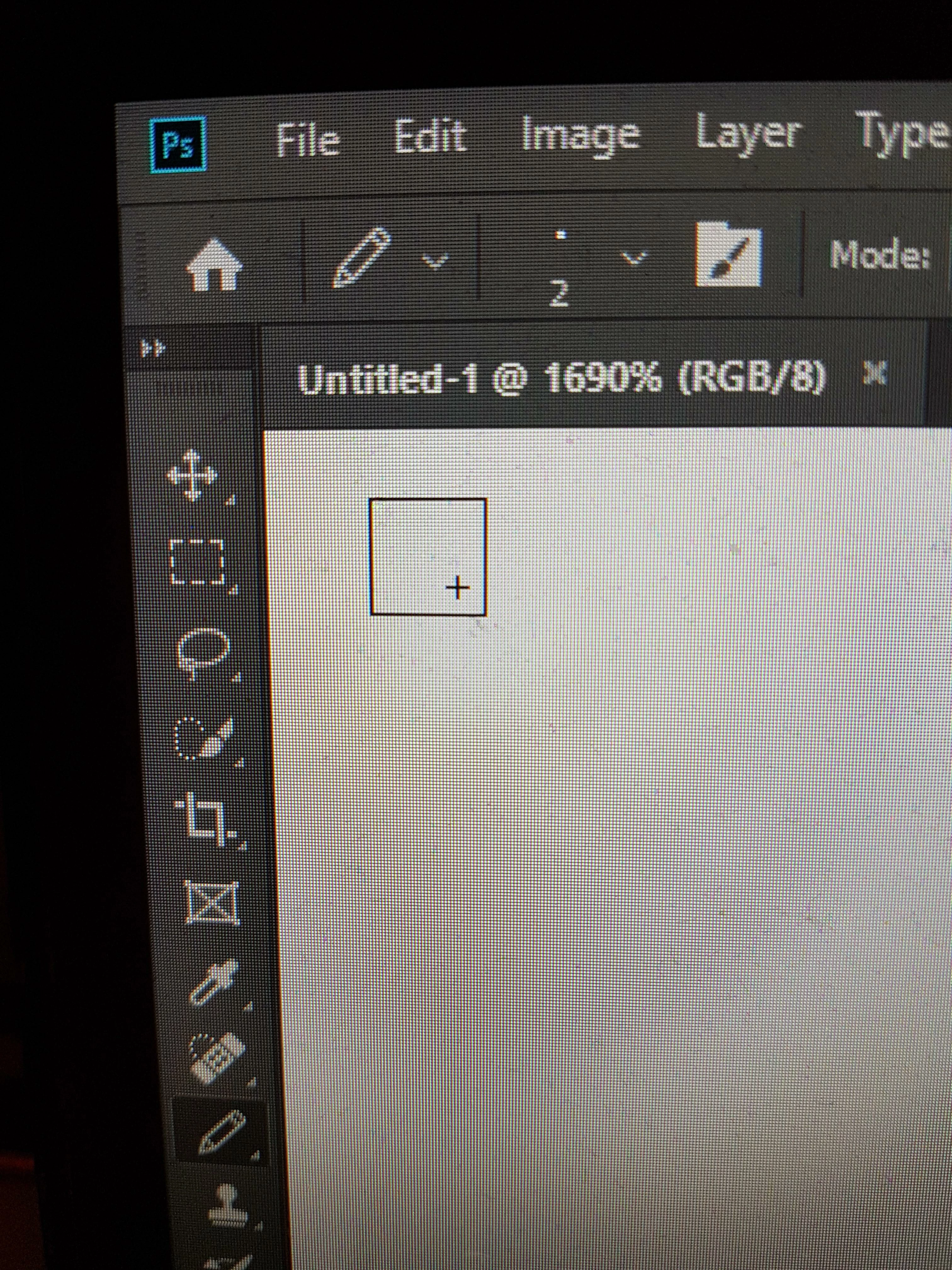
Pencil tool center/crosshair offset to bottom right corner at 2px size
  • May 2, 2019
  • 6 답변들
  • 2808 조회

What happened here and how can I undo it? I've dug through all the settings, and can't seem to find anything. I even reinstalled Photoshop and removed my settings. It's offset down and to the right on any even-numbered brush size, but placed correctly dead center on any odd-numbered brush size. I swear it wasn't always like this. The ideal behavior, and how I remember it working, would be for it to "target" the grid point between the center 4 pixels on even sizes.

    6 답변

    Participant
    September 4, 2024

    Hi, I recently ran into the same problem, did anyone find the solution to it? Everything was working as it should and suddently I came across this...

    It already happened before but it fixed by itself, but now its kinda frustrating to have to work like this.

    Thank you.

    Jeff Arola
    Community Expert
    Community Expert
    May 2, 2019

    Unfortunately, that's nothing new.

    Photoshop 6.0.1 (circa 2000) running on mac os 9.

    First photoshop version to show crosshair with pencil tool.

    Sebastian Bleak
    Community Expert
    Community Expert
    May 2, 2019

    Wow! I've never seen that. I was going to tell you to do a hard reset on your preferences but I think Barbara is right, you should report this in the bug form.

    Vayra
    Vayra작성자
    Participating Frequently
    May 2, 2019

    Just as a followup note, things I have tried:

    - Turning "View > Snap" off

    - Turning "Preferences > Tools > Snap vector tools and transforms to pixel grid" off

    - Changing the settings in "Preferences > Cursors"

    - Resetting brush settings

    - Uninstalling and reinstalling Photoshop

    - deleting the Photoshop folder in /appdata/ and restarting Photoshop

    None of these have changed the behavior. I'm certain it wasn't always like this and used to center on the pixel grid intersection in the center of even-px sized pencil brushes.

    barbara_a7746676
    Community Expert
    Community Expert
    May 2, 2019

    I tried it on my computer and the crosshair is in the same position as yours is when the Pencil is set to 2 pixels. I don't see any way to change that.

    You could report it to Adobe. Feature Request/Bug Report Form

    Vayra
    Vayra작성자
    Participating Frequently
    May 2, 2019

    Thanks, I'll do that. Unfortunate that there's no way to change this right now.

    barbara_a7746676
    Community Expert
    Community Expert
    May 2, 2019

    And in Tools preferences, see if snap is on.

    Vayra
    Vayra작성자
    Participating Frequently
    May 2, 2019

    Hi, thanks. Unfortunately I tried both and neither seems to solve it.

    barbara_a7746676
    Community Expert
    Community Expert
    May 2, 2019

    Under the View menu, see if snap is turned on.