Exit
  • Global community
    • Language:
      • Deutsch
      • English
      • Español
      • Français
      • Português
  • 日本語コミュニティ
  • 한국 커뮤니티
1

Perspective wrap on smart object preview/output bug

New Here ,
Jun 21, 2023 Jun 21, 2023

Hi,


I've been having bugs with Perspective wrap for a while and can't seem to find a solution for it. 

The preview works fine, but depending on the angle (and Photoshop's will to cooperate), it starts to cut out a part of the preview, for no specific reason. There is no mask, no layer on top of it that could hide this part of the visual. It just stops previewing some pixels. Then sometimes it comes back if I randomly move the smart object, but this doesn't work all the time. When I export the image, it stays cut. So it's a preview problem but also in the output.

It doesn't happen on every perspective warp, it's only sometimes and i have no clue how to fix it. Really seems like a bug.


I'm on Photoshop CC 24.5.0

I have a Macbook Pro, Apple M2 Pro Chip, Mac OS Ventura 13.0

I already have the Graphics processor checked in the Preferences.


Here you see where it "randomly" cuts.
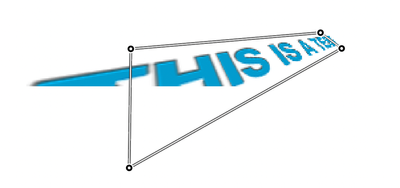
Screenshot 2023-06-21 at 10.05.57.png

This is what the smart object with text looks like.

Screenshot 2023-06-21 at 10.05.42.png

This is the position i'd like it in, but it doesn't work.

Screenshot 2023-06-21 at 10.05.39.png


Thanks!

TOPICS
macOS
292
Translate
Report
Community guidelines
Be kind and respectful, give credit to the original source of content, and search for duplicates before posting. Learn more
community guidelines
Adobe
Community Expert ,
Jun 21, 2023 Jun 21, 2023

I can replicate that here on Windows 11 using v24.6

Looks like a bug


Dave

Translate
Report
Community guidelines
Be kind and respectful, give credit to the original source of content, and search for duplicates before posting. Learn more
community guidelines
New Here ,
Jun 21, 2023 Jun 21, 2023
LATEST

*Warp and not wrap, oops.

Translate
Report
Community guidelines
Be kind and respectful, give credit to the original source of content, and search for duplicates before posting. Learn more
community guidelines


