No, I do not want distortion, I have many images, over 100 sometimes for projects that I do. I need ALL of those images to be no more than 1000px wide or 700 px high. Some are smaller than that so they should not be changed (enlarged). Some need to have height reduced, some need width reduced, some need both, it just depends on the size of the image. Hence my and/or logic,
When I tried using photoshop image processor, it does EVERYTHING perfectly according to my logic EXCEPT it will increase smaller pictures to the larger 700 px. When I use Image Processor Pro, it only does the 700 OR 1000, so it sometimes doesn't conform to what I want. It's very frustrating.
I have tested with the latest version of Photoshop and it is not increasing smaller files. However, as previously explained you can record action.
Just to point to something: When I use Image Processor Pro, it only does the 700 OR 1000, so it sometimes doesn't conform to what I want. It's very frustrating. It seems that we still do not understand what exactly you want. Image which is 1500x1000px will be reduced to 1000x667 pixels not to 1000x700px, thats how things works without to distort images. Do you expect the image to be cropped to 1000x700px from the center or something similar?
If you want ready made action please download it from here Resize to fit.atn - Google Drive
Load action in Photoshop (double click on downloaded file or go to File > Open navigate to Resize to fit.atn and double click on that file.
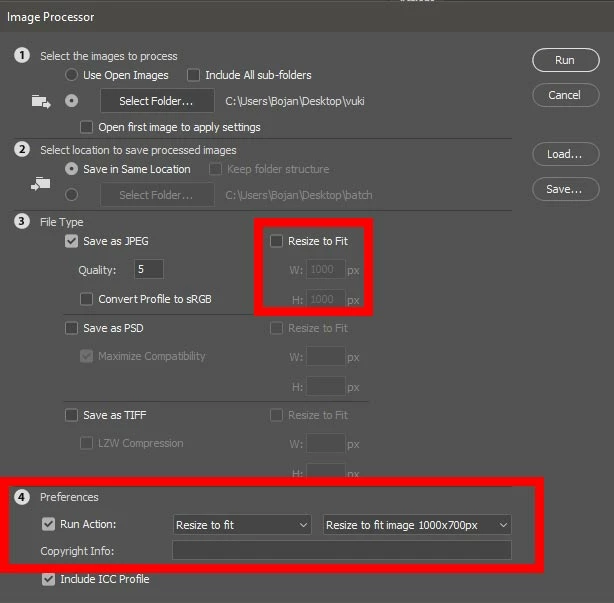
In Image Processor uncheck Resize to Fit. At the bottom check Run Action and then point to Resize to fit set and Resize to fit image 1000x700px action as shown below. The rest is on you, which images to process and in which folder to save.




 AdChoices