
Brad_Trent
Known Participant
July 10, 2020
Question

Photoshop 2020 Bug - File Info/Metadata/Template Folder Non-Alphabetical Random Order

  • July 10, 2020
  • 2 replies
  • 1182 views

Photoshop 21.2.0


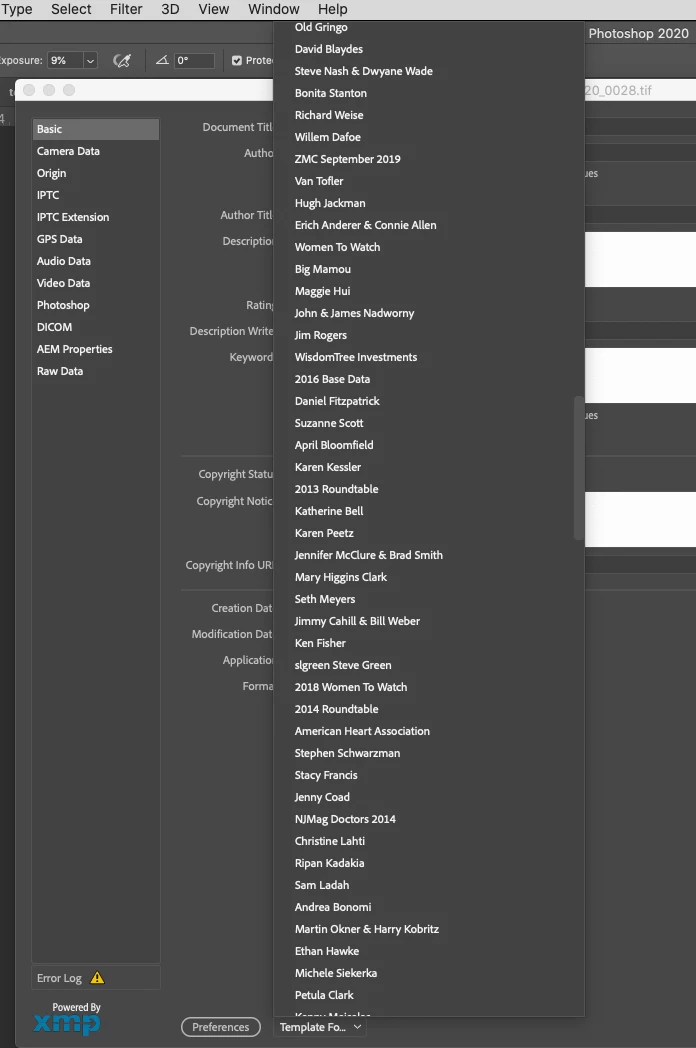
Under File Info, all my saved metadata templates are totally out of order! Of course, in their folder they are fine, but pulling up File Info shows a complete jumble of over 500 saved names, so I now must slowly scroll through every entry until I come across the data file I'm looking for! 


Is there a preference file I can trash to make things get back into order???


Computer Info:

iMac (Retina 5K, 27-inch, 2019)

3.6 GHz 8-Core Intel Core i9

128 GB 2667 MHz DDR4

Radeon Pro Vega 48 8 GB


Screen shot attached to show out of order data entries.....
 

This topic has been closed for replies.

2 replies

Brad_Trent
Known Participant
August 21, 2020

So it's the middle of August and still no reply from Adobe on this issue?!! I've written directly to Adobe techs and no response...I've posted across forums and no response...but other users are experiencing the same problem! It's getting pretty damn infuriating to not have a single person from Adobe at least acknowledge that users are seeing this problem and that just maybe they're doing something to correct it! 

Nick-13
Known Participant
December 30, 2020

This problem still exists 3 years on - Big Sur OS still dispalys the very same out of alphabetical order that has been prevelent for many years now - Adobe, please focus on a resolution.  My workflow is dramatically compromised

Nick-13
Known Participant
December 30, 2020

This problem still exists 3 years on - Big Sur OS still displays the very same out of alphabetical order that has been prevalent for many years  now - Adobe, please focus on a resolution.  My workflow is dramatically compromised (spellchecked version)

Brad_Trent
Known Participant
July 11, 2020

Since nobody seems to have any clues as to how to fix this issue, I've spent hours searching he forums for similar problems and came across the exact thing in Bridge from over two years ago...


https://community.adobe.com/t5/bridge/sorting-metadata-templets/m-p/11280460#M19815


Since having 'File Info' list metadata randomly has been a problem in the past that had to be addressed in a software update, how about someone from Adobe let me know if they've seen this in the current version on Photoshop?!! Having to hunt & peck for a metadata file from a pull-down menu that show over 500 random names not only screws up my workflow, but the frustration truly makes me wanna punch a wall 

!!! 🙎

Brad_Trent
Known Participant
July 18, 2020

A week later am not a single reply? Does that mean I'm the only person alive who's having this issue, or simply that there is no fix available? Since this is the only way for users to 'speak' to an Adobe tech regarding issues, it would be nice to have someone chime in...🙎