
Known Participant
June 27, 2023
Answered

Photoshop 2023: Marquee Selection Tool not selecting the full area.

  • June 27, 2023
  • 18 replies
  • 8363 views

HI, I am having a problem using the ‘Rectangular Marquee’ selection tool in Photoshop 2023. (I'm not sure if its actually a bug or an incorrect setting)

I regularly use the tool in conjunction with ‘stroke’ when applying borders to my images. In general, my image will be zoomed in to 66% or 100% and will cover an area much larger than my screen can display. When I drag my selection area the image will start to scroll across the screen, as expected, but will freeze before I have reached the end of my selection. If I reduce the zoom so that the image does not take up as much area, say 50%, it will allow me to select the whole image. When I’m making the selection I normally have the grid lines visible and set to centimeters/milimeters. I want to be able to select using the marquee tool when I've zoomed in to 100%
At zoom of 50% or less it is difficult work with the grid as the lines are too close together.
Occasionally this task works without problems and sometimes if I use the Purge tool it can also help.
I have already tried: deleting Temp & Cache files, reinstalled Photoshop
(My PC: Windows 11, I7-12700 Processor, 32gb Ram, 3060TI GPU. Screen is a BenQ 270c - 27”)
Correct answer @mj

Hi @danielle30993502usfi,


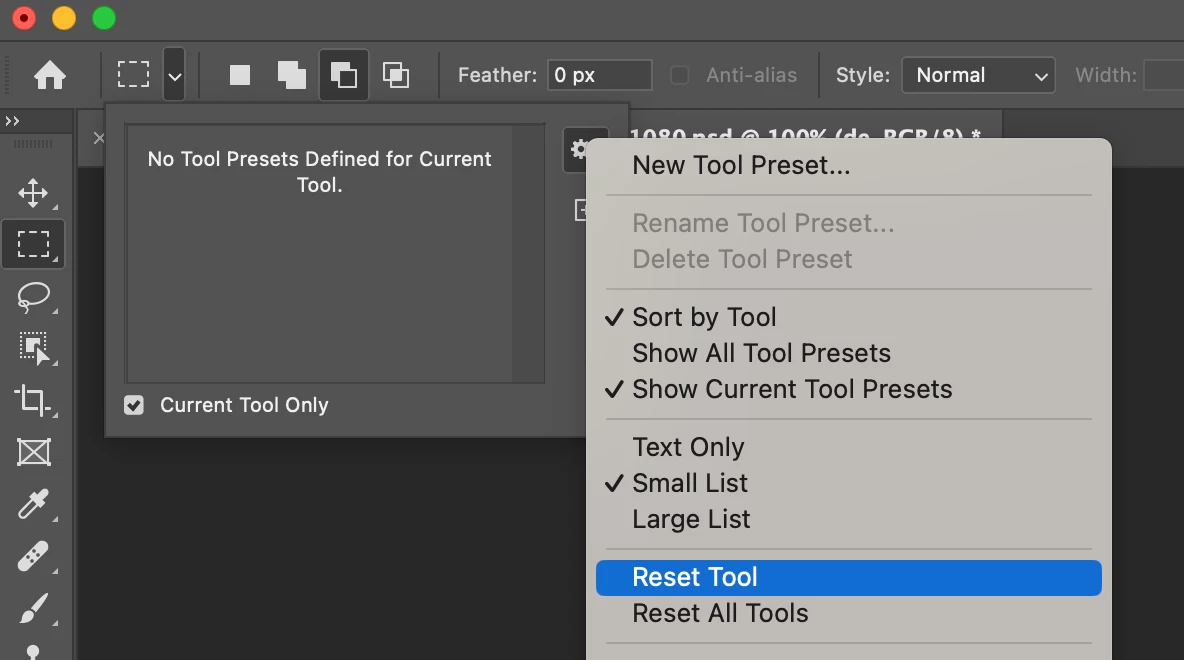
Click on the dropdown arrow alongside the marquee tool, on the control bar, then the settings icon and choose Reset Tool.


Let us know how you go

mj

18 replies

Participant
July 12, 2023

Hello Cory,

That worked, I reset the tool and it is now working perfectly! Thank you so much!  

@mj
Community Expert
@mjCommunity ExpertCorrect answer
Community Expert
July 11, 2023

Hi @danielle30993502usfi,


Click on the dropdown arrow alongside the marquee tool, on the control bar, then the settings icon and choose Reset Tool.


Let us know how you go

mj

CShubert
Community Manager
Community Manager
July 10, 2023

@danielle30993502usfi what are your settings here?


Participant
July 10, 2023

I am having the same issue as the user who started this conversation. I click on my marquee tool to select an image (to copy and paste it). The rectangle is restricted and does not allow me to make a rectable the size I need. I hope that makes sense! Please let me know if anyone has a solution, it is really frustrating.

@mj
Community Expert
Community Expert
July 9, 2023

Hi,

The other possible conflict could be with the GPU.

Please try these sugesstions from Adobe.

https://helpx.adobe.com/photoshop/kb/troubleshoot-gpu-graphics-card.html

Let us know how you go.

mj

@mj
Community Expert
Community Expert
July 9, 2023

Hi @Irish-Valk,

Please see the screengrab above.

Inserting of video on this platform becomes available in the formatting bar when you reply to a thread.

Best

mj


@mj
Community Expert
Community Expert
July 9, 2023

My bad.

This was not for you @x-x-x-x 

Best

mj

Participating Frequently
July 7, 2023

@@mj I beg Your pardon? What do you mean?

@mj
Community Expert
Community Expert
July 7, 2023

HI @x-x-x-x 


Please see th screengrab above.


It becomes available in the formatting bar when you reply to a thread.


Best

mj

Participating Frequently
July 7, 2023

It´s not solved yet! I do have the same problem: After update to V 24.3.0. the animated zoom doesn´t work. Things done so far:

- untick animated zoom, restart Photoshop > no

- restart Windows > no

Please, @CShubert Instruct the Adobe developer team not to change working parametres! 😕😕


Any further help appreciated, as it wastes a lot of time not to be able to use the animated zoom. It is work time. The customers don´t want to pay the extra money just because Adobe did not work on Updates precisely and properly. We are paying for this app! But it has to be a WORKING app.

Thanks in advance.