
Exit
  • Global community
    • Language:
      • Deutsch
      • English
      • Español
      • Français
      • Português
  • 日本語コミュニティ
  • 한국 커뮤니티
0

Photoshop 2026 Generative Upscale giving black image layers

Participant ,
Oct 28, 2025 Oct 28, 2025

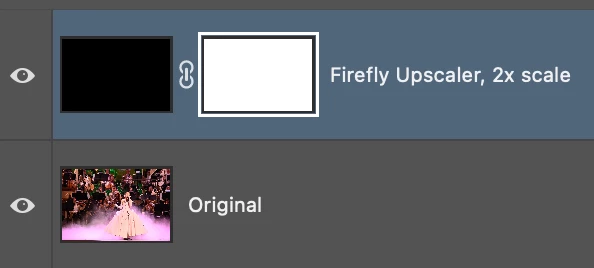
On my work machine, the PS 2026 won't upscale using any of the three models avaialbe. They all produce a new file at the size chosen with the "Original" as the bottom layer, and the layer above that is supposed to be the upscaled version is just a black layer with a layer mask. The actual image is just a flat black color. When I try this on my personal version at home, it works as intended. What gives?
Screenshot 2025-10-28 at 2.48.18 PM.png


TOPICS
macOS
145
Translate
Report
Community guidelines
Be kind and respectful, give credit to the original source of content, and search for duplicates before posting. Learn more
community guidelines

correct answers 1 Correct answer

Participant , Oct 29, 2025 Oct 29, 2025

I reset my preferences and restarted my computer and that fixed it. So, I'd try restarting first, and if that doesn't work, reset the prefs.

Translate
Adobe
Adobe Employee ,
Oct 28, 2025 Oct 28, 2025

Hi @BTA-1138


Thanks for reporting this! It might be related to how the image background or color profile is being handled. Could you please try running Generative Upscale on a different image (preferably one without a black or dark background) and see if the same issue occurs? 

Also, if possible, please also share the image you’re testing with so we can try to reproduce the issue on our end.


Regards,

Srishti

Translate
Report
Community guidelines
Be kind and respectful, give credit to the original source of content, and search for duplicates before posting. Learn more
community guidelines
Participant ,
Oct 29, 2025 Oct 29, 2025
LATEST

I reset my preferences and restarted my computer and that fixed it. So, I'd try restarting first, and if that doesn't work, reset the prefs.

Translate
Report
Community guidelines
Be kind and respectful, give credit to the original source of content, and search for duplicates before posting. Learn more
community guidelines