


Known Participant
March 8, 2024
질문

Photoshop action works fine, but when I create a droplet, it adds an extra photo.
  • March 8, 2024
  • 8 답변들
  • 267 조회


Hello! 🙂


I've been working on an action that slices images and creates new files for me. When I run the action in photoshop on a random image, it works perfect. For some reason when I run it using the droplet, it adds an extra photo for me.


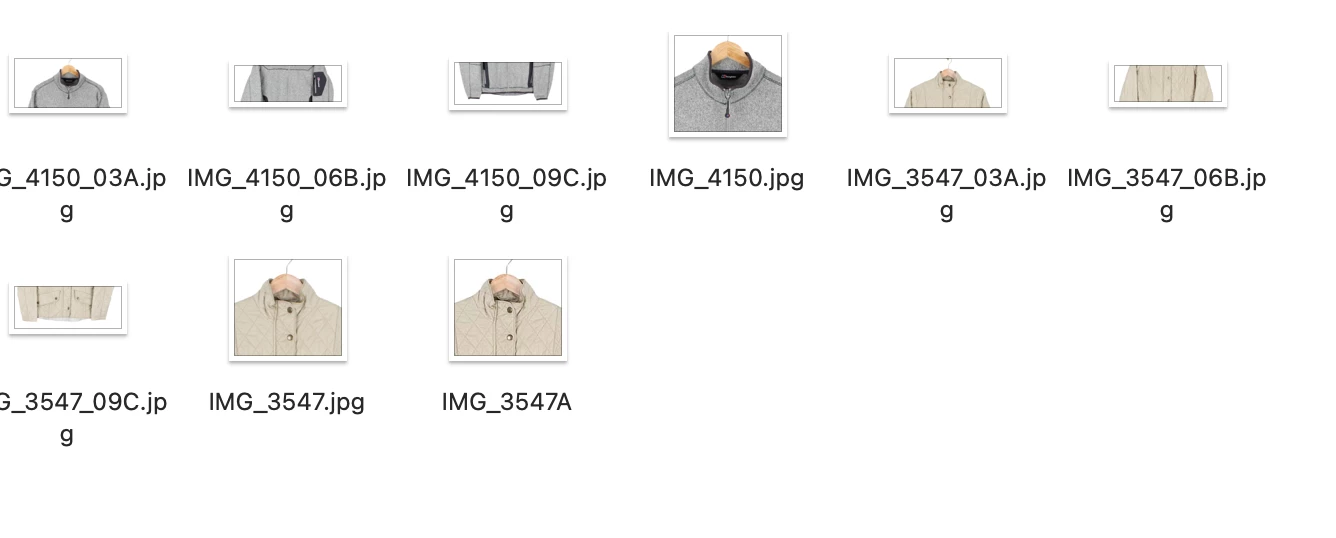
I'll attach a folder of what my files are showing.


The top images (grey product) has had the action work perfectly fine. Then when I use the droplet on the beige product, it adds an extra photo for some reason.


I think the action itself is fine, but I'm not sure the droplet has been created correctly. 


Any help would be great 🙂

Thanks

이 주제는 답변이 닫혔습니다.

8 답변

Known Participant
March 12, 2024

Ohh perfect. I'll try this now 🙂 Thanks for your help. I'll let you know how it goes!

Known Participant
March 12, 2024

Export Save for Web (Legacy) isn't the same thing as Save As. It would be helpful if you expanded the export step and made the panel wide enough to view all content in the recording.


Ohhh I had no idea, apologies! When you say export step. Do you want to see the 'Save for web' box that it opens? Sorry, I'm really not that good with PS. I'll attach a photo of when I click 'Save for Web'. Thanks!! 


Bojan Živković11378569
Community Expert
Community Expert
March 11, 2024

You have export step plus instruction to save document name with A,B,C suffix as I guess. Record Save As step and check Overwrite Save As commands in droplet creation dialogue. Do not forget to add extension after A,B,C...

Stephen Marsh
Community Expert
Community Expert
March 11, 2024

Export Save for Web (Legacy) isn't the same thing as Save As. It would be helpful if you expanded the export step and made the panel wide enough to view all content in the recording.

Known Participant
March 11, 2024

Okay I'll try that. I think I included the droplet extension to be honest. I was worried about files getting overwritten so I just added that. I presume that maybe the mistake? Thanks

Known Participant
March 11, 2024

Thanks for getting back to me. I've attached the action and the droplet settings that I used. I'm not very good with PS so let me know if you need more info 🙂 Thanks 

Bojan Živković11378569
Community Expert
Community Expert
March 9, 2024

You may want to recreate the droplet because the setup might be hard to recall. It appears that the Serial Letter (A, B, C) is somehow included in the droplet setup. However, I have not been able to reproduce it successfully.


Try to recreate the droplet and check if the error persists. A strange thing is that docnameA lacks an extension.

Stephen Marsh
Community Expert
Community Expert
March 8, 2024

It would help if you posted screenshots of the action panel with all steps expanded/disclosed and also the droplet setup settings.