


Participating Frequently
March 28, 2021
Répondu

Photoshop add texture to my photos

Hello there. I'm a professional photographer, but a few weeks ago I started to have an issue in Photoshop after one of the latest upgrades. I develop an image in Lightroom without noise or any other texture, but as soon as I opened in Photoshop for a few edits, it shows the picture with A LOT of texture, almost like grain. When I open the picture in any other software, even from Adobe, doesn't show that texture! What can I do to fix that?

Ce sujet a été fermé aux réponses.
Meilleure réponse par Per Berntsen

I am unable to replicate this issue on my computer.


Has it resolved since you did the uninstall and reinstall?


Do you have any additional Pbotoshop plugins? 


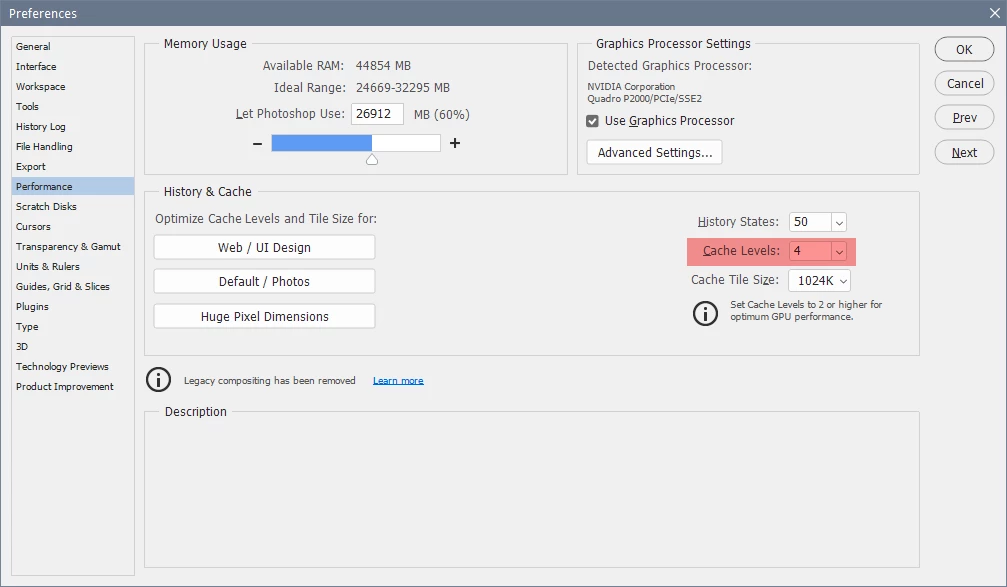
Having Cache levels set to less than 4 has been known to cause graininess in some cases.

Edit > Preferences > Performance > Cache levels.

Another thing to try is to disable the graphics processor in the same tab of Preferences.


In the future, please insert images directly in your posts, use the Insert Photos button in the toolbar.


7 commentaires

davescm
Community Expert
Community Expert
March 28, 2021

It looks like the Photoshop version is oversharpened but I can't see why that would happen if all you have done is gone straight from Lightroom to PS using "Edit in Photoshop". One last check - can you switch to the Develop module in Lightroom again at 100%. Does that look the same as the Lightroom preview or the same as the Photoshop version?


Dave

Participating Frequently
March 28, 2021

Dave, exactly the same as in the Library module. And when I opne the picture in any other program it looks just like in Lightroom, so I guess the problem is Photoshop... And when I export the images and I check them in other program, they looks ok!!!

davescm
Community Expert
Community Expert
March 28, 2021

How did you move from Lightroom to Photoshop ? Was it Lightroom's Edit in Photoshop or another method?


Dave

Participating Frequently
March 28, 2021

Dave, thank you for your answer and interest!


From Lightroom I go straight to Edit in Photoshop...


Thanks!!!

mglush
Community Expert
Community Expert
March 28, 2021

Hi Again,

I just looked at the Screen shots --thanks for posting them. Are you doing any sharpening in Lightroom?

Michelle

Participating Frequently
March 28, 2021

No, that's the RAW file...


Thanks!

mglush
Community Expert
Community Expert
March 28, 2021

Hi!

Along with the screenshots, can you tell us what version of Photoshop and Lightroom you are using? Also, it would be helpful to know what platform (Mac or Windows) and what operating system you are using?

Thanks,

Michelle

Participating Frequently
March 28, 2021

Michelle, thank you for your andwer. I´m using Lightroom 10.1.1 and Photoshop 22.2.0, under Windows 10.


Thank you!!!

Participating Frequently
March 28, 2021
Sofia_Photoshop.jpg
Leslie Moak Murray
Community Expert
Community Expert
March 29, 2021

That is very weird. Why not try opening the RAW image directly to Photoshop (after adjusting it in RAW)?

davescm
Community Expert
Community Expert
March 28, 2021

Can you add a couple of screenshots showing the difference between Lightroom and Photoshop with both set to 100% zoom


Dave

Leslie Moak Murray
Community Expert
Community Expert
March 28, 2021

Can you post a screen shot?
