Participant
April 28, 2021
Answered

Photoshop.Application.DoAction not working

  • April 28, 2021
  • 1 reply
  • 1456 views

Hi Team,


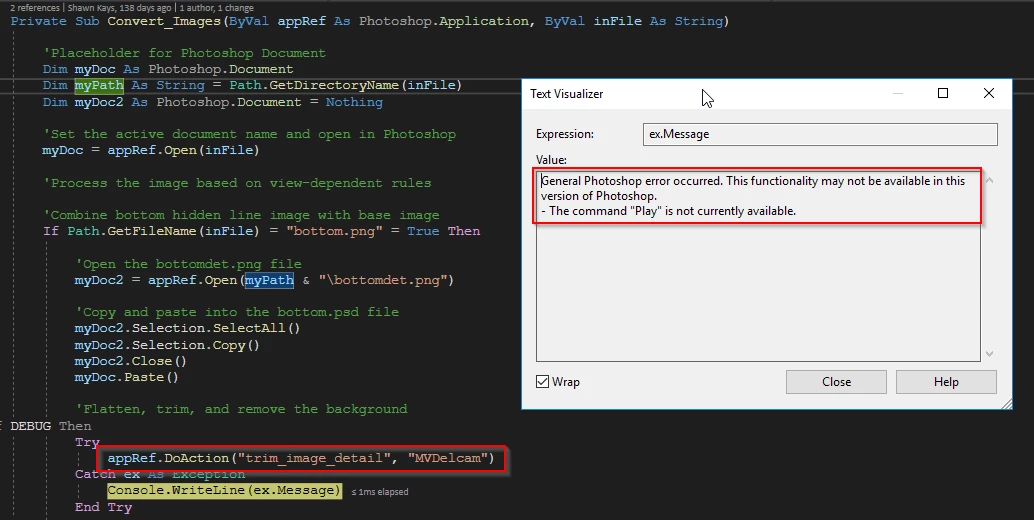
I have on vb.net project. Previously we use the Photoshop CS5 version. In that, the Photoshop.Application.DoAction() method work perfectly fine. After we upgrade the Photoshop CS5 to Photoshop 2021. All DoAction command failed. It gives us the below error.

General Photoshop error occurred. This functionality may not be available in this version of Photoshop.
- The command "Play" is not currently available.


Could you please help us to resolve this issue?


We already checked the below solution present on this forum but that won't help 

https://community.adobe.com/t5/photoshop/c-running-actions-command-play-currently-unavailable/m-p/11397499


Please Help...!!!


This topic has been closed for replies.
Correct answer JJMack

Did you migrate your actions sets to Photoshop 2021? Why would Play not be available if your action set  in loaded in Photoshop 2021 Actions Palette and the action is in the Action set.  If they are not in the Action Palette the message would seem to be valid. How could Play, Play something that does not exists?

1 reply

JJMack
Community Expert
Community Expert
April 28, 2021

Is the Action Set loaded in the Action Palette and is the action in the action set. That message may be correct if the action is missing in Action. Did you you install a new version of Photoshop  or  move the action or rename it or its action set?

JJMack
Participant
May 4, 2021

Hi JJMack,


Thanks for your response. Previously my code is working fine. It is working from the last few years. We have just updated the photoshop version and photoshop DLL. My changes are as follows.

  1. Upgraded photoshop CS5 to Photoshop 2021
  2. Included the Interop.Photoshop.dll from the Photoshop 2021. i.e. Added a reference in my project from COM Adobe photoshop 2021 object library.


I did not change the Action Palette.

JJMack
Community Expert
JJMackCommunity ExpertCorrect answer
Community Expert
May 4, 2021

Did you migrate your actions sets to Photoshop 2021? Why would Play not be available if your action set  in loaded in Photoshop 2021 Actions Palette and the action is in the Action set.  If they are not in the Action Palette the message would seem to be valid. How could Play, Play something that does not exists?

JJMack