

Photoshop brush/eraser not painting at cursor
I've tried searching and googling for my issue, but I've not had any luck at all.
The problem: When I paint, the line jerks up to the left, draws my line, then jerks down to the right. It's difficult to describe, so I've tried to illustrate with the screenshot below. I've taken the brush tool and drawn a line DIRECTLY from A to B. Those "table legs" are just what Photoshop does now. I can't draw a straight line anymore! I can't even just tap to make a circle with a hard brush. It ALWAYS draws that line. Note: The eraser tool does this as well, but text, shapes, and other things appear in the right place.
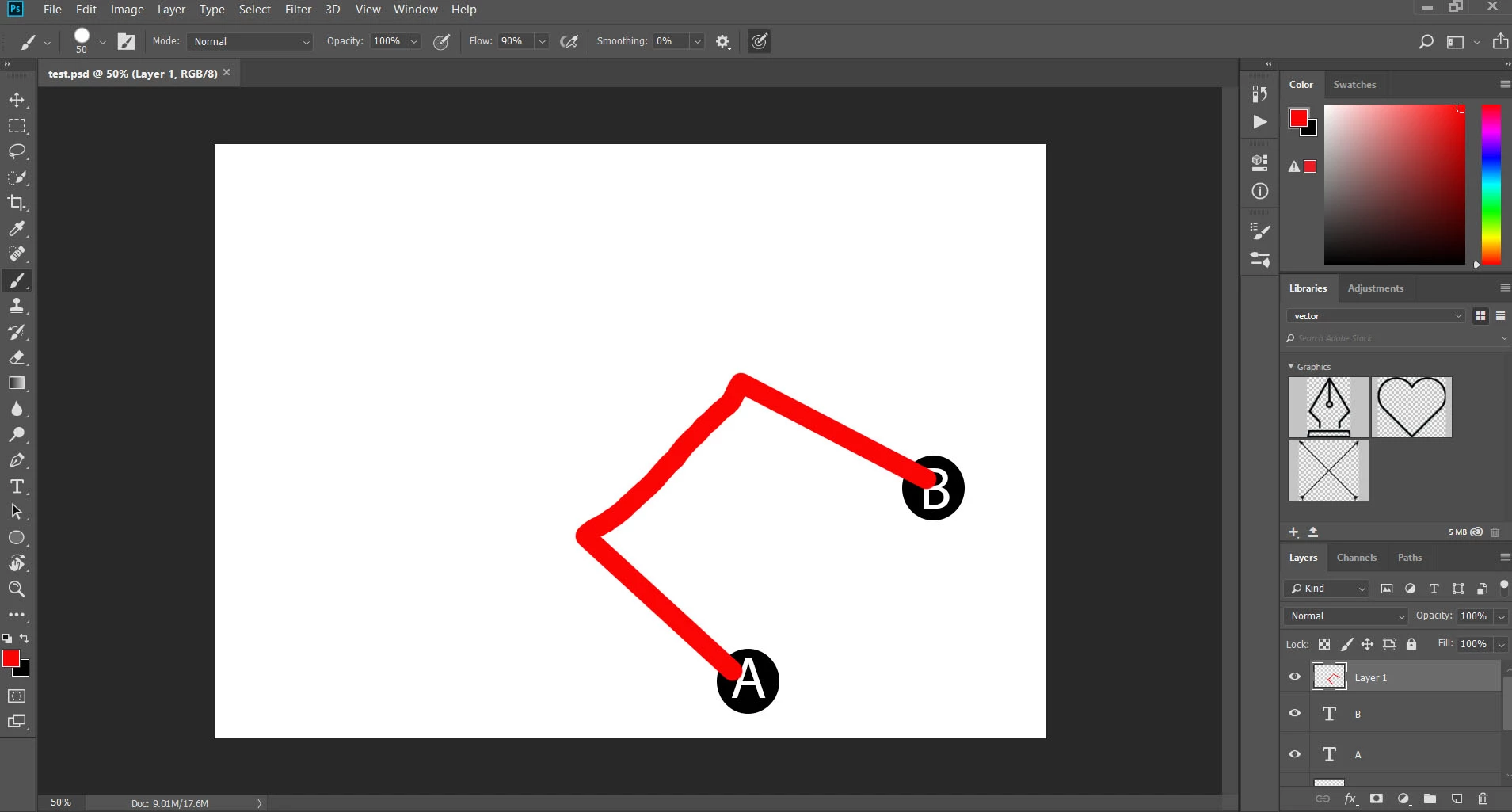
What I've tried (all had no effect)
- Reset the tools
- Reset the preferences
- Uninstalled and reinstalled Photoshop completely (after telling it not to save any settings)
- Restarted the computer in safe mode (to make sure it wasn't 3rd party extensions interfering)
- Updated my video driver
- Updated windows
- Disabled GPU
I'm on Windows 10, GeForce GTX1060, 16GB memory
I'm not even sure what else to try, but it's leaving Photoshop unusable for drawing anything.
 AdChoices