Exit
  • Global community
    • Language:
      • Deutsch
      • English
      • Español
      • Français
      • Português
  • 日本語コミュニティ
  • 한국 커뮤니티
0

Photoshop CC 2015 black screen problem

New Here ,
Mar 04, 2016 Mar 04, 2016

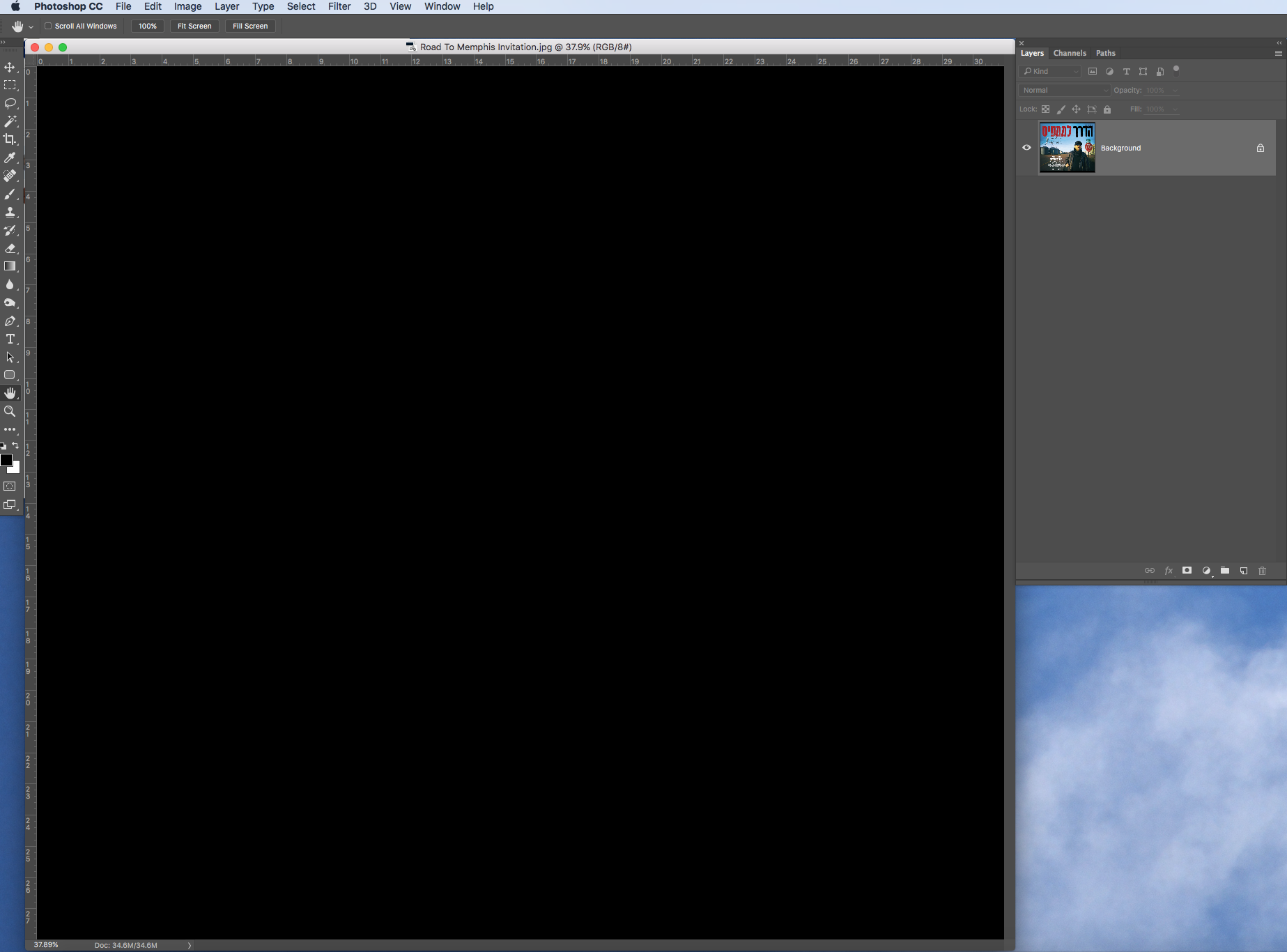
I'm running Photoshop CC 2015 on a Surface Book, and it performs well until tonight. A few hours ago I installed a software called Splashtop Wired XDisplay Agent, and did some color calibration via windows itself, then I found that when I tried to open some photos in Photoshop, nothing showed up but a piece of black background. There was only a tiny thumbnail in the layers window.屏幕截图(8).png

I thought this might be cause by that new software, so I uninstalled it right away and restarted the system, but the problem remained.

Then I found that if I disable "Use Graphics Processor" though it does detect my graphic card, I can get Photoshop display photo files correctly. And there was once a time when I opened Photoshop, a window popped out saying there was some errors with my graphic card, unfortunately I couldn't recall the whole sentence. Then I reinstall the graphic driver and restarted the system, but the problem remains.

屏幕截图(9).png屏幕截图(10).png

Moreover, the Adobe Camera Raw and the Premiere Pro CC 2015 also get influenced by this problem and they don't display any photos or videos.

屏幕截图(11).png

11.9K
Translate
Report
Community guidelines
Be kind and respectful, give credit to the original source of content, and search for duplicates before posting. Learn more
community guidelines
Adobe
Mar 04, 2016 Mar 04, 2016

Hi ranw,

Please disable GPU usage in Camera raw

  • Go to Edit>>Preferences>>>Camera raw(Photoshop)
  • Uncheck Use graphics Processor

11002.PNG

Regards,

Akash

Translate
Report
Community guidelines
Be kind and respectful, give credit to the original source of content, and search for duplicates before posting. Learn more
community guidelines
New Here ,
Mar 04, 2016 Mar 04, 2016

Yes the photos displays correctly after I disable the GPU but these apps could run correctly WITH the GPU before tonight and I really need my GPU to get them run faster.

How to solve this problem?

Translate
Report
Community guidelines
Be kind and respectful, give credit to the original source of content, and search for duplicates before posting. Learn more
community guidelines
Mar 04, 2016 Mar 04, 2016

Update your GPU drivers from manufacturer's website.

~Akash

Translate
Report
Community guidelines
Be kind and respectful, give credit to the original source of content, and search for duplicates before posting. Learn more
community guidelines
New Here ,
Mar 04, 2016 Mar 04, 2016

Yes I have updated my GPU driver to the latest version. It doesn't help.

Translate
Report
Community guidelines
Be kind and respectful, give credit to the original source of content, and search for duplicates before posting. Learn more
community guidelines
Mar 04, 2016 Mar 04, 2016

Which graphics card are you using?

I installed a software called Splashtop Wired XDisplay Agent, and did some color calibration via windows itself, then I found that when I tried to open some photos in Photoshop,

Check if the device driver is showing up in Device manager.

Post System info from Photoshop>>Help.

~Akash

Translate
Report
Community guidelines
Be kind and respectful, give credit to the original source of content, and search for duplicates before posting. Learn more
community guidelines
New Here ,
Mar 04, 2016 Mar 04, 2016

The GPU is a customized version of nvidia graphic card for Surface Book only.

NumGLGPUs=1

NumCLGPUs=2

glgpu[0].GLVersion="3.0"

glgpu[0].IsIntegratedGLGPU=0

glgpu[0].GLMemoryMB=1024

glgpu[0].GLName="Intel(R) HD Graphics 520"

glgpu[0].GLVendor="Intel"

glgpu[0].GLVendorID=32902

glgpu[0].GLDriverVersion="20.19.15.4364"

glgpu[0].GLRectTextureSize=16384

glgpu[0].GLRenderer="Intel(R) HD Graphics 520"

glgpu[0].GLRendererID=6422

glgpu[0].HasGLNPOTSupport=1

glgpu[0].GLDriver="igdumdim64.dll,igd10iumd64.dll,igd10iumd64.dll,igd12umd64.dll,igdumdim32,igd10iumd32,igd10iumd32,igd12umd32"

glgpu[0].GLDriverDate="20160112000000.000000-000"

glgpu[0].CanCompileProgramGLSL=1

glgpu[0].GLFrameBufferOK=1

glgpu[0].glGetString[GL_SHADING_LANGUAGE_VERSION]="1.30 - Build 20.19.15.4364"

glgpu[0].glGetProgramivARB[GL_FRAGMENT_PROGRAM_ARB][GL_MAX_PROGRAM_INSTRUCTIONS_ARB]=[1447]

glgpu[0].glGetIntegerv[GL_MAX_TEXTURE_UNITS]=[8]

glgpu[0].glGetIntegerv[GL_MAX_COMBINED_TEXTURE_IMAGE_UNITS]=[192]

glgpu[0].glGetIntegerv[GL_MAX_VERTEX_TEXTURE_IMAGE_UNITS]=[32]

glgpu[0].glGetIntegerv[GL_MAX_TEXTURE_IMAGE_UNITS]=[32]

glgpu[0].glGetIntegerv[GL_MAX_DRAW_BUFFERS]=[8]

glgpu[0].glGetIntegerv[GL_MAX_VERTEX_UNIFORM_COMPONENTS]=[4096]

glgpu[0].glGetIntegerv[GL_MAX_FRAGMENT_UNIFORM_COMPONENTS]=[4096]

glgpu[0].glGetIntegerv[GL_MAX_VARYING_FLOATS]=[64]

glgpu[0].glGetIntegerv[GL_MAX_VERTEX_ATTRIBS]=[16]

glgpu[0].extension[AIF::OGL::GL_ARB_VERTEX_PROGRAM]=1

glgpu[0].extension[AIF::OGL::GL_ARB_FRAGMENT_PROGRAM]=1

glgpu[0].extension[AIF::OGL::GL_ARB_VERTEX_SHADER]=1

glgpu[0].extension[AIF::OGL::GL_ARB_FRAGMENT_SHADER]=1

glgpu[0].extension[AIF::OGL::GL_EXT_FRAMEBUFFER_OBJECT]=1

glgpu[0].extension[AIF::OGL::GL_ARB_TEXTURE_RECTANGLE]=1

glgpu[0].extension[AIF::OGL::GL_ARB_TEXTURE_FLOAT]=1

glgpu[0].extension[AIF::OGL::GL_ARB_OCCLUSION_QUERY]=1

glgpu[0].extension[AIF::OGL::GL_ARB_VERTEX_BUFFER_OBJECT]=1

glgpu[0].extension[AIF::OGL::GL_ARB_SHADER_TEXTURE_LOD]=0

clgpu[0].CLPlatformVersion="2.0 "

clgpu[0].CLDeviceVersion="2.0 "

clgpu[0].IsIntegratedCLGPU=1

clgpu[0].CLMemoryMB=6515

clgpu[0].CLName="Intel(R) HD Graphics 520"

clgpu[0].CLVendor="Intel(R) Corporation"

clgpu[0].CLVendorID=32902

clgpu[0].CLDriverVersion="20.19.15.4364"

clgpu[0].CUDASupported=0

clgpu[0].CLBandwidth=2.11978e+010

clgpu[0].CLCompute=175.569

clgpu[1].CLPlatformVersion="1.2"

clgpu[1].CLDeviceVersion="1.2 CUDA"

clgpu[1].IsIntegratedCLGPU=0

clgpu[1].CLMemoryMB=1024

clgpu[1].CLName="GeForce GPU"

clgpu[1].CLVendor="NVIDIA Corporation"

clgpu[1].CLVendorID=4318

clgpu[1].CLDriverVersion="362.00"

clgpu[1].CUDASupported=1

clgpu[1].CUDAVersion="8.0.10"

clgpu[1].CLBandwidth=3.45781e+010

clgpu[1].CLCompute=221.676

Translate
Report
Community guidelines
Be kind and respectful, give credit to the original source of content, and search for duplicates before posting. Learn more
community guidelines
Mar 04, 2016 Mar 04, 2016

That says you are using an Intel GPU, not Nvidia.

Translate
Report
Community guidelines
Be kind and respectful, give credit to the original source of content, and search for duplicates before posting. Learn more
community guidelines
Enthusiast ,
Aug 03, 2016 Aug 03, 2016

Just wanted to report the same problem.

iMac (27-inch, Late 2013)3.2 GHz Intel Core i5

NVIDIA GeForce GT 755M 1024 MB

Screen Shot 2016-08-03 at 1.26.44 PM.png

After doing this:

Preferences>Performance>“Advanced” button

Drawing Mode = Basic

Restart Photoshop

Restart Computer,

So far seems ok.

all the best,

shlomit

Translate
Report
Community guidelines
Be kind and respectful, give credit to the original source of content, and search for duplicates before posting. Learn more
community guidelines
New Here ,
Jan 08, 2018 Jan 08, 2018
LATEST

I did the exact same steps and it worked for me , now the problem is that I can't write on the photos anymore .. help plz

Translate
Report
Community guidelines
Be kind and respectful, give credit to the original source of content, and search for duplicates before posting. Learn more
community guidelines