seasand
Participant
November 19, 2016
Answered

Photoshop CC 2017 right to left text direction support.

  • November 19, 2016
  • 3 replies
  • 13933 views

Hello everyone.

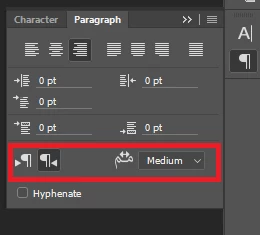
I installed Photoshop CC 2017 trial lately, and it seems it's missing the options highlighted in the attached image(from CC 2015)!

Is there a way to get them back?

PS: I already checked "Middle Eastern and South Asian" option in the preferences.
    This topic has been closed for replies.
    Correct answer Semaphoric

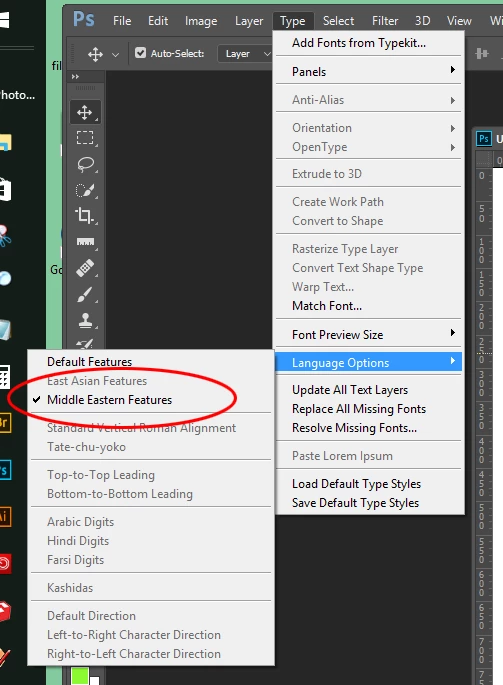
    Not just in the Preferences - in the Type menu.


    3 replies

    Participant
    December 3, 2016

    Does this option in Illustrator too??
    there's no (Language Options) in Illustrator's Type Menu

    M_ries_Lab
    Inspiring
    December 7, 2016

    or in InDesign, where are these options?

    seasand
    seasandAuthor
    Participant
    November 20, 2016

    It worked!

    Thank you both very much for taking the time to answer.

    Semaphoric
    Community Expert
    Community Expert
    November 19, 2016

    Under Type > Language Options, make sure "Middle Eastern Features" is checked.

    seasand
    seasandAuthor
    Participant
    November 20, 2016

    As I mentioned earlier, I already did that and it didn't fix it.

    davescm
    Community Expert
    Community Expert
    November 20, 2016

    Have you set the direction in the Type menu ?

    Dave