burkhardk18767876
Participating Frequently
January 27, 2018
Answered

Photoshop CC 2018 - features missing

  • January 27, 2018
  • 12 replies
  • 31972 views

Hi,

I am working on a project with photoshop cc 2018 and have neither of these options available. What can I do about it or am I missing here something?

    This topic has been closed for replies.
    Correct answer davescm

    burkhardk18767876 See here to reset the toolbar, don't worry about the 2015 designation it still works the same  Tools missing from the toolbar Photoshop CC 2015

    herasymcuk  If you are not seeing the tool with 19.1 then try

    a. Resetting the tools
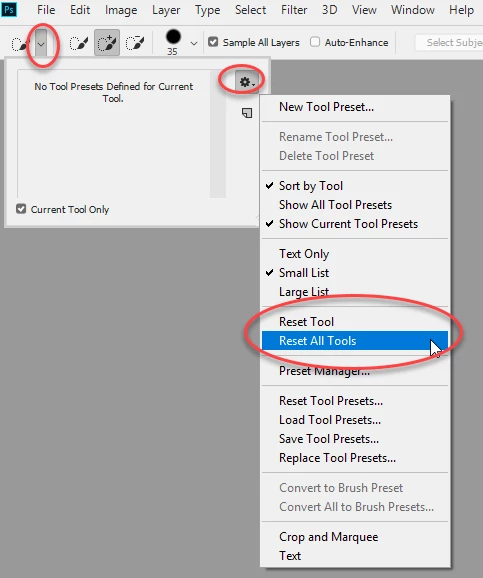
    if that does not work

    b. Reset Preferences . Go to Preferences >General >Reset Preferences on Quit and then close and restart Photoshop

    Dave

    12 replies

    Conrad_C
    Community Expert
    Community Expert
    January 27, 2018

    If you do have the right version, one thing to check is which workspace you're in, because different workspaces can show, hide, or rearrange tools to places you aren't expecting.

    To reset everything to the way it's documented in the help file, first choose Window > Workspace > Essentials (Default). If you still don't see the tool you want, choose Window > Workspace > Reset Essentials.

    If that still doesn't do it, try resetting preferences: Open Preferences > General, click Reset Preferences on Quit, then quit and restart Photoshop.

    burkhardk18767876
    Participating Frequently
    January 28, 2018

    It doesn't work for me. I have the tools only available when I go to select and select "select and Mask".

    Conrad_C
    Community Expert
    Community Expert
    January 28, 2018

    Select Subject is a command or button, not a tool, so when you click the Select menu, is the Subject command there? It should be in the same group of commands as Color Range and Focus Area.

    If you aren't seeing the Magic Wand or Quick Selection tools, attach a screen shot of the Tools panel to your next reply in case that helps us see what's going on.

    Trevor.Dennis
    Community Expert
    Community Expert
    January 27, 2018

    Go Help > About Photoshop ​if you do not show 19.1.0 (I think) then check for updates.