


- Home
- Photoshop ecosystem
- Discussions
- Could not complete your request because the file n...
- Could not complete your request because the file n...
Photoshop CC 2018 Launch Error "File name was not valid" on Windows 10

Copy link to clipboard
Copied
Hello,
My Photoshop (CC 2018) recently just stopped working on my laptop (Win10 x64), as in it won't even launch or open.
When I try to open it, I first get the error message "could not complete your request because the file name was not valid"

then when I press OK, the following error pops up "could not initialize photoshop because the file name was not valid".
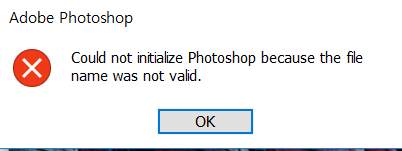
Does anyone have a clue why this happened all of a sudden? and how to fix it?
I tried removing / reinstalling / updating to the newest version / starting as administrator / removing preferences / restarting my laptop but had no luck in fixing.
The last time I used it without any problem was a few weeks ago.
My other Adobe programs (Illustrator, Indesign) work just fine. It's just Photoshop that I'm having trouble with.
I'd really appreciate any input. Thanks
{Thread renamed by moderator}



Explore related tutorials & articles
 12
Replies
12
12
Replies
12



Copy link to clipboard
Copied
Hi
Try using this tool to uninstall/reinstall, sometimes corrupt files can get left behind from a normal uninstall
Use the Creative Cloud Cleaner Tool to solve installation problems
Copy link to clipboard
Copied
Hello,
I've tried and followed every step as instructed, but once I try to operate the Cleaner Tool, it only stays for like a second then automatically turns off, which leaves me no time to proceed to removing all the leftovers.
Would you know the reason for this? Or should I remove all the files manually?
Thanks for the input
Copy link to clipboard
Copied
JW44628335 wrote
Hello,
I've tried and followed every step as instructed, but once I try to operate the Cleaner Tool, it only stays for like a second then automatically turns off, which leaves me no time to proceed to removing all the leftovers.
Did you run it as Administrator, just tested it and it opens fine for me
Copy link to clipboard
Copied
Yes I did,
and just tried once more, but the same thing happened.
The program opens for about 1 second, then just turns off.
Copy link to clipboard
Copied
Can you try logging onto the Laptop with a different local admin user account
Copy link to clipboard
Copied
Hello,
Even with a different admin user account, I wasn't able to run the cleaner tool.
However, there has been another Windows update recently and since then, my Photoshop just works fine again.
I guess it's a compatibility issue between Windows10 and Photoshop.
I'm glad I can get back to using PS, but still not sure why the issue had happened.
Anyway, many thanks for the input. Hopefully this won't happen again.


Copy link to clipboard
Copied
Hi there,
That does not sound good, let's make it right.
Please try Ged's suggestion and see if it helps.
You should also update Photoshop to version 20.0.5 via the Creative Cloud desktop app and see how it goes.
Also, check out this article and let us know if it helps.
Troubleshoot file recovery in Photoshop
Regards,
Sahil
Copy link to clipboard
Copied
Thanks for the help,
I was not able to find any solutions through the link you sent.
As far as I'm aware, all the Photoshop works and files I created were not corrupted (until about a month ago). Then until now, I didn't make any change to Photoshop related files and only when I tried to use it again a few days ago, the issue occurred.
But I do remember there was an automatic Window(10) update before Photoshop stopped working properly... could this be related by any chance?

Copy link to clipboard
Copied
Hi
Have you solved your problem? Because I am just facing the exacly same problem as you since yesterday, ive tried everything i can, but it just wont work, it literally just came out from nowhere. Thank you.

Copy link to clipboard
Copied
Hi, May I know have you solved this issue? I met the exactly same problem as you, I can't open the photoshop and can't use the cleaningtool either, I've been confused and upset about it for several days, I'd be really thankful if anyone can point out where's went wrong. I tried delete and download to different places, run it in administrative way.....nothing happens still.

Copy link to clipboard
Copied
Hi, if you have solved the problem, then it is great. Otherwise, I solved this by reinstalling the windows system. That is the only way that worked for me. Good luck!

Copy link to clipboard
Copied
I have been using Adobe Photoshop CC latest version. Everything was okay until yesterday, I just installed Windows 11 IoT Enterprise LTSC,
when I tried to start photoshop message pops up :
Could not complete your request because the file name was not valid
- After I press Okay another error pops up :
Could not initialize Photoshop because the file name was not valid
I reinstalled Photoshop but It won't work. Other Adobe products don't work too.


Get ready! An upgraded Adobe Community experience is coming in January.
Learn more
 AdChoices