



Photoshop CC crashing if Graphics Processor is enabled
I've been on the All Apps plan for about a year now although I primarily use Photoshop CC.
It's never given me any issues, until just recently- I start up the program normally, but within 10-30 seconds a crash report message ( like this one ) pops up.
I have looked at the data included in the crash report, but it doesnt seem to yield much info about why the crash happened.
After troubleshooting for hours, looking at forums and tutorials, clearing up unnecessary files from my PC (as well as uninstalling and reinstalling Photoshop to its latest version more than once), there's been no change in the problem. My brother has been helping me, and is far more adept with software related issues, but even he is at a loss.
ALTHOUGH we may have narrowed the issue down to whether the 'Use Graphics Processor' option in my preferences is checked or not:
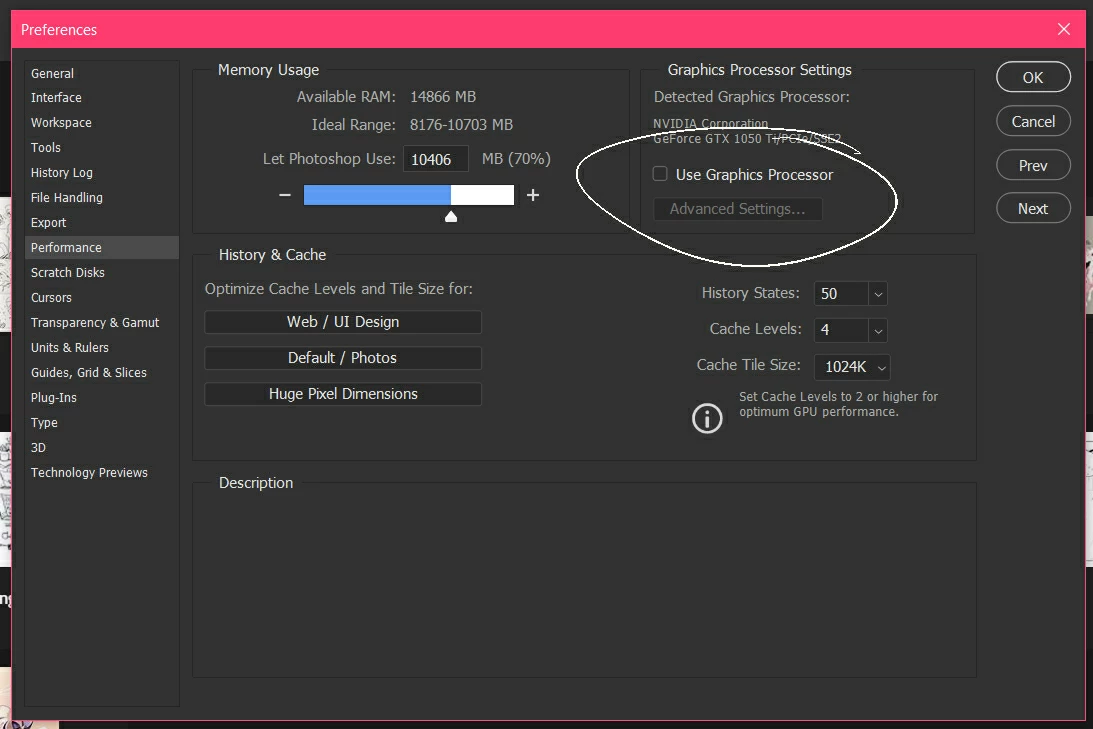
Leaving it unchecked is the only thing that seems to keep Photoshop running, but without the OpenGL features it's very uncomfortable to work in.
I have done a clean install of my graphics driver (I'm using NVIDIA GeForce GTX 1050 Ti) but it doesn't seem to have made a difference.
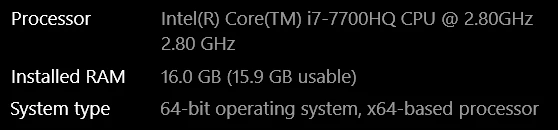
These are some other specs about my PC, if it helps:
I am no expert with technical things, but I could really use a solution to this,,
 AdChoices