
Participant
June 18, 2013
Answered

Photoshop CC Live Shapes Properties Bug (also in 2022)

  • June 18, 2013
  • 38 replies
  • 72477 views

Checking out the corner radii controls on vector shapes and it looked to be working, until I created a couple of other shapes. The Properties box inconsistently changes for the same kind of shapes.


Link to vid to show my problem: http://cl.ly/PheD


Looks like I can't go back to edit the shape for some reason. What would cause this? It's like the shape has suddenly stopped being a Live Shape.


Cheers!
This topic has been closed for replies.
Correct answer Jeff Arola

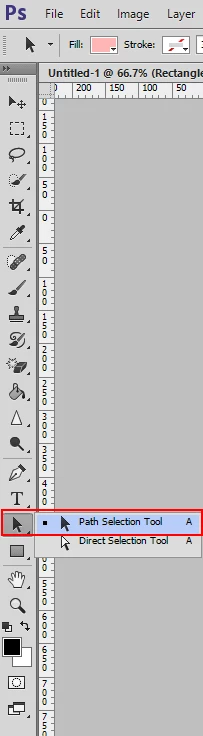
What happens if you use the Path Selection Tool to select the shapes instead of the Move Tool?

38 replies

Participant
July 4, 2013

I have the same issue, but then I found out you have to use the path selection tool to select the shape. The properties show up after a lag though. I also encountered a decimal bug. Values becomming 300,99 but visually it is still correct. Very annoying.

Participant
June 28, 2013

Same problem here. It's indiscriminate. Sometimes it only shows Masks rather than Live Shape Properties. Very annoying.

Participant
July 1, 2013

Wondering why there has been no response about this issue. Still seeing it occuring today.

Participant
July 24, 2013

No you are right, I now have a 'bug' error. So it basically forgets its a 'Live Shape' after you create others and go back to it. So you cannot edit it after a while. I assume this is a bug Adobe will fix. However previously I have CS6 which doesnt include this feature at all (or certainly it wasn't working on ours)


Not only does it forget that you have a live shape, you can not create a new live shape if the you have a shape layer selected. You would need to select a raster layer or group to create a new live shape... that it later forgets that it's a live shape.

Participant
June 27, 2013

I am also experiencing the same issue.

Participant
June 25, 2013

I've got the same problem. When alt-copying a live shape all seems fine, but when I copy the shape via the layer panel the live shape properties disappear!

Participant
June 26, 2013

Stop the insanity.

https://sphotos-a.xx.fbcdn.net/hphotos-frc3/996863_10151754854240719_844700773_n.jpg

Participant
June 26, 2013

It appears that PS is losing the shape's designation as a rectangle with round corners – if I create a triangle immediately after making a rect with round corners, it loses its original options.

Participant
June 23, 2013

Hi Guys,

I have same problem with my CC. Live shape properties just missing when I select shape object.

Cheers,

Michal

June 24, 2013

Yes I only managed to get the live shape properties to work when reselecting an object once. Pity as this was the feature that made me want to upgrade.

Participant
June 22, 2013

Hi,

This bug goes a lot further than what you have stated, if you select the live shape from the tool menu on the left it removes the properties and the width becomes the width of the space.

Very strange issue's happening.

These silly bugs needs sorting out ASAP.

Jeff Arola
Community Expert
Jeff ArolaCommunity ExpertCorrect answer
Community Expert
June 18, 2013

What happens if you use the Path Selection Tool to select the shapes instead of the Move Tool?

Participant
June 19, 2013

Selecting the shape with the Path Selection Tool seems to reset it and turn it back in to a Live Shape — but it doesn't stay that way. Really strange.

mjarrott
Adobe Employee
Adobe Employee
June 18, 2013

Hi Jack,

I moved your discussion from the Creative Cloud forum to the Photoshop forum, where you may get more relevent help more quickly.

Could you please post a screenshot of your layers panel?

Michael

Participant
June 19, 2013