
Participant
June 18, 2013
Answered

Photoshop CC Live Shapes Properties Bug (also in 2022)

  • June 18, 2013
  • 38 replies
  • 72481 views

Checking out the corner radii controls on vector shapes and it looked to be working, until I created a couple of other shapes. The Properties box inconsistently changes for the same kind of shapes.


Link to vid to show my problem: http://cl.ly/PheD


Looks like I can't go back to edit the shape for some reason. What would cause this? It's like the shape has suddenly stopped being a Live Shape.


Cheers!
This topic has been closed for replies.
Correct answer Jeff Arola

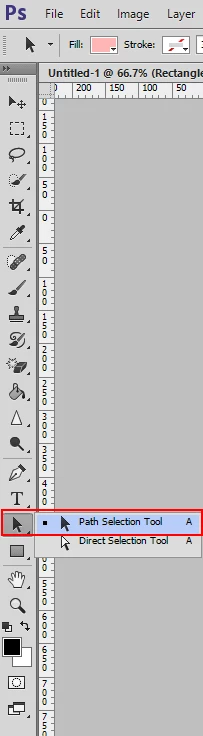
What happens if you use the Path Selection Tool to select the shapes instead of the Move Tool?

38 replies

Known Participant
October 1, 2014

Something I discovered, is if you've got the shape layer linked with another layer, the panel won't work. For instance, I created an arrow and a drop shadow converted to it's own layer and linked the two. Wanted to change the fill, but couldn't do so until I disabled the link.

andy-mrio
Inspiring
September 24, 2014

Same problem, CC2014 live shape properties accessible only on shape creation. If I select another layer and then come back to shape, only mask and feather options are visible, no live shape properties.
Please fix it!

Participant
August 29, 2014

I'm noticing that using the Path Selection tool brings up the Live Shape panel on shapes that I make with the pre-dertimined tools (that are circles, rectangles, rounded rectangles, etc.), but if I add points to modify those original shapes (say, add a little pointer thingy to a rounded rectangle) the Path Selection tool no longer triggers the Live Shape Properties panel, which is a bummer. See below:

HELP!

Participant
September 2, 2014

Can confirm that this is still very broken and regularly completely prevents you from changing live shape properties.

Participant
August 19, 2014

Using Photoshop CC 2014 and same problem here!

Participant
August 4, 2014

Hi everyone,

I was going nuts too with the live properties disappearing and only the mask option visible:

What solved it for me was that after selecting the Path Selection Tool, you need to literally place the cursor on the very edge of the shape and SELECT THE PRECISE EDGE/PATH OF THE SHAPE ITSELF in order for the live properties to become visible again...

Hope this helps!

Participant
August 14, 2014

hi,

i'm glad some of you at least see the live shape properties once in a while because i have never had the good luck to even see them at all. I've tried everything and i just cannot call them alive.

-Created a vector shape, nothing appears

-Did as said before and click with patch selection tool on the very edge of a shape, nothing appears

-closed and restarted PS, nothing

-turn off default masks for fill layers, nothing

It would thrill me to see this feature at least once so i know i can die a happy man...

Where is Adobe in this? Seems this issue has been going on for at least a year now!

Thx

Luthian
Participant
August 15, 2014

I'm in the same boat as Adobart. Never can bring up the live shape properties on a saved file I got from someone else. Tried everything mentioned here including clicking on edges and using path selection tool. I'm not really surprised that a simple thing like editing a previously created shape isn't working but I am disappointed.

CC 14.2.1 x64 on a Mac running 10.8 Mountain Lion.

Participant
February 25, 2014

I've tried all of the above, but still cannot get live properties to show.

Ive tried:

- selector tool

- clicking on active layer

- command + j

- turning off auto masks in panel

etc

https://www.youtube.com/watch?v=pOFLhcDnagg&feature=youtu.be

imaginaldi
Participating Frequently
June 26, 2014

Thank god I'm not the only one complaining about live shapes in Photoshop.

Working with live shapes is really a pain to me.

It's the most unintuive and buggy feature in Photoshop.

Participant
February 15, 2014

http://youtu.be/6EeTEFNsR8g

Short SILENT demo on the Live Shape Properties Panel

Jeff Yarbrough

a.hortin
Participating Frequently
February 16, 2014

This is good but as I mentioned above, even when selecting the shapes with the Path Selection Tool, it doesn't always return the properties. There still seems to be an issue with it not working ll the time.

a.hortin
Participating Frequently
February 9, 2014

This is still really buggy in Ps CC 14.2. I have live shapes that I just can't access the properties on still, no matter whether I select them with the Path Selection Tool or anything else! Things seem to get messed up when you start copying shapes (ie. when you try to make a duplicate of an existing shape). Would REALLY love to see a permanent fix for this!

Participant
February 9, 2014

Agreed. I seem to also have trouble on files that I saved and haven't opened in a few weeks. I know that doesn't make sense, but here we are.

Participant
January 8, 2014

Had the same problem. Turns out I needed to use the Path Selection Tool and click the path right on the canvas, not in the layer panel. This re-enables the Live Shape properties.

Here is a short video with more details if you're interested -> http://www.michalkopec.com/blog

January 8, 2014

Excellent. Not sure that is the way it should work but at least a solution!

Participant
November 2, 2013

Alt-click on shape layer brings live shape properities window active if this is what you're looking for.

Participating Frequently
November 19, 2013

That little trick is proving to be a huge help. Thanks for the tip!