Participant
February 11, 2017
해결됨

|| Photoshop CC || When I modify a graphic inside an other graphic, the modifications wont apply. Why ?

  • February 11, 2017
  • 2 답변들
  • 443 조회

Hi everyone !

So let me explain my problem.

I am making the UI for a online shop.

Here is the case:

I want to build a design to display a white shirt, I need to create 3 graphics elements.

Graphic 1

Button1 - I draw a rounded rectangle and apply specific color, radius, shadow.

Graphic 2

Button1 + text - I load Button1 in this graphic and write inside "View more details"

Graphic 3

WhiteShirtBox  - I will create a box with a picture of a white shirt, the price and load the graphic Buttons1 + text.

My problem

When I modify Graphic1, for example I decide to remove the shadow, my modifications will not show in WhitShirtBox. It seems that the Graphic is broken even if I still can double click it a modify it.

Why ? Is it something that I can not do ? Should I use an other software ? Should I download a plugin ? Help !

Thanks for reading and looking forward to your replies !

[Moved by moderator from the non-technical Lounge Forum to the Photoshop Forum for technical help]

이 주제는 답변이 닫혔습니다.
최고의 답변: melissapiccone

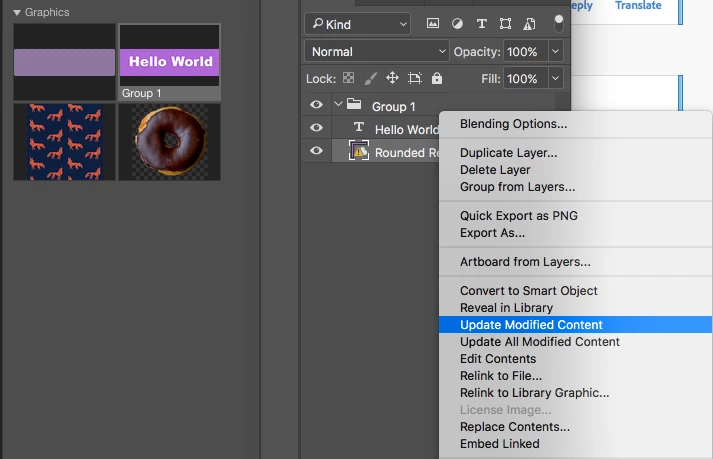
I see what you are trying to do now - I'm awake now and in Photoshop - actually pretty clever - ignore my other response ;P.

You just need to right click on the layer with the warning and choose Update Modified Content .

2 답변

melissapiccone
Community Expert
Community Expert
February 12, 2017

You need to update the graphic from the library. I think it's in the layer fly out menu. When I get in front of my computer I'll do a screenshot for you.

You want the color change to be permanent, so all buttons ate now blue? If not, I suggest you make different color buttons. I also suggest that you wait until you are finished to put everything into your libraries.

Libraries are meant to hold images so you can access them from any app at any time And of course, easily reuse elements.  It seems to me that you are using them as an integral part of your design process, as in each piece goes into and comes out of the library, like how we work in Adobe Animate. They aren't meant to be used in this way.

Melissa Piccone | Adobe Trainer | Online Courses Author | Fine Artist
melissapiccone
Community Expert
Community Expert
February 11, 2017

How are you "loading" the graphics? I have no idea what you are doing. Are you using smart objects? Layer groups? Libraries? Can you post a screenshot of your layers and what you are having issues with? The screenshot you provided isn't helpful.

Melissa Piccone | Adobe Trainer | Online Courses Author | Fine Artist
Chloe75작성자
Participant
February 12, 2017

Thanks for your quick answers ! I really need to know what problem is it as soon as possible. Have a wonderful day !

melissapiccone
Community Expert
Community Expert
February 12, 2017

I see what you are trying to do now - I'm awake now and in Photoshop - actually pretty clever - ignore my other response ;P.

You just need to right click on the layer with the warning and choose Update Modified Content .

Melissa Piccone | Adobe Trainer | Online Courses Author | Fine Artist