


Participant
April 8, 2023
해결됨

Photoshop fashes opening a file

  • April 8, 2023
  • 1 답변
  • 632 조회

I hope you can help me.
a couple of days ago photoshop began to no longer open files, both from lightroom and directly, both from dropbox and directly.
From lightroom it regularly asks me what I want to do and then the file opens continuously fashing.
Same thing if I open the file directly, Bridge opens regularly, and then when I tell it to open, it fashes all the time.
I tried uninstalling it but the result is the same.

Please see the file attached
I have a desktop with win 10, 64 bit. Adobe cloud version.
이 주제는 답변이 닫혔습니다.
최고의 답변: Ged_Traynor

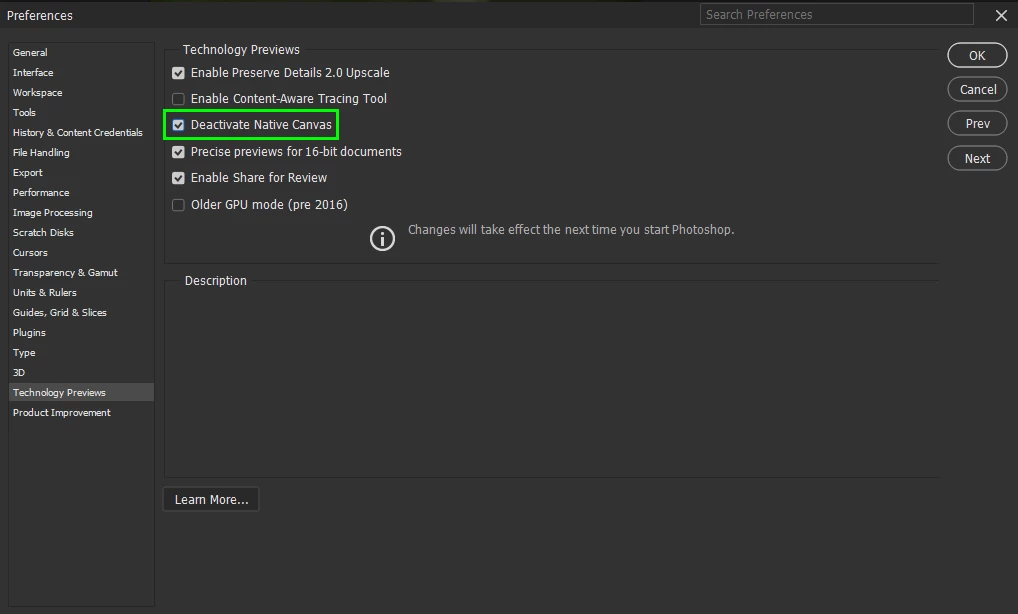
@Pietro Branchi go to Edit > Preferences > Technology Previews and enable this option, then restart Photoshop

1 답변

Ged_Traynor
Community Expert
Community Expert
April 8, 2023

@Pietro Branchi go to Edit > Preferences > Technology Previews and enable this option, then restart Photoshop

Known Participant
April 8, 2023

Thanks!


I had exactly the same problem and your solution worked for me (and i had even followed a longwinded Nvidia tutorial for GPU optimization to no avail).


It's rather a pity that Adobe introduces malfunctions like these out of the blue.


(De-activating the GPU in PS Settings had worked too.)