
Participant
October 29, 2017
Answered

PHOTOSHOP FILTERS NOT WORKING CORRECTLY

  • October 29, 2017
  • 2 replies
  • 11022 views

I've no idea what has happened to my photoshop filters - none of them are working correctly.

With this image for instance:
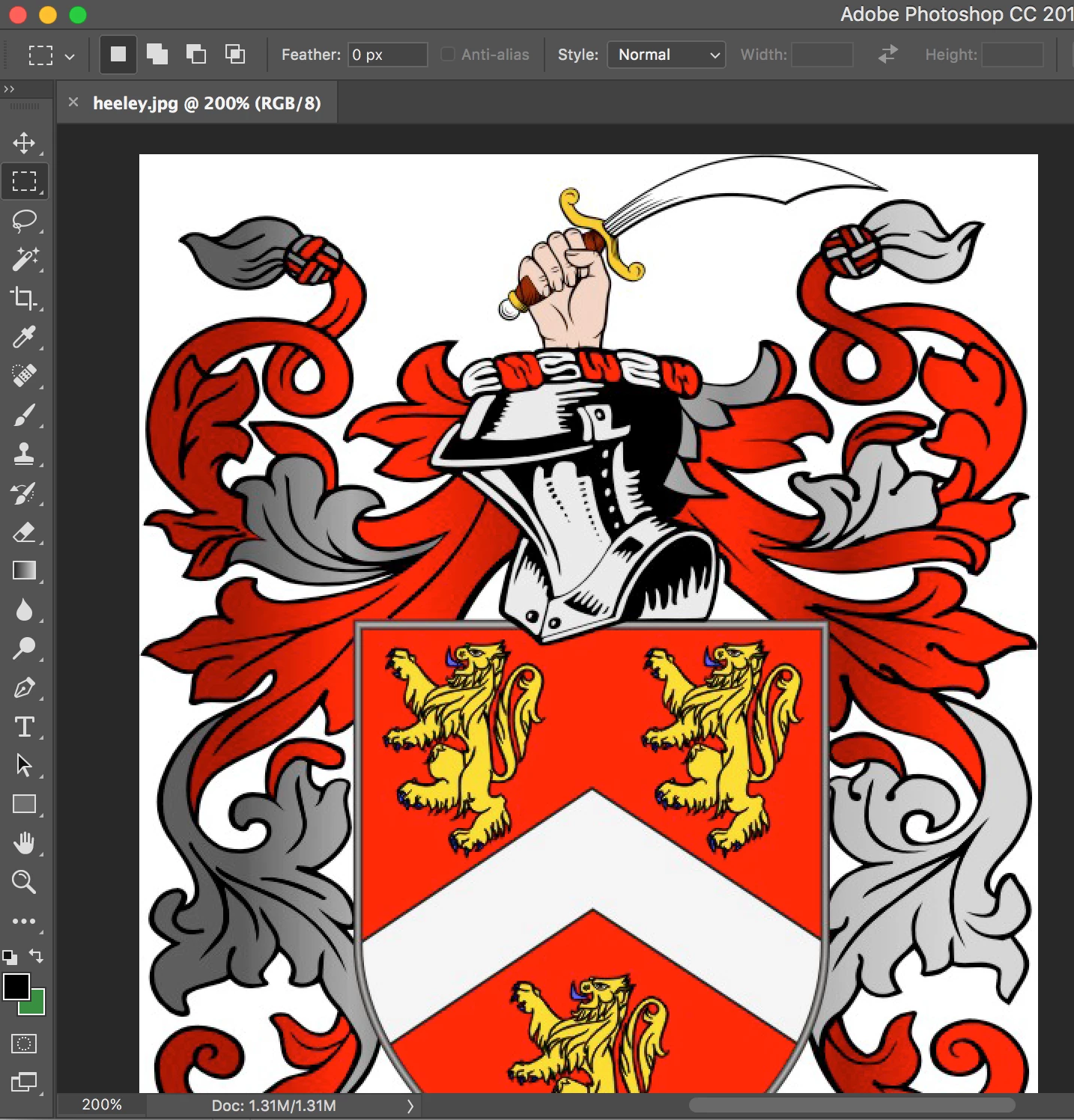
You wouldn't expect the CUTOUT panel to look like this would you?
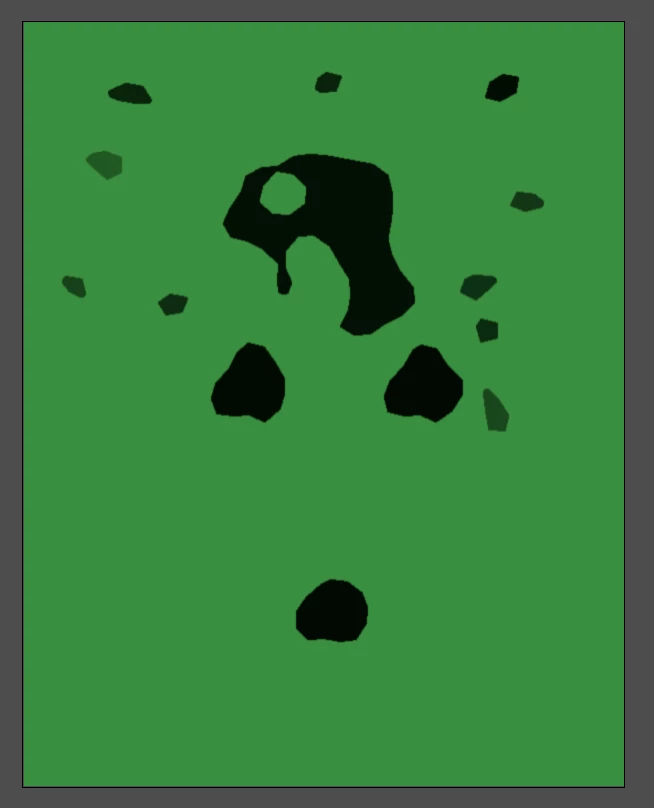
I've tried everything my 20 years knowledge will allow me to do, including turning off the Graphics Processor....

I'm totally in the dark on this one.

Please help!

Jon

    This topic has been closed for replies.
    Correct answer M Shaw

    All sorted.  Apparently it was bad preferences settings.

    Adobe remotely accessed my computer and changed a folder to read ".old" and all was solved.

    Great service!


    As Noted in this thread the filters use the Foreground and Background colors. Resetting prefs is going to set the Foreground and Background color back to Black and white. a less obtrusive way would be to type "D" to set the FG/BG back to default or click on the small black and white icon above the FG/BG swatches on the Tool Bar.

    2 replies

    Participant
    November 1, 2017

    I'm having the same issue. Applied a quick charcoal filter to a photo last night, just to be sure it would work the way I wanted. Then closed out and figured I'd do the real work in the AM.

    Opened it this morning, applied the same filter, and it came out almost inverted—grey blobs, with white lines, rather than sketchy black/grey on white background. Re-did another image I'd done the night before, with similar results: same photo, same filter, same settings, totally different results. Rebooting doesn't help. Other filters seem to be OK, but I can't seem to get the ONE filter I need to use to work properly! If I can't find a solution, I'll try uninstalling and reinstalling, but came here first to see if I could find a less pain-in-the-butt solution.

    Participant
    November 2, 2017

    A follow-up: reinstalling didn't help, and strangely enough, I'm having the same issue with CS6 as I did with CC. So I'm guessing it may be something related to my machine, rather than a Photoshop glitch. But short of checking the graphics card—which didn't make any difference when I turned it off, as per other troubleshooting I found online—I'm at a loss of what that something might be.

    For reference: the black and white image is a rough sample I tested in the evening using the charcoal filter. The next day, I ran the same filter on the same photo, and got the other, sepia-toned, inverted result. As far as I can see, the filter settings are still the same—there are only three sliders for that filter, and I usually end up using roughly the same settings for this type of work, and changing them doesn't fix the issue. I haven't inadvertently inverted the image or changed the color profiles. Running the charcoal filter on other photos, both in CC and CS6, now gives results similar to the "after" photo, rather than the initial test, which is what I would expect—and have experienced every time I've run it in the past.

    I have no idea what's different, or even what I might test on my machine itself to figure out what might affect this one filter.

    Participant
    November 2, 2017

    As Noted in this thread the filters use the Foreground and Background colors. Resetting prefs is going to set the Foreground and Background color back to Black and white. a less obtrusive way would be to type "D" to set the FG/BG back to default or click on the small black and white icon above the FG/BG swatches on the Tool Bar.


    THANK YOU. Somehow I'd never realized the foreground/background colors were reflected in the filter results. Reset the colors, and all seems to be working fine again. And now that I'm finished smacking myself in the forehead, I can get back to work.

    Brad Lawryk
    Legend
    October 29, 2017

    Which filters are you using? Are they greyed out? Also what are your image settings? RGB, CMYK, etc.?

    Participant
    October 29, 2017

    All settings are fine (RGB, 8 bit etc).

    It just seems to have messed up over night.

    Nothing greyed out, just not working correctly.

    I've even upgraded to 2018 to see if that helped but it didn't.

    Jon Henderson

    Artwork-King.co.uk