


- Home
- Photoshop ecosystem
- Discussions
- Re: Photoshop horrible performance since last CC U...
- Re: Photoshop horrible performance since last CC U...
Photoshop horrible performance since last CC Update (April 2019)

Copy link to clipboard
Copied
Since the last CC Update, my Photoshop performance is extremely slow and barely useable.
The problem seems to be that photoshop doesn't want to use any resources.
CPU usage never goes above 10%, Photoshop uses 1GB Ram at maximum, GPU isn't used at all.
I've checked the corresponding settings in photoshop itself which are still allowing the program to use up to 24GB of Ram and GPU accelleration.
Does anyone have a solution besides downgrading to the version before?
Best regards
Lennard



Explore related tutorials & articles
 18
Replies
18
18
Replies
18


Copy link to clipboard
Copied
Hi Lennard,
Sorry about the performance issues with Photoshop CC as it is not using the available system resources to deliver equivalent performance.
Could you please uncheck the option "use graphics processor" under the Preferences> Performance menu in Photoshop and see if the application performance still doesn't improve.
Also, take a look at this article Optimize performance Photoshop CC and let us know if that helps.
Thanks,
Akash
Copy link to clipboard
Copied
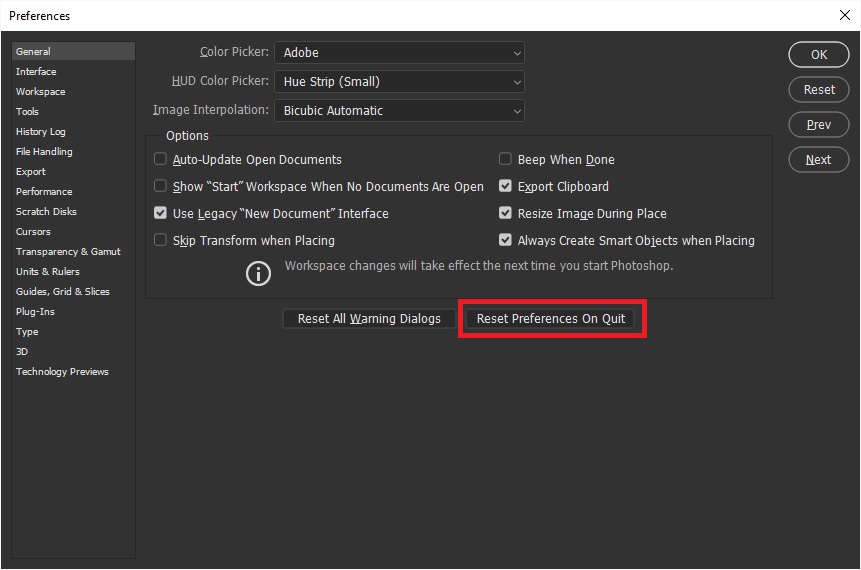
Not using the GPA decreases the performance even more. I've already resetted the preferences, but that didn't help either.
I'm running Photoshop on Windows 10, my drivers are all up to date.
According to the efficiency monitor, Photoshop is at 100% efficiency. I've tried all tips from the performance optimization guide.
Reinstalling Photoshop didn't help as well.
I'm working specifically with multiple layer Tif files.

Copy link to clipboard
Copied
Hi
Not having any issues with Photoshop CC2019 running on Windows 10, have you tried resetting Photoshop preferences
What operating system are you using


Copy link to clipboard
Copied
This is most likely a buggy video driver (yes, even with GPU off the driver is still operational for basic stuff). Other likely candidates are third-party plugins or extensions, font managers and so on.
It has to be something specific to your system. The rest of us don't have these problems.

Copy link to clipboard
Copied
Actually, I'm having the same problem. PS is very sluggish. I have updated my GPU driver, and updated PS to 20.0.4.

Copy link to clipboard
Copied
I also have the same problem. Brushes are close to unusable.
I'm on a Mac.
Strange enough, the clone tool doesn't show any of these problems.
I even had Photoshop turn off the graphics card once.
As I have no problem running Final Cut Pro X it can't be the graphics processor.
Code that is related to how Photoshop uses the graphics processor seems to be faulty.
Copy link to clipboard
Copied
I'm not using any third party software in Photoshop, so I can rule that one out.
I'll try rolling back my GPU driver to an earlier version, but the rest of the CC that I'm using (Lightroom, Premiere, AE) seem to work fine. So Photoshop seems to be the only one making problems and they only occur since the last update. I didn't have the time yet to roll back Photoshop as a whole and install an earlier version, but I'll do that as well.

Copy link to clipboard
Copied
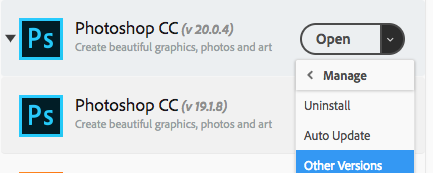
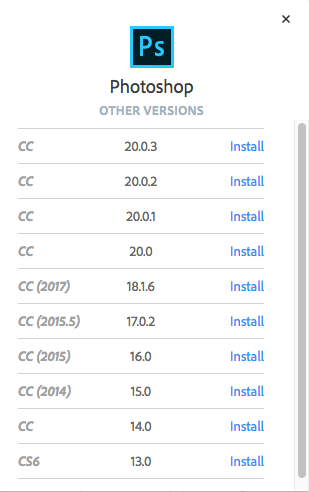
Have you had this problem in 20.0.3? It seems 20.0.4 is causing problems with some users.
I would suggest you roll back to 20.0.3
Copy link to clipboard
Copied
Rolling back may be a good option.
I'm getting increasingly wary of updates. So often they are worse than the previous version (e.g. the unusable Bridge 9 - horrible interface that cannot be customized and blurry previews).
And not push updates that break things. Especially on a Mac, where there aren't that many or that different versions of computers.
And make sure older computers are compatible. Adobe has listed 5 and 6 year old Macs as incompatible with Photoshop - can you believe that?
They listed a great number of graphics card used in retina MacBook Pros as no longer supported.
Adobe is very rich and should have enough coding staff to properly test and also make sure that older computers are being cared for. Because it no longer makes sense to buy a computer every few years. People are keeping their computers longer.
Copy link to clipboard
Copied
For the sake of comparison I tried PS at home & at work. My home PC specs are
Intel i7 3770
16GB RAM
SSD with 67GB for scratch disc
GTX 1070 GPU drivers current as of April 11
WIN 10 current build
Work is
Intel i5 6500
8GB RAM
Standard HD 5200 RPM
Built in graphics
WIN 7
Both running PS 20.0.4
At home, a simple selection - cut out - resize is choppy, sluggish and slow. At work, same file and same workflow is snappy and fast? So, maybe a combination of Adobe & MS not playing well together?

Copy link to clipboard
Copied
I have noticed the same issues of extremely slow performance making Photoshop barely usable & it's so frustrating. Nothing else has changed in my system other than the latest Windows & CC updates. I've reset preferences, made sure scratch discs were still set, still, it's painfully slow.

Copy link to clipboard
Copied
Yeah me too, in June 2020. NOTHING IMPROVED SINCE CS6 only went down hill from there.
All they added are just some useless things nobody uses and slows down your computer.
Just making it more accessible for non designers whit their useless 'rich tooltips' and animated zoom and crap, geez.
Adobe, what the hell are you doing? By trying to please everybody you'll start to seriously displease the pros.
Every update I hold my heart because I know it's going to be slower, weird stuff's going to happen and settings will be lost. I wonder why... for €650 a year, it more and more seems like a very bad cost.

Copy link to clipboard
Copied
Yea, pretty same. Still in 2020. Slow performance, now its 21.2 and still very slow.
Im have 100% ussage of one core and about 30% for others core on my i7-8700k but just draging of image by the screen (one layer, 20mp) - very laggy. Im have no problems in other aps so its PS issue.

Copy link to clipboard
Copied
It is amaizing that you succeeded with update at all Adobe does not provide adiquat bandwith so your updates can take dayes many dayes. If our politicians ware not owned by corporations we would have some reasnable level of consumer protection and Adobe and other corporations could not get away with it.

Copy link to clipboard
Copied
This thread is a couple of years old. Do you actually have a question or did you just want to rant?
BTW, I've had no trouble with installing my updates--certainly doesn't take "many days".
Copy link to clipboard
Copied
I thought blaming Adobe for poor internet bandwidth was pretty good... 😉

Copy link to clipboard
Copied
If you look at all of the four comments this fellow has posted to these forums, it is clear he/she has an agenda and is trolling.
A moderator can take care if this if anyone desires but best to simply ignore.
.png)
Copy link to clipboard
Copied
I just checked out of curiosity moments ago, and I was able to download Photoshop (1.7 GB) from Adobe in 103 seconds...
Hopefully that's fast enough for most people? We do have a gigabit connection to our house so that helps, but there seemed no limitation on the speed by Adobe's servers.


Find more inspiration, events, and resources on the new Adobe Community
Explore Now
 AdChoices